

Using AI to write blog posts: a 7-step workflow that keeps quality up
Using AI to write blog posts works when you use it for the parts of writing it's good at (drafting, structuring, rewording) and keep the parts that make a post worth reading: the question you answer, the facts, and what you know from experience. Google doesn't penalise content for being AI-written; it acts against content made mainly to manipulate rankings, however it is produced.
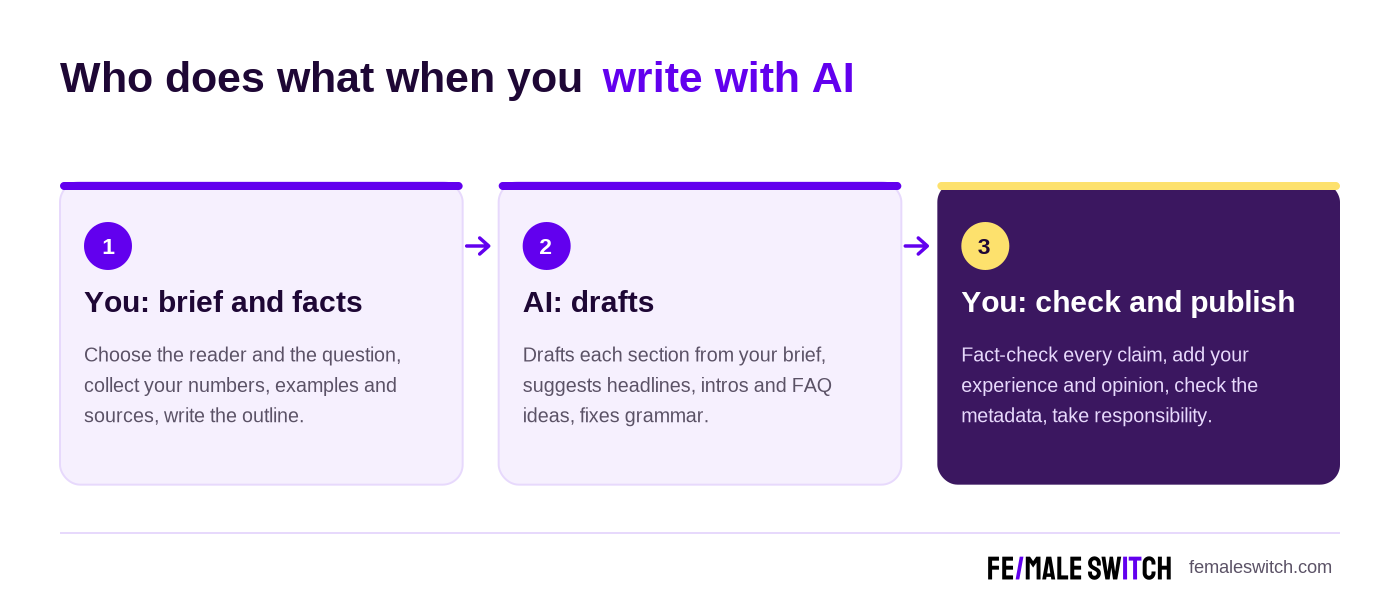
Quick answer: pick one reader and one question, collect your own facts, write the outline yourself, let AI draft section by section, fact-check every claim, add your own experience and examples, then check the title, meta description and image alt text before you publish. Publishing many unedited AI pages is what Google's spam policies call scaled content abuse.
Write FREE SEO-optimized Blog Articles! Our Article Writer ensures your blog is loved by both Google and your readers, turning those clicks into customers.
👉 Write your article here
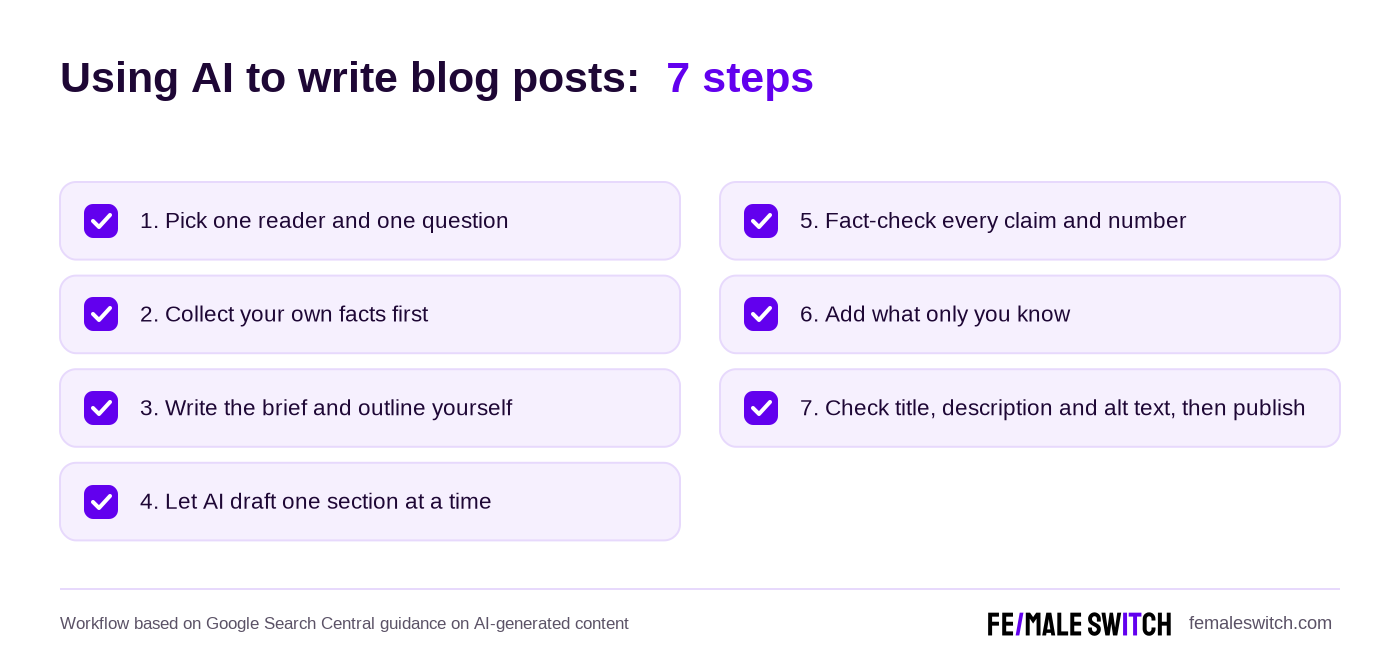
The 7 steps
1. Pick one reader and one question
Write down who the post is for and the one question it answers, in the words that person would type into Google. "How do I register a sole proprietorship in the Netherlands?" is a post. "Starting a business" is a topic for a book. Check what already ranks for that question: if the top results are step-by-step guides, write a guide; if they are comparisons, write a comparison.
2. Collect your own facts first
Before you open the AI tool, gather what it can't know: your prices, your customer questions, your numbers, screenshots, quotes from the official sources you'll cite. Generative models don't look facts up; Google's own documentation reminds publishers that they predict a likely sequence of words and can be wrong. Feed the model your facts and you get a draft about your business, not a generic one.
3. Write the brief and outline yourself
A good brief takes ten minutes: reader, question, main keyword and 3 to 5 related terms, the facts from step 2, the sections in order, the length, and the tone. The outline is where your judgement goes in: which points matter, in which order, and what you leave out.
4. Let AI draft one section at a time
Ask for one section per prompt and paste the brief each time. Short, focused prompts give better drafts than "write a 2,000-word blog post about X", and you can steer each section before the next one. The Fe/male Switch free SEO article generator turns a keyword into a complete first draft with a title, meta description, headings and FAQ, which you then edit with steps 5 to 7.

5. Fact-check every claim and number
Go through the draft sentence by sentence. Every number, date, price, law and name needs a source you have opened yourself; delete what you can't verify. Watch for invented statistics ("73% of startups..."), invented experts and quotes, and products or features that don't exist. Google says it's critical to fact-check and review all AI-generated content before publishing.
6. Add what only you know
This is the step that decides whether the post deserves to be found. Add a real example from your work, a mistake you made, a photo or screenshot you took, a table with your own numbers, an opinion you can defend. Google's ranking systems aim to reward content that shows experience, expertise, authoritativeness and trust (E-E-A-T); a reworded summary of the top ten results shows none of them.
7. Check title, description and alt text, then publish
Google's guidance on generative AI content says the review also covers the title element, the meta description, structured data and image alt text, which can all appear in search results. Read them as a searcher would: does the title promise exactly what the post delivers? Then link the post from two or three related posts on your site, so readers and search engines can find it.
Does Google penalize AI content?
No, not for being AI-written. Google's position, published in February 2023 and repeated in its documentation since, is that appropriate use of AI or automation is not against its guidelines. What breaks the rules is the purpose and the scale:
Sources: Google Search Central, Google Search's guidance about AI-generated content (8 February 2023), guidance on using generative AI content, spam policies and creating helpful, reliable, people-first content.
What most guides miss: the EU AI Act
If you publish in the EU, Article 50 of the AI Act adds a transparency rule for AI-generated text "published with the purpose of informing the public on matters of public interest": it must be disclosed as artificially generated, unless a person has reviewed or edited it and someone holds editorial responsibility for the publication. Under the Act's timetable, Article 50 applies from 2 August 2026. A startup blog post about your product is usually not "public interest" news, and the 7 steps above are exactly the human review the exemption describes. But if you publish news or information on public matters with little editing, add a short note on how AI was used. Deepfake images, audio and video always need a disclosure.
Mistakes to avoid when using AI to write blog posts
- Publishing the first draft. It reads like every other AI post on the topic because it is built from the same patterns. Edit for your reader and your facts.
- Letting AI pick the topic. AI suggests the obvious topics everyone already covers. Start from questions your customers actually ask.
- Trusting statistics in the draft. If a number has no source you can open, delete it. Invented statistics are the most common AI writing error.
- Writing 30 near-identical posts. "Best X in city A", "best X in city B" with the same text is what scaled content abuse looks like. One strong post beats thirty thin ones.
- Pasting confidential information into a tool. Check a tool's data settings before you share customer data, contracts or unreleased numbers. Under GDPR you stay responsible for personal data you share.
- Forgetting the metadata. An AI-written title or alt text that doesn't match the page is a small error searchers see first.
More on what goes wrong: our list of AI SEO mistakes that hurt search visibility, and how to make posts easy for AI search tools to cite in the generative engine optimization guide.
Which tools to use
Any capable AI assistant works for this workflow; the steps matter more than the tool. Compare options in our round-ups of free AI article writers, free AI SEO content generators and AI content writing tools for entrepreneurs. To pick the related terms for your brief (step 3), see our guide to semantic SEO.
FAQ on using AI to write blog posts
Is it OK to use AI to write blog posts?
Yes. Google says appropriate use of AI or automation is not against its guidelines. What matters is that the post is accurate, helpful and made for readers, not mainly to manipulate rankings.
Does Google penalize AI content?
Not for being AI-generated. Google acts against low-value content made mainly to manipulate rankings, and its spam policies name generating many pages without adding value as scaled content abuse, whether a person or a tool wrote them.
Can Google detect AI-written content?
Google hasn't said it ranks pages by whether AI wrote them; its stated focus is quality, however content is produced. Write for quality, not to hide the tool.
How do I make AI-written content sound human?
Give the model your own facts, examples and opinions, cut generic phrases, vary sentence length and read the post aloud before publishing. Adding real experience works better than any rewording trick.
Should I disclose that I used AI?
Google suggests explaining how automation was used where readers would reasonably expect it. In the EU, the AI Act requires disclosure for AI-generated text on matters of public interest unless a person reviewed it and holds editorial responsibility.
How long does it take to write a blog post with AI?
With your facts ready, drafting takes minutes; fact-checking and adding your own examples is most of the work. Plan for the editing, not just the draft.
What is the best free AI tool for writing blog posts?
For a first draft with SEO basics, try the Fe/male Switch free SEO article generator: no sign-up, a title, meta description, headings and FAQ in under a minute. Then follow steps 5 to 7.
Can AI write SEO-optimized blog posts?
AI can place keywords, headings and an FAQ, but SEO also depends on answering the searcher's question better than other pages, with accurate facts and links. That part still needs you.
About the Author
Violetta Bonenkamp, also known as MeanCEO, is an experienced startup founder with an impressive educational background including an MBA and four other higher education degrees. She has over 20 years of work experience across multiple countries, including 5 years as a solopreneur and serial entrepreneur. Throughout her startup experience she has applied for multiple startup grants at the EU level, in the Netherlands and Malta, and her startups received quite a few of those. She’s been living, studying and working in many countries around the globe and her extensive multicultural experience has influenced her immensely.
