
TL;DR: Link exchange partners can remove your backlink without telling you, so we built a free tracker that checks every link we received. It is one Markdown table (one row per link), a Python script that uses only the standard library, and a real browser for anything the script can't confirm. It took one evening, about two hours, and now runs in about 10 minutes. The full results of the audit are in our link exchange study.
Every exchange in our experiment was inbound. A partner site asked us for a link, we agreed, and we asked for one back. We never pitched an exchange ourselves.
The links went to test websites in our portfolio, not the sites we use for business. Over about 14 months (mid-August 2025 to October 2026) we collected 131 links on 115 partner pages, from 62 partners, pointing to 27 of our sites.
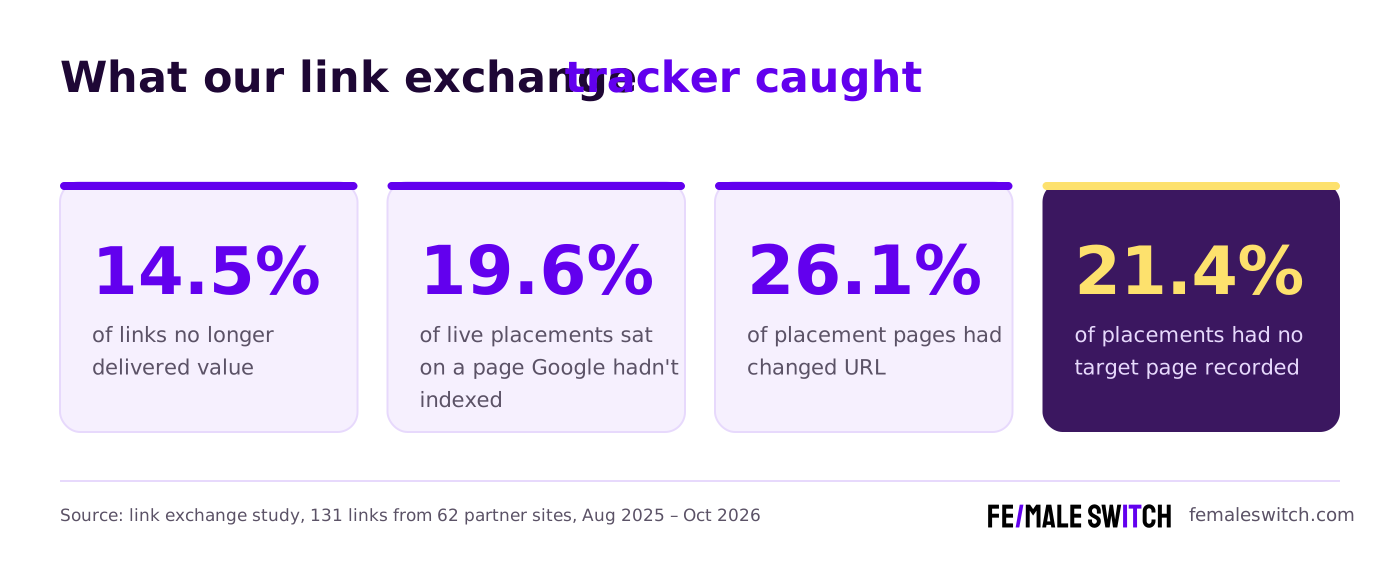
When we finally checked them, 14.5% of the links no longer delivered any value. Nobody had noticed, because nothing breaks on your side when a partner quietly removes a link.
This guide shows how we built the tracker that caught that, step by step, with the template at the end.
Why a link exchange needs a tracker

These are the ways our exchanged links died. None of them shows up unless you check each page.
- The page was deleted. This caused almost half of the losses (7 of 16).
- The link was removed but the words stayed. In 5 of 8 removals the partner unlinked the anchor and left the text, so the article looks unchanged.
- The article was rewritten under a new URL without the link.
- The link stayed but became worthless: the page was switched to noindex (once through a hidden HTTP header), or it pointed search engines to a different URL as its official version.
- The page was never indexed in the first place, so the link never counted.
Step 1: Start from what you have (and expect a mess)
Our raw data was a spreadsheet export of 123 records, filled in over about 14 months by different people in different ways. We kept it by hand in a plain Google Sheet. Record keeping is now handled by AI agents, Claude and Codex.
Lesson: don't fix the spreadsheet in place. Decide on a clean structure first, then move each record into it.
Step 2: How to track a backlink exchange: one row per link
The most important decision is one row per pair of partner page and your page. Not one row per partner, and not one per page.
A single partner page can carry several of your links (one of ours carried six), and each can be removed on its own. In our data, 12 pages held 28 of our links.
Two rules keep this working:
- People and the script own different columns. The script never touches the human columns or the index column, so you can re-run it any time.
- ? is allowed as a target. If you don't know which of your pages a partner linked to, the script lists every link to your sites that it finds on the page.
Step 3: Know your domains (and track ABC link exchanges)
The checker has to recognise "a link to one of our sites", including subdomains. It reads your list of domains and reduces each one to its root:
This matters most for ABC link exchanges, where a partner links to one of your sites and you link back from a different one. A tracker that knows only one domain will miss those links completely.
In our experiment the ABC exchanges did worst. The partner sites were mostly low quality, and most of the pages carrying our links never got indexed by Google.
Step 4: Clean the data
- Split multi-line cells into placement URL, target URL, anchor and notes.
- Decide the direction with your domain list. A URL on your list is the target; the other is the placement.
- Merge duplicates into one row per link.
- Keep notes separately. Placement details go into Notes; loose notes go into a short list to resolve with the team.
- Mark unknown targets with ? instead of guessing.
- Fill the gaps from the live pages after the first check. Our first run found the real target for every ? row and showed that two records had swapped targets.
After cleaning we had 131 links on 115 pages from 62 partners.
Step 5: Keep the tracker in a Markdown file
We keep the tracker as one Markdown file, not a spreadsheet. It is readable by people, easy for a script to parse, and works with version control.
The script writes a summary block at the top, between two markers. It holds counts per status, a "needs attention" list and a "live, but the page isn't in Google" list. A spreadsheet works too, as long as you keep one row per link and separate columns for people and the script.
Step 6: Write the link checker
Ours is one Python file of about 400 lines, using only the standard library.
Fetch each page like a browser. Many servers return 403 or 406 to a default script, so send browser-like headers. Follow redirects and record the final URL. Run one request at a time with a 1.5-second pause; a full run takes about 10 minutes.
Parse every link. For each <a href>, keep the full anchor text (including image alt text) and the rel attribute. From the page, read the meta robots tag, the X-Robots-Tag HTTP header and the canonical tag.
Compare URLs and anchors sensibly. Ignore the scheme, www., the trailing slash and capitals. Compare anchors without case and punctuation, and accept agreed alternatives and close variants such as a plural.
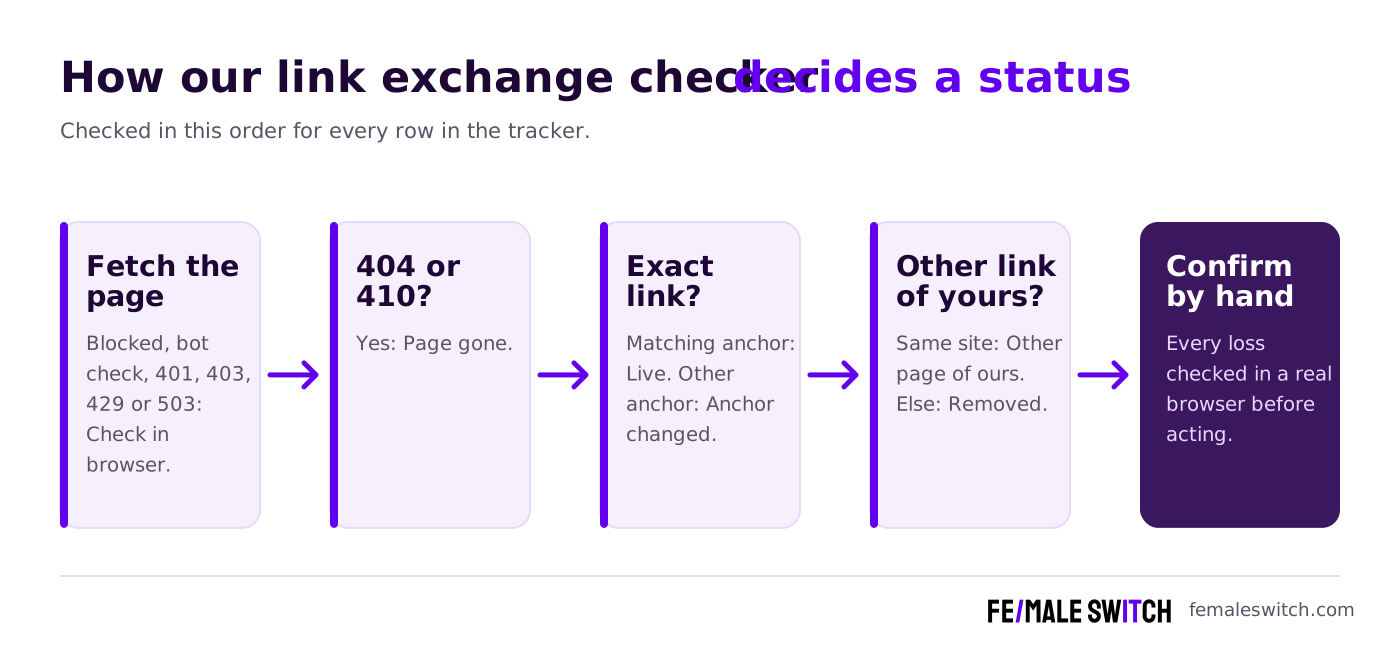
Decide a status, in this order:
- Page can't be fetched, shows a bot check, or returns 401, 403, 429 or 503 → Check in browser
- Page returns 404 or 410 → Page gone
- Link to the exact target page with a matching anchor → Live; with a different anchor → Anchor changed
- Link to a different page on the same site of yours → Other page of ours
- No link to that site, but links to your other sites → Removed (the cell shows what's there instead)
- Very little content or very few links (probably built with JavaScript) → Check in browser
- Otherwise → Removed
Add page-level flags, but only once you know you have the real page: redirects, noindex (meta tag or header), canonical elsewhere, and your own target page broken. A backlink to a 404 on your side is wasted too.
Write results back to the script's own columns only, and exit with a non-zero code if anything needs attention, so a scheduler can alert you.
Step 7: Verify every loss in a real browser
Automation gets you about 90% of the way. Check these by hand:
- Every "check in browser" row. Some sites serve scripts a near-empty page but show people the full article.
- Every "removed" and "page gone" before you treat it as lost. For 404s, search the partner's site to see whether the article just moved.
Label hand-checked results, for example "Live (browser)", and make the script keep that label on the next run.
Step 8: Tracking link insertions and niche edits: is your link indexed?
A live link on a page Google hasn't indexed passes little or no value. In our audit, 1 in 5 live placements (19.6%) sat on a page Google hadn't indexed.
How to check: search site: plus the exact page URL. A result means the page is indexed.
Pace it. Google showed a CAPTCHA after about 35 quick searches. Run one search a minute or slower, back off for at least 15 minutes when blocked, and never try to get around a CAPTCHA. For volume, a paid search-results (SERP) API does the same check. Search Console can't help, because the pages belong to your partners.
Check the link, not just the page. A page can be in Google in a version from before your link was added. For a link insertion (niche edit) in a new sentence, search site: plus the URL plus a few words of that sentence in quotes. If the link sits on words that were already on the page, a text search proves nothing, so check that the page is still in Google and the link is still live 7 days after the partner's re-indexing request.
Google only. Google and Bing disagreed on 23.7% of our pages, but checking Bing doubled the work and never changed a decision. We now track Google only.
6 mistakes we made building the tracker
- Trusting the script. For one partner, 3 of 4 links looked removed to the script but were live in a real browser. Confirm every loss in a browser before acting.
- Reading bot-check pages as real pages. Our first version read the noindex tag on a "Just a moment…" bot-check page as if it belonged to the partner's page. Judge page signals only once you know you have the real page.
- Overwriting manual results. A script run overwrote a result we had confirmed by hand. Give hand-checked results a label the script respects.
- Querying Google too fast. Google blocked us for about 8 hours after about 35 searches. Overnight retries got empty pages instead of results, so 71 results were useless and had to be redone. Budget about 35 searches per session.
- Checking "is the page indexed" instead of "is our link indexed". One page was in Google, but only in a version from before our link was added. Use the phrase search for new sentences and the 7-day rule for existing words.
- Checking Bing. It doubled the index-checking work and never changed a decision. Track Google only.
Step 9: Triage and keep it running
After each check:
- Lost links (page gone, link removed, never published) move to a separate "deleted links" file with the target, anchor, date and evidence.
- Live but worthless links (noindex, canonical elsewhere) are treated as lost.
- Live links on pages Google hasn't indexed move to a "parked" list until someone decides what to do.
- When one partner's link disappears, check all of its links. Only 2 of 62 partners kept some of our links and dropped others.
Schedule: add a row the day an exchange goes live, run the link check weekly, and check indexing monthly.
The same register works for any links you depend on, including links from project and consortium partners.
What it took
- Tools: Python (standard library only), a normal web browser and the domain list we already had. No paid tools.
- Time: one evening, about two hours, for cleaning, building the script, the first full check and browser verification. The Google index check then ran slowly in the background.
- Ongoing: one new row per exchange and a scheduled re-run.
Template you can copy
Before you add a partner's link to your own site, run the 11 checks in our link exchange checklist.
FAQ
What should a link exchange tracker record?
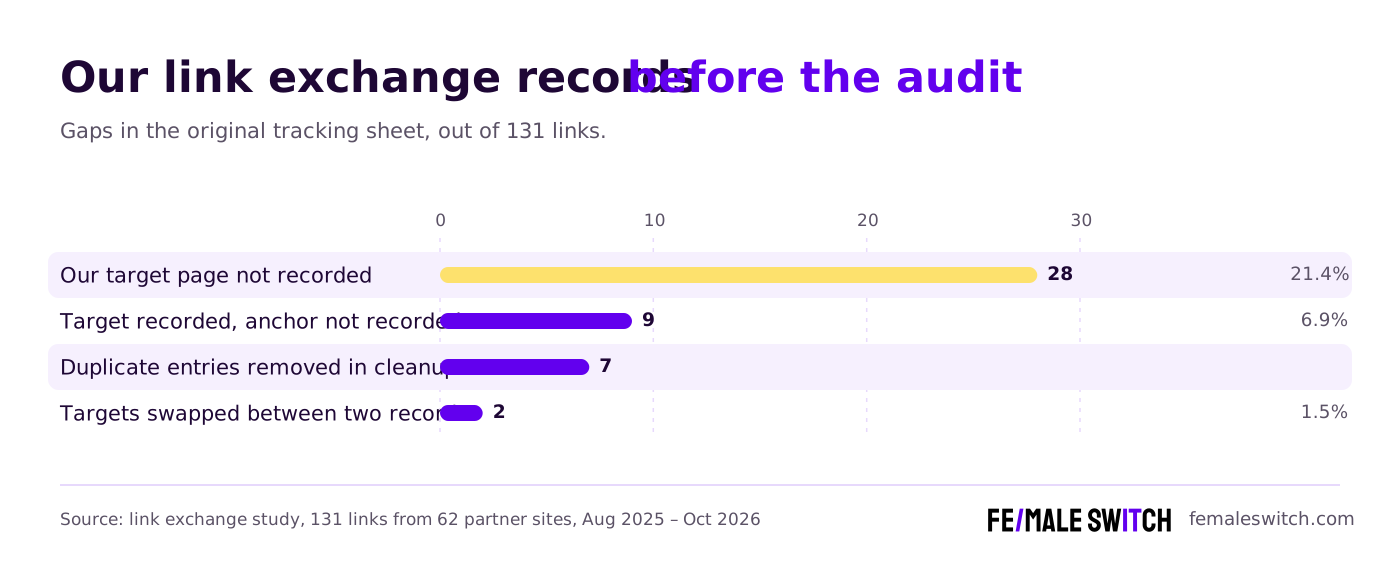
At minimum: the partner's page, your page, the agreed anchor and the date. Then the status, anchor found, rel attribute, page flags and Google index status. In our first audit, 21% of links had no target page recorded, which cost the most cleanup time.
How often should I check exchanged backlinks?
Run the automated link check weekly and the index check monthly. Our full run takes about 10 minutes and needs no attention. 14.5% of our exchanged links had stopped delivering value before anyone noticed.
Can I track backlinks without paid tools?
Yes. Our tracker uses Python's standard library, a normal browser and a list of our own domains. The only paid option worth considering is a search-results API if you need to check indexing for many pages.
Why does my script say a link is removed when I can see it?
Some sites show scripts a near-empty page and show people the full article. For one partner, 3 of 4 links looked removed to our script but were live in a browser. Always confirm a loss in a real browser.
How do I know if a backlink page is indexed by Google?
Search site: plus the exact page URL. To check that the version with your link is indexed, add a few words from the sentence with your link in quotes. Google showed us a CAPTCHA after about 35 searches, so go slowly.
How do I track an ABC link exchange?
Give the tracker a list of every domain you own, so it recognises links to any of your sites. In an ABC exchange the partner links to one of your sites and you link back from another, so a single-domain tracker misses them.
About the Author
Violetta Bonenkamp, also known as MeanCEO, is an experienced startup founder with an impressive educational background including an MBA and four other higher education degrees. She has over 20 years of work experience across multiple countries, including 5 years as a solopreneur and serial entrepreneur. Throughout her startup experience she has applied for multiple startup grants at the EU level, in the Netherlands and Malta, and her startups received quite a few of those. She’s been living, studying and working in many countries around the globe and her extensive multicultural experience has influenced her immensely.

