

Need to recover a deleted partition?
There's nothing worse than getting ready to pitch your startup and facing hard drive issues, like one of the partitions is suddenly lost without any reason. The issue often comes from accidental user actions. A single incorrect operation in Disk Management or Command Prompt can remove a partition, even if the data itself is still on the drive and recoverable. In such circumstances, the partition is not completely erased. Instead, Windows simply stops recognizing it after a system change or interruption.
Besides, this also happens because the partition table is damaged. Since it tells Windows how the drive is organized, any corruption caused by a system crash, malware, or an improper shutdown can make a partition appear deleted.
Power interruptions can also contribute to the problem, which I know all too well when working out of Malta, where electricity goes out on a weekly basis. If your computer shuts down unexpectedly while a drive is being formatted or resized, the process may not complete properly, leaving the partition inaccessible.
However, some partitions only seem lost. A missing drive letter, system update, or hardware change may prevent Windows from showing the partition in File Explorer, even though it still exists. To recover the deleted partition, you can follow the steps in the next section.
Use AOMEI Partition Assistant to recover deleted partition
When a partition is deleted or suddenly goes missing, having reliable recovery software makes a big difference. AOMEI Partition Assistant is a free partition manager. It shares a practical and easy-to-use solution to help recover deleted or lost partitions with minimal effort.
The software scans the entire disk to search for missing partitions, including those lost due to accidental deletion, disk errors, or repartitioning. With both quick and deep scan options, it improves the chances of finding partition information that is no longer visible in Windows.
What makes AOMEI Partition Assistant especially helpful is its simple interface. Even users with little technical experience can recover partitions without using complex command-line tools. For systems that fail to boot because a system partition is missing, the software also allows you to create a bootable WinPE media to restore access to the drive. It supports common file systems, including FAT32, NTFS, and other formats, making it suitable for most recovery scenarios.
In addition to partition recovery, AOMEI Partition Assistant provides useful tools such as moving data from one SSD to another, rebuilding the MBR and setting an active partition, which can help fix boot-related issues. AOMEI Partition Assistant offers a reliable and user-friendly way to recover deleted partitions while also providing advanced disk management features when needed.
Step 1. Find the lost partition in Disk Management. Install and open AOMEI Partition Assistant.
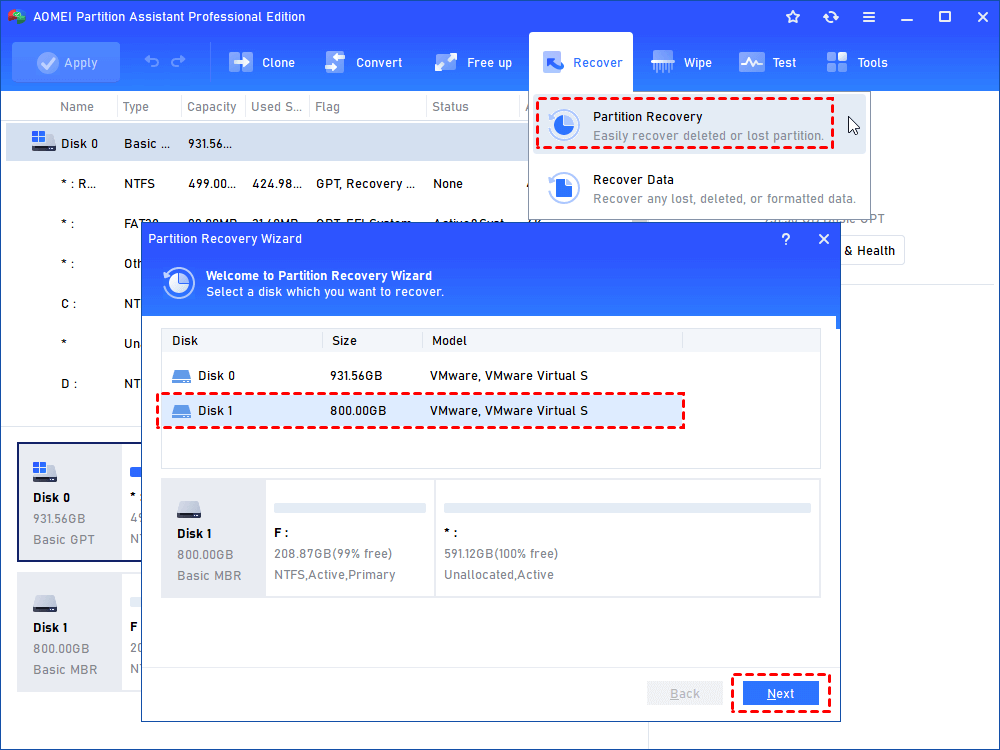
Step 2. Go to Recover > Partition Recovery on the main interface. When you get into the partition recovery wizard, select a disk that you want to recover. Click Next.
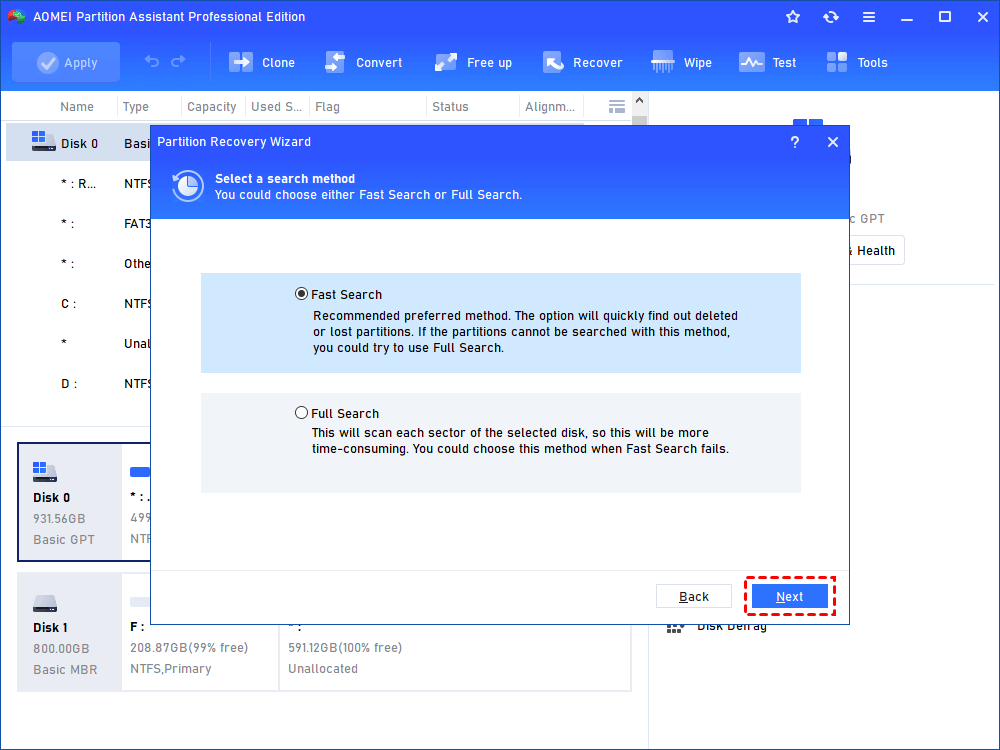
Step 3. Select Fast Search. It is recommended that you select this option the first time as it is faster than Full Search. If you are unable to recover the lost partition using Fast Search then I recommend you try the Full Search option.
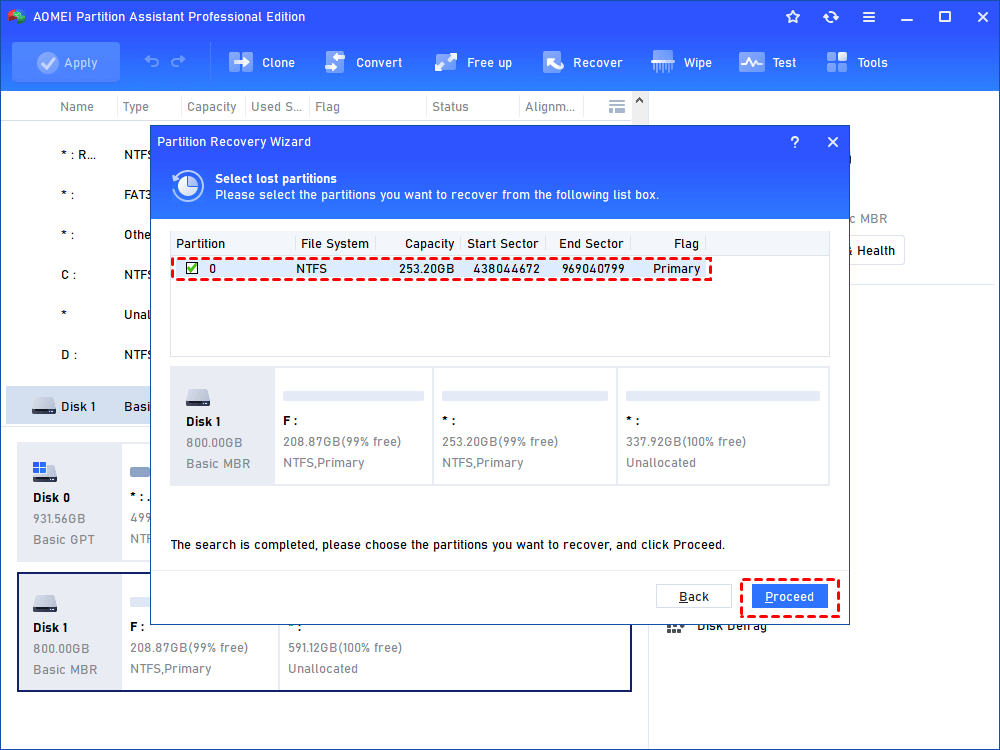
Step 4. Select the lost partition and click Proceed.
Step 5. Click Finish to exit this window after you see the congratulations message.
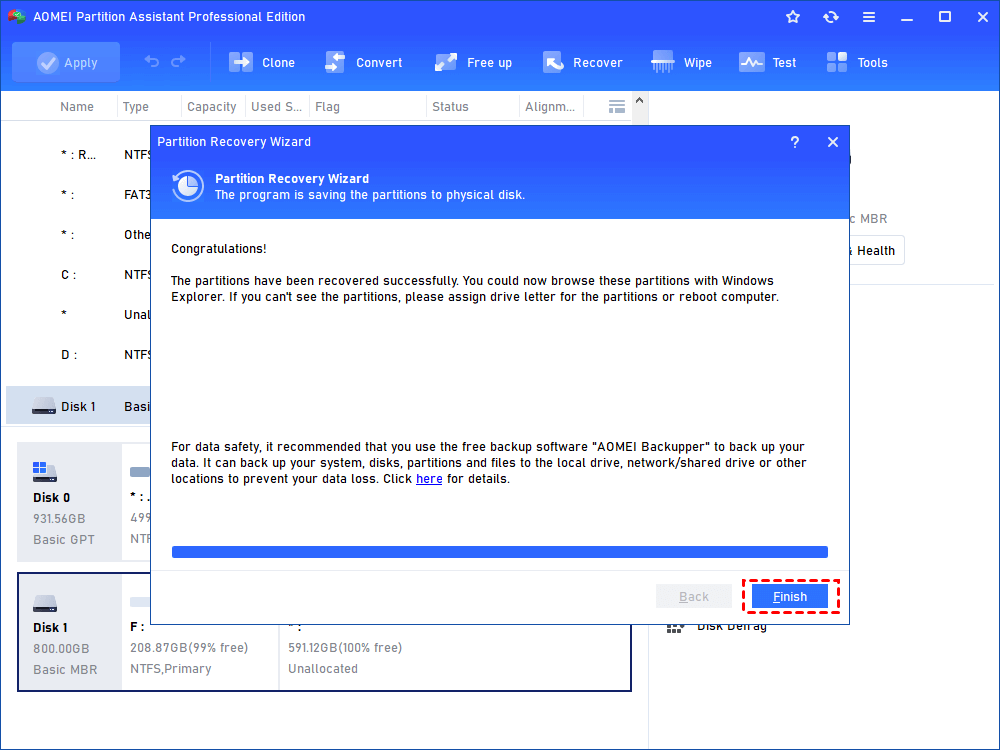
Then you can go to Windows File Explorer to check if the partition is restored. If you did not make any further operations on the partition since it is deleted and lost, the inside data will also be back and accessible now.
Conclusion
Recovering a deleted partition in Windows does not have to be stressful or technically complex. In most situations, partitions disappear due to system interruptions, accidental operations, or disk structure issues rather than permanent data loss. With AOMEI Partition Assistant, you can safely scan your disk, locate missing partitions, and restore them using clear and guided steps. Its user-friendly design and powerful recovery features make it suitable for both beginners and advanced users. By acting quickly and using reliable software, you can significantly improve the success rate of lost partition recovery and protect your important data.
FAQ on Data Recovery
How does partition recovery aid startup founders?
Partition recovery minimizes downtime by restoring access to critical files, ensuring that your business operations and planning stay on track. Entrepreneurs rely heavily on data-driven decisions, so recovering lost data promptly can protect your startup from operational delays or potential financial losses.
What causes a partition to disappear unexpectedly?
Issues like accidental deletion, malware attacks, power interruptions, or even improper system shutdowns can cause partitions to disappear. For founders, particularly those managing remote or digital operations, understanding these causes is vital to mitigate future risks.
Can you recover a partition without specialized knowledge?
Absolutely. Modern tools like AOMEI Partition Assistant come with user-friendly interfaces that make partition recovery accessible for non-technical founders. Features such as Fast Search and guided workflows simplify the process, allowing entrepreneurs to focus on scaling their ventures.
Why is AOMEI Partition Assistant recommended for startups?
AOMEI Partition Assistant stands out due to its efficiency, simplicity, and comprehensive features. It supports multiple file systems like FAT32 and NTFS and even offers solutions for bootable recovery, ensuring tech resilience in startups operating on lean resources.
How does a lost partition impact startup growth milestones?
Losing data during pivotal moments, such as investor preparation or product launches, can delay goals and erode team confidence. Planning for unexpected disruptions by having reliable partition recovery software is essential for maintaining momentum.
Does partition recovery disrupt current operations?
With robust solutions like AOMEI Partition Assistant, partition recovery is designed to be minimally intrusive. Fast scanning capabilities ensure that data is restored without negatively impacting ongoing operations or sensitive timelines, a critical aspect for startups running tight schedules.
Can a startup recover permanently deleted partitions?
Often, partitions are not truly erased but hidden due to structural issues. AOMEI Partition Assistant scans and restores such partitions effectively. For more insights on protecting your startup's assets, check out our guide on How to Safeguard Your Startup's Intellectual Property .
What role does prevention play in data management for startups?
Prevention is key to avoiding critical disruptions. By backing up systems regularly, leveraging anti-malware tools, and using quality hardware, startups can minimize the risk of partition loss.
Can recovery tools handle bootable partition repairs during a system crash?
Yes, tools like AOMEI Partition Assistant allow you to create bootable WinPE media, enabling the recovery of system partitions. This feature ensures startups can quickly recover and operate efficiently in case of such crashes.
How can founders ensure long-term data protection?
Long-term data security is a combination of robust disk management tools, regular backups, and secure infrastructures. Approaching data as an asset ensures your startup remains resilient against threats and operational hiccups.
About the Author
Violetta Bonenkamp, also known as MeanCEO, is an experienced startup founder with an impressive educational background including an MBA and four other higher education degrees. She has over 20 years of work experience across multiple countries, including 5 years as a solopreneur and serial entrepreneur. Throughout her startup experience she has applied for multiple startup grants at the EU level, in the Netherlands and Malta, and her startups received quite a few of those. She’s been living, studying and working in many countries around the globe and her extensive multicultural experience has influenced her immensely.
About the Publication
Fe/male Switch is an innovative startup platform designed to empower women entrepreneurs through an immersive, game-like experience. Founded in 2020 during the pandemic "without any funding and without any code," this non-profit initiative has evolved into a comprehensive educational tool for aspiring female entrepreneurs.The platform was co-founded by Violetta Shishkina-Bonenkamp, who serves as CEO and one of the lead authors of the Startup News branch. The Fe/male Switch team is located in several countries, including the Netherlands and Malta.

