
Transferring data from your iPhone to your PC may seem like a straightforward task, but for entrepreneurs managing fast-paced startups, inefficiencies in this process can slow them down. Streamlining this operation with reliable tools allows founders to focus on scaling their business rather than troubleshooting tech hiccups.
When your iPhone flashes the dreaded "Storage Almost Full" prompt, the most practical solution is usually to transfer your precious photos, videos, and files to your Windows computer. However, many people will not have a smooth process in completing this seemingly simple task. You may have tried methods that are too slow, too confusing, or simply do not give you the ability to transfer some of the files as you think. This is where dedicated data management tools become crucial. In this guide, we'll focus on using FoneTool to master iPhone to PC data transfer, providing you with a quick, organized, and user-friendly solution to meet your daily needs.
Why Do You Find the iPhone to PC Transfer Process Difficult?
There are several key reasons why most iPhone users need to transfer data to their PC: creating a secure backup for precious memory, freeing up valuable space on your device, or needing to move to a larger screen to organize and use files. While basic iPhone data transfer methods exist, they often have significant drawbacks, leading users to look for better alternatives.
Standard cables connected to Windows File Explorer tend to result in a large number of unnamed image files becoming cluttered. Relying on iCloud or other cloud services requires a stable network connection, ample cloud storage (usually charged monthly), and patience for uploads and downloads. These common issues plague users – lack of control, slow speed, and poor organization – highlighting the need for a tool specifically designed to make the process more convenient. FoneTool solves these exact problems by putting you in control.
Transfer Data from iPhone to PC with FoneTool
FoneTool is a comprehensive iPhone manage tool that offers an efficient and more controlled way to transfer data between iPhone and PC.
• Selective Transfer: Precisely select specific files, albums, or date ranges for data movement, saving time and storage space.
• Intuitive way to browse your gallery: Browse and select your media content through a clean and intuitive interface instead of cluttered file names from folders.
• Original image quality assurance: All photos and videos are transmitted in full, high-resolution state without any compression.
• Built-in HEIC Converter: Automatically batch convert iPhone photos to universal JPG format for seamless viewing in any Windows app.
Detailed Steps to Transfer Data from iPhone to PC
The process of using FoneTool to transfer your data is designed to be intuitive and efficient. Here is a streamlined overview of the key steps:
Step 1. Download and install FoneTool on your Windows PC. Launch the application and connect your iPhone using a standard USB cable. Tap "Trust" on your iPhone if prompted.
Step 2. On the FoneTool main interface, navigate to the "Phone Transfer" section and select "iPhone to PC".
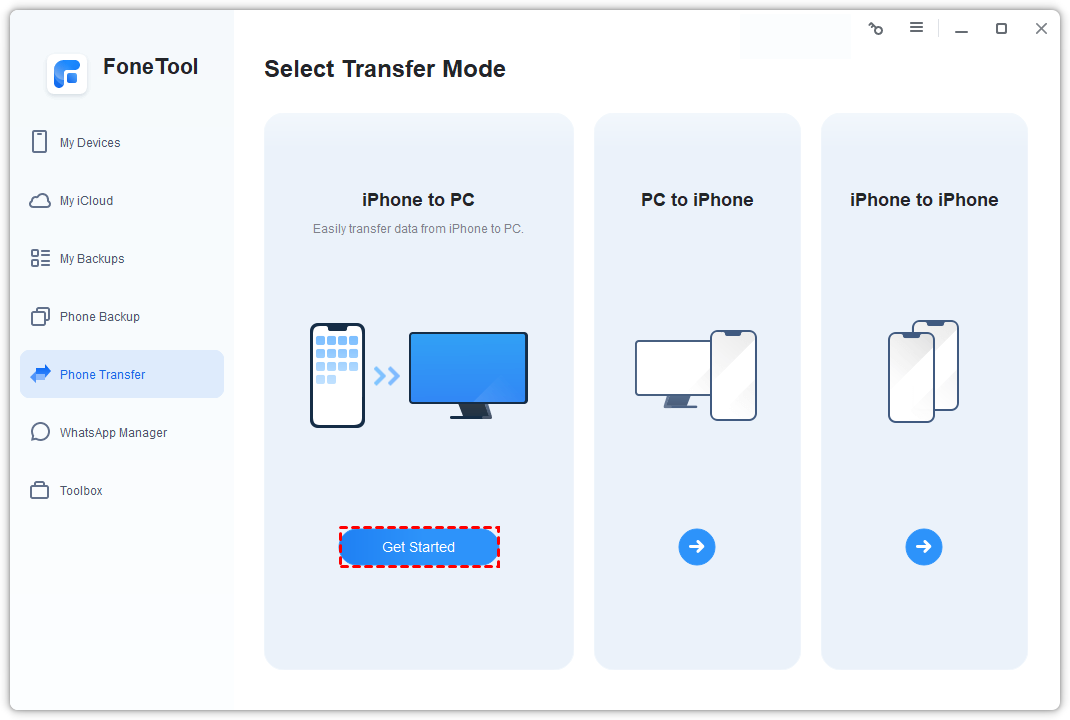
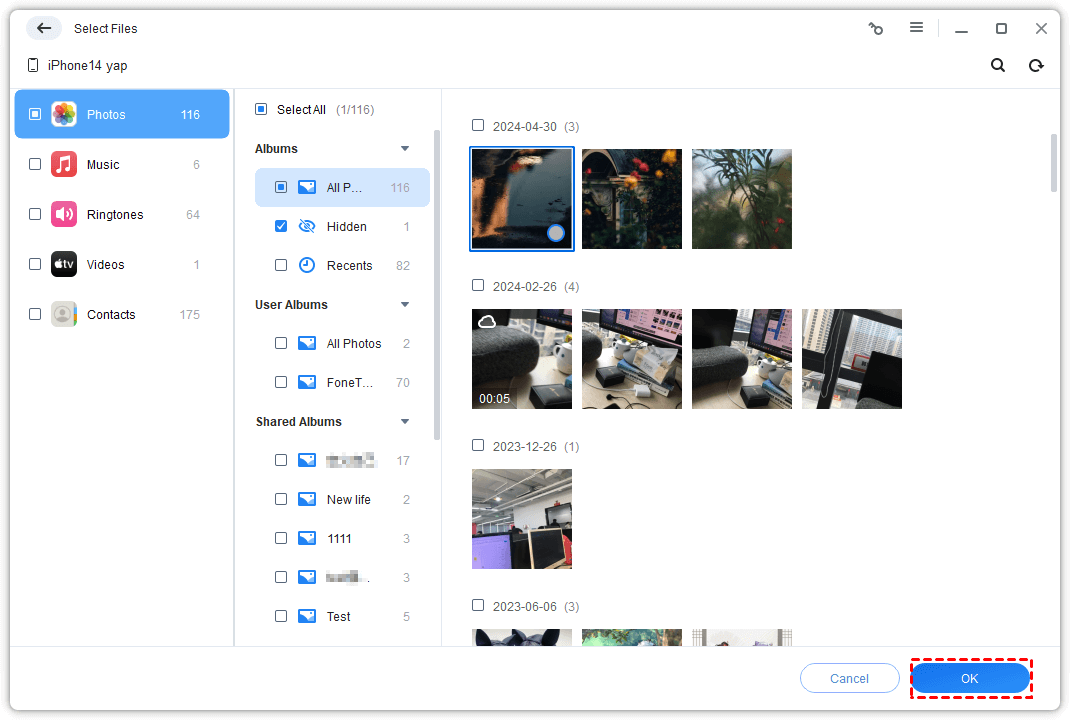
Step 3. You can select the file types you need to transfer, such as Photos, and then you will see an ordered view of your iPhone photos. Browse and select the specific files or albums you wish to transfer. You can use filters or dates to quickly find content.
Step 4. Select a destination folder on your PC to store the transferred data, then click the "Start Transfer" button and FoneTool will move your selected files quickly and reliably.
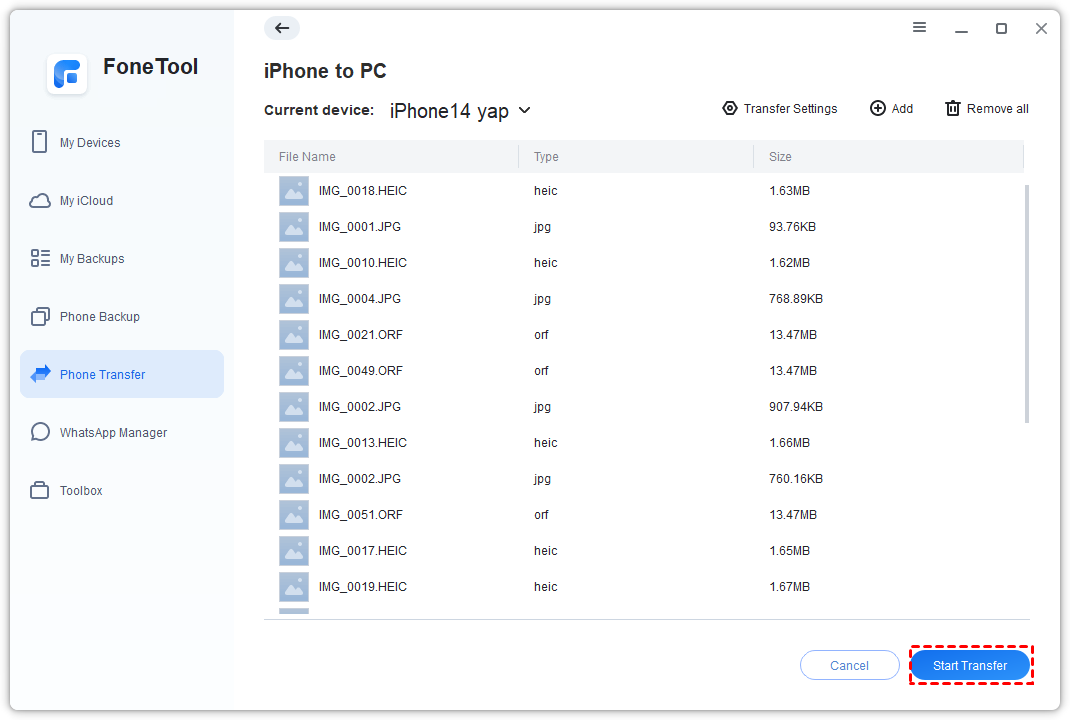
Following these steps ensures that your files are transferred in an efficient and secure manner, making it easy for you to access, edit, and archive them on your computer.
FoneTool's More iPhone Data Transfer Modes
While this guide focuses on transferring files from iPhone to PC, FoneTool is powerful enough to cater to various data transfer needs:
• PC to iPhone: Easily move music, videos, files, and more from your computer to your iPhone.
• iPhone to iPhone: Perform a quick and straightforward device-to-device migration without the need for iTunes and iCloud when upgrading your phone.
Final Words
Transferring data from iPhone to computer should be a straightforward and controlled process, and FoneTool effectively addresses the core issues of speed, organization, and selectivity that exist with built-in methods. By focusing on the iPhone data transfer process, it enables you to actively manage your device's storage space, protect your memories locally, and break free from the limitations of cloud storage subscriptions.
With FoneTool, you can not only complete iPhone data transfer smoothly but also get a reliable partner to continuously manage and optimize your precious digital life.
FAQ on iPhone to PC Data Transfer
Why is transferring data from iPhone to PC important for entrepreneurs?
Every entrepreneur values time and efficiency. Transferring data from an iPhone to a PC is essential for creating backups, freeing up device storage, and enabling editing or organizing files on a larger screen. For startup founders, this process ensures their workflow remains uninterrupted while keeping important files easily accessible and secure.
What challenges do people face while transferring iPhone data to PC?
Some commonly encountered challenges include cluttered file organization, lack of file selectivity, and dependence on stable internet for cloud-based transfers. These issues can be particularly cumbersome for entrepreneurs juggling multiple tasks, making tools like FoneTool vital for alleviating these inefficiencies.
How can FoneTool enhance the data transfer process?
FoneTool offers selective transfers, an intuitive gallery interface, original quality assurance, and even a built-in HEIC converter for compatibility with Windows systems. Entrepreneurs benefit from efficient and streamlined data migration, enabling them to focus on scaling their ventures instead of sorting files.
Is it possible to batch convert HEIC files during transfer?
Yes, tools like FoneTool include a built-in HEIC converter that automatically turns iPhone images into universally readable JPG formats. This feature ensures compatibility and simplifies file usage, which is crucial for entrepreneurs relying on quick accessibility.
What is the best method for maintaining local data backups for startups?
Startup founders need reliable methods to protect their operational data. FoneTool provides a secure way of transferring and storing files locally, allowing entrepreneurs to avoid potential pitfalls of cloud outages or cyber risks associated with online storage.
Can FoneTool transfer more than just photos and videos?
Absolutely. FoneTool enables selective data transfer for various file types, including documents and videos. Founders managing diverse startup projects can migrate specific elements with ease, ensuring files are ready for immediate use.
Why is organizational efficiency vital for startup teams?
Removing clutter and streamlining operations, including data transfers, enhances productivity in startups. Organizational efficiency directly correlates with more time spent on strategic tasks, like fundraising or product development. For helpful strategies, check out our guide on How Founders Can Build a Resourceful Startup Culture Without Burning Out.
Can entrepreneurs utilize FoneTool for PC-to-iPhone transfers?
Yes, FoneTool isn’t just limited to transferring data from iPhone to PC. Entrepreneurs can move important files or media from their PC to their iPhone effortlessly, proving the tool versatile for both work and personal needs.
How does FoneTool ensure efficient device-to-device migration?
FoneTool simplifies device-to-device migrations by eliminating the need for iCloud or iTunes. Startup founders upgrading their tech gear can perform quick and hassle-free transfers, saving time and avoiding compatibility issues.
Are there any security concerns when using FoneTool for sensitive startup data?
FoneTool prioritizes data security, ensuring encrypted transfers and secure file storage pathways. Startup leaders can confidently transfer sensitive documents knowing their data is safe from unauthorized access.
About the Author
Violetta Bonenkamp, also known as MeanCEO, is an experienced startup founder with an impressive educational background including an MBA and four other higher education degrees. She has over 20 years of work experience across multiple countries, including 5 years as a solopreneur and serial entrepreneur. Throughout her startup experience she has applied for multiple startup grants at the EU level, in the Netherlands and Malta, and her startups received quite a few of those. She’s been living, studying and working in many countries around the globe and her extensive multicultural experience has influenced her immensely.
About the Publication
Fe/male Switch is an innovative startup platform designed to empower women entrepreneurs through an immersive, game-like experience. Founded in 2020 during the pandemic "without any funding and without any code," this non-profit initiative has evolved into a comprehensive educational tool for aspiring female entrepreneurs.The platform was co-founded by Violetta Shishkina-Bonenkamp, who serves as CEO and one of the lead authors of the Startup News branch. The Fe/male Switch team is located in several countries, including the Netherlands and Malta.

