
Customers rarely blame your design. They just leave and tell you the price was too high, or say they’ll think about it, or vanish without a word. Bad design hides behind excuses like these, and most business owners never trace the real cause.
Customers respond to design in ways they can’t always name. A page that navigates badly costs you credibility before you’ve said anything about your product. A button that doesn’t incite interest and sits at the end of the page costs you a sale.
These reactions happen fast, and they happen below the level customers consciously notice.
This article pulls that invisible layer into the open. Here, we’ll walk through design principles that shape how customers feel and act on your site, using real examples from brands that turned small design choices into measurable gains in trust, clicks, and revenue.
Navigation That Makes Important Pages Easy to Find
Every extra click between a visitor and what they want is a chance for them to give up.
That’s not an exaggeration. More than six in ten users leave a website altogether when they can’t find their way around it.
Navigation is the map that decides whether someone stays on your site or bounces to a competitor.
The fix starts with ruthless simplification:
- Map your site from your customer’s point of view, not your internal organization chart.
- Group pages by what visitors search for, not by how your team categorizes products internally.
- Keep your top-level menu short, ideally under seven items, so people can scan it in a glance.
- Use clear, specific labels instead of vague ones like “Solutions” or “Resources.”
- Add a search bar with autocomplete for larger catalogs.
- Test with real users to catch confusing paths before customers do.
Here’s an example:
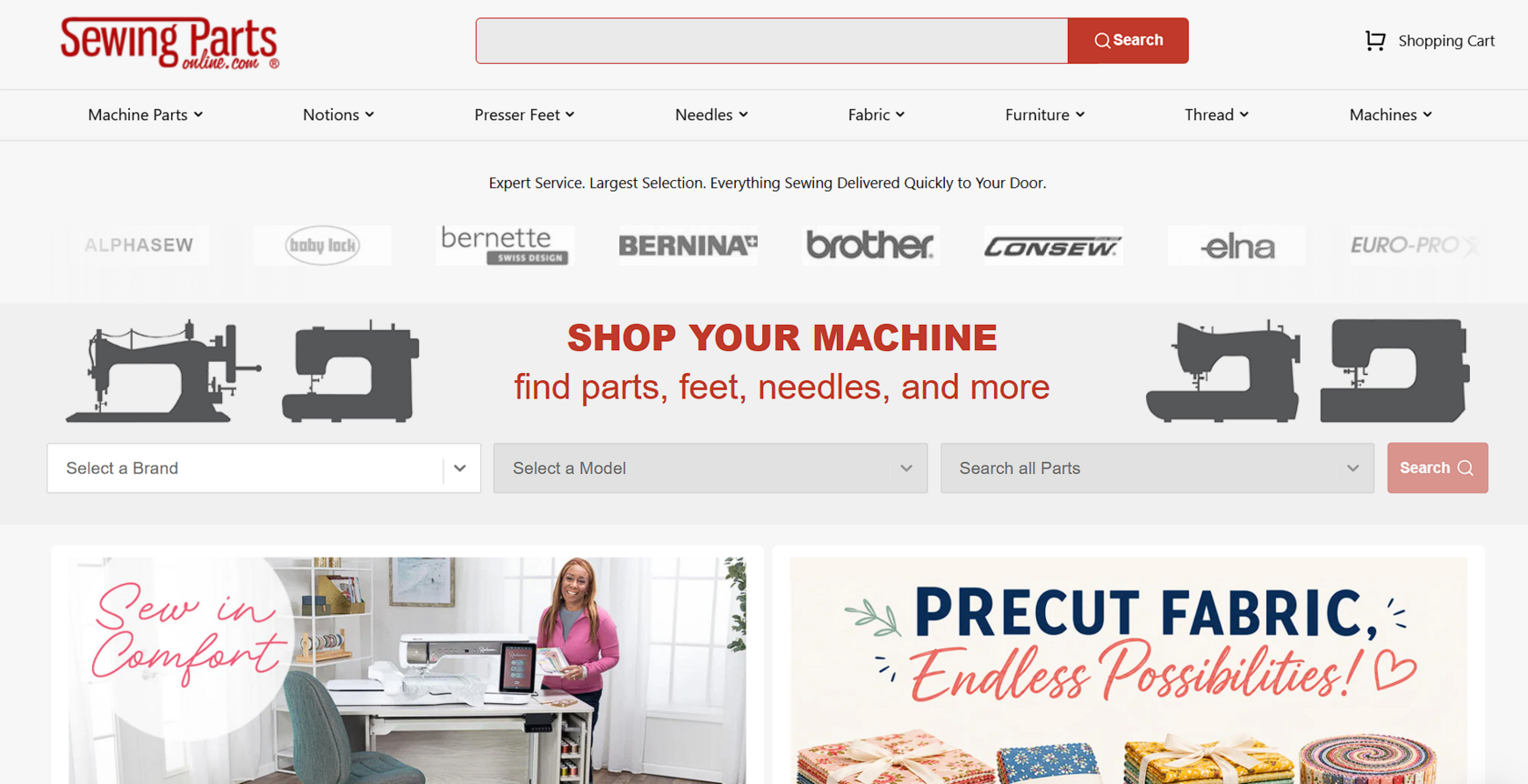
Sewing Parts Online is an online retailer for sewing machines and accessories. Their catalog spans thousands of products across dozens of brands, yet their navigation keeps that scale from overwhelming shoppers.
Their top menu splits products into clear categories – machines, accessories, fabrics, threads, and parts. From there, visitors can narrow further by brand, material, or color without ever feeling lost.
Their guided part selector takes this a step further. Visitors pick their sewing machine brand, select the exact model, and instantly see every compatible part for that machine.
This removes the guesswork that usually comes with buying replacement parts, especially for older or less common machine models.
Homepage Messaging That Sets Clear Expectations
A visitor forms an opinion about your homepage in the time it takes to blink twice. If they can’t tell what you sell or who you sell it to within those first few seconds, they leave and try the next search result instead.
Clear messaging removes that hesitation immediately, telling visitors they’ve landed in the right place before they scroll an inch.
Here’s how to achieve that:
- Write your headline around the problem you solve, not around your company name or industry jargon.
- State who your product serves and what makes it different in one sentence.
- Back it up with a short line of supporting text.
- Cut any word that doesn’t add meaning.
- Test your headline by reading it out loud. If it sounds like something only a marketer would say, rewrite it in plain language a friend would use.
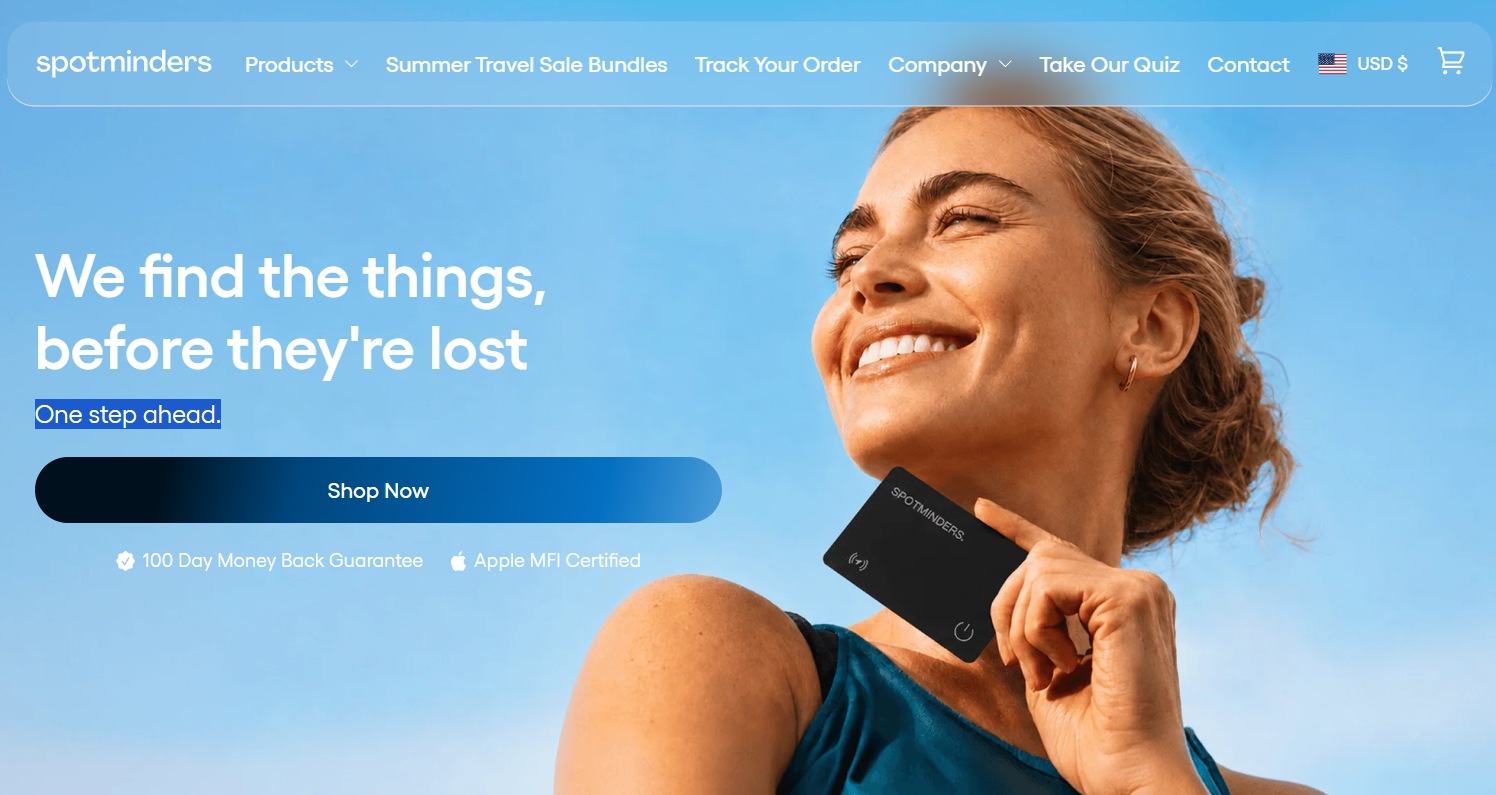
Spotminders, a company that sells slim tracking devices, gets this right. Their homepage doesn’t waste a single word explaining features or specs upfront. The hero section leads with a simple line and supports it with a short piece of text, reinforcing the same idea without repeating it.
Together, these two lines tell visitors exactly what the product does and why it matters, all before they’ve scrolled past the first screen. There’s no mention of Bluetooth range or battery specs in the hero section, because that’s not what convinces someone their keys won’t go missing again. The rest of the homepage builds on this same promise, layering in details only after the core message has landed.
Clear messaging like this turns confused visitors into confident ones within seconds.
Product Pages That Answer Questions Before They’re Asked
Every product page carries the weight of a conversation that never happens out loud. A shopper wonders if the item fits their needs, how it compares to alternatives, or what happens after they click buy, and if your page doesn’t answer that, they’ll open five more tabs to find out somewhere else.
The best product pages act like a knowledgeable salesperson standing beside the customer, catching hesitation before it turns into abandonment.
Here’s how to build yours:
- List every question your support team hears repeatedly about a product.
- Turn each one into a section on the page itself, using headers customers would actually search for.
- Place technical specs near the top for buyers who already know what they need, but explain those specs in plain terms for buyers who don’t.
- Add comparison charts when you sell similar products side by side, so visitors don’t have to guess which option fits their situation.
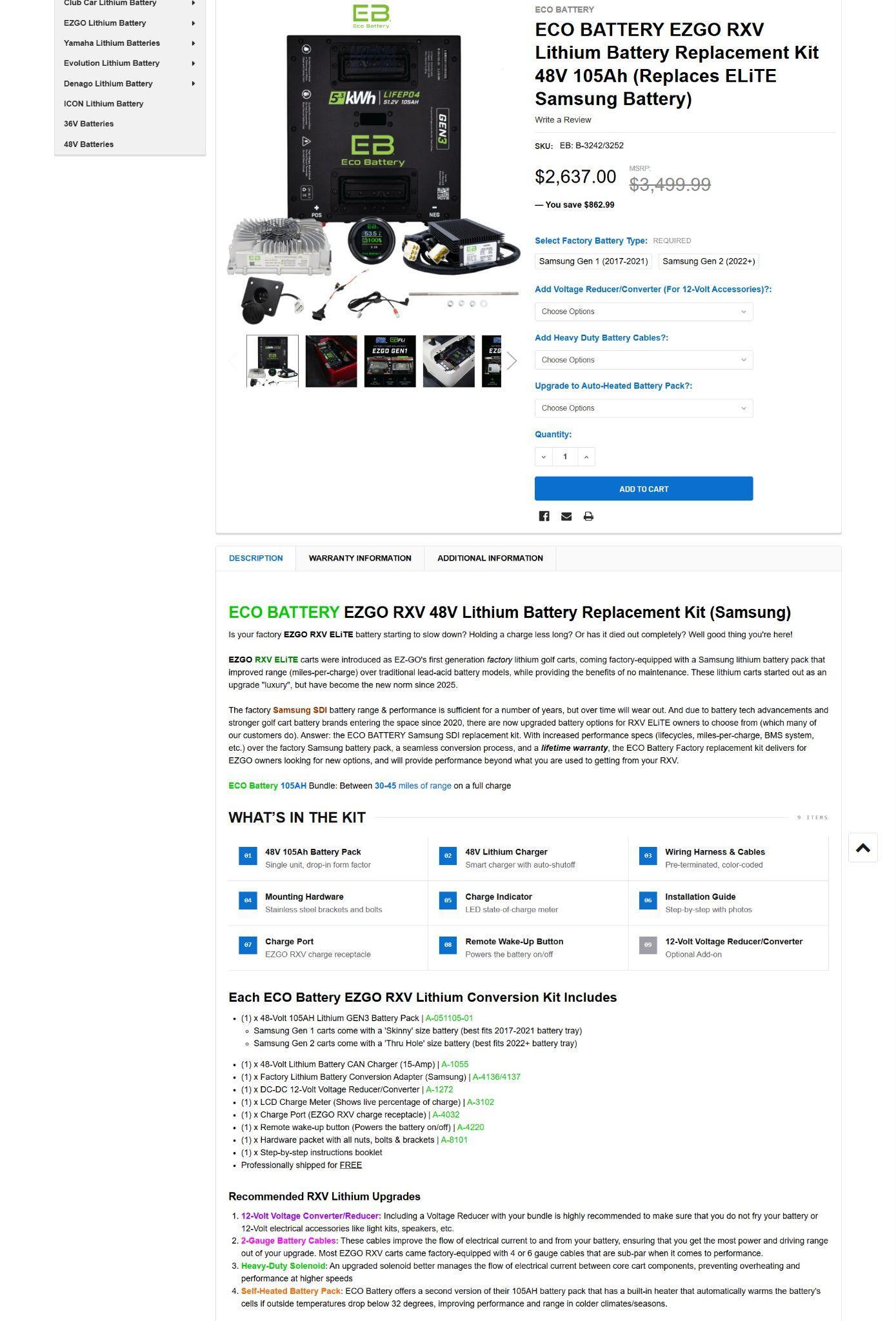
LithiumGolfCartBatteries.com, a retailer selling lithium battery kits built specifically for golf carts, applies this approach across its catalog. Their product pages tackle compatibility head-on, telling shoppers exactly which cart models and voltage systems each battery works with before they add it to their cart.
Performance details follow a similar pattern, covering range, lifespan, and charging times in language a first-time buyer can understand. When multiple battery options exist, the pages spell out the differences between them so customers can choose with confidence instead of guesswork.
This approach turns a product page into a resource, not just a sales pitch, cutting down on returns and support tickets alike.
Trust Elements That Reassure Visitors at Key Decision Points
Shoppers wonder if your products match the photos, if your company ships what it promises, or if anyone else has actually been happy with their purchase. Trust signals answer these silent objections before they turn into abandoned carts.
Research backs this up directly. 86% of consumers say they need some form of trust signal or social proof before they’ll complete a purchase.
Here’s how to implement that on your website:
- Place trust elements right where hesitation peaks, not buried in a footer nobody scrolls to.
- Add customer reviews near your product images and pricing, where doubt naturally spikes.
- Show real photos from real customers whenever possible, since staged stock photography rarely convinces anyone.
- Explain your production or shipping process in plain terms, so buyers know what happens after they click purchase.
- Display security badges near your checkout form, and keep your return policy visible instead of hidden behind a link.
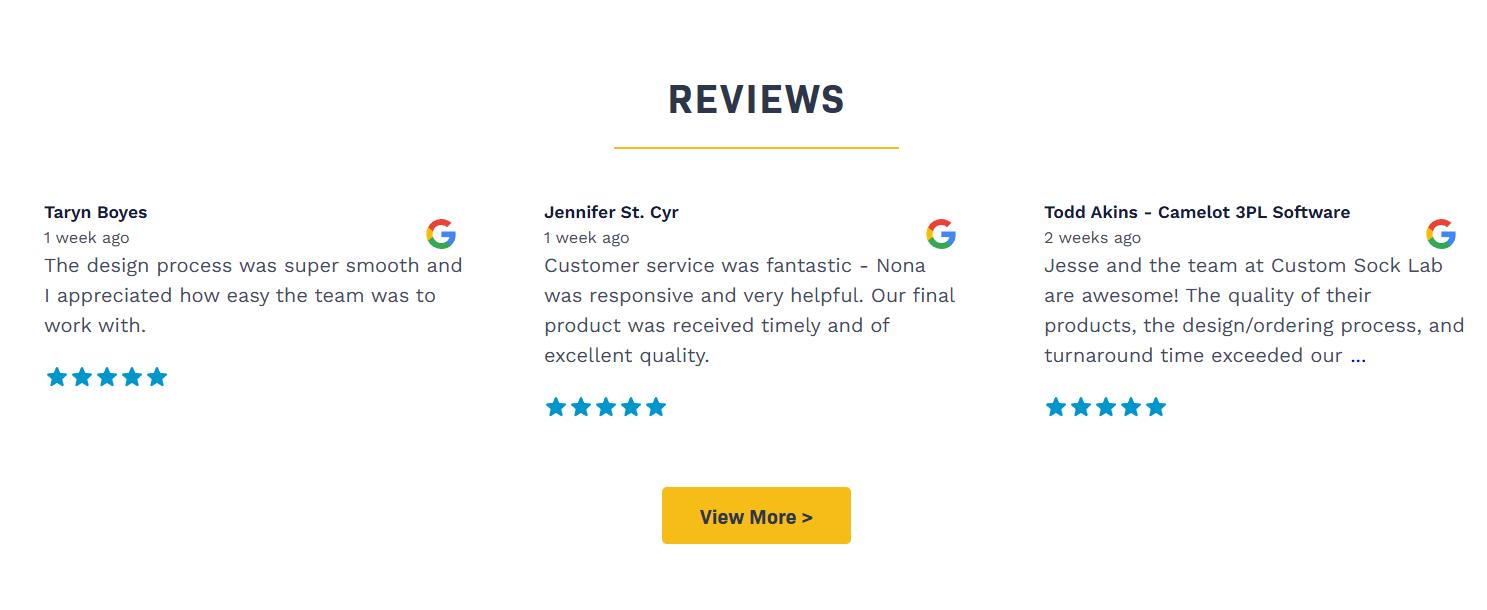
Custom Sock Lab, a company that designs and produces custom socks for businesses, teams, and individual customers, builds this kind of confidence throughout its site. Shoppers ordering a personalized product often feel more cautious than usual, since customization removes the safety net of returning a generic item.
Custom Sock Lab addresses this by placing customer reviews throughout the ordering journey, not just on a single testimonials page. The site also explains its production process clearly, walking visitors through how their design becomes a finished pair of socks.
This transparency matters even more for custom orders, where buyers can’t simply picture a standard product waiting in a warehouse. Each of these elements chips away at hesitation until the purchase feels like an easy decision.
Calls to Action That Feel Helpful, Not Pushy
Most CTA buttons read like commands barked by someone who doesn’t know you. “Submit.” “Start Now.” “Sign Up.” These generic imperatives treat every visitor identically while ignoring context, motivation, and the relationship you’ve built up to that moment.
The best CTAs guide people forward the way a helpful employee would, offering the next logical step instead of demanding a decision.
Here’s how to craft CTAs that support the buyer’s journey:
- Match their wording to what’s happening on that specific section of the page, rather than repeating the same generic phrase everywhere.
- Think about what a visitor actually wants to do after reading that section, then write a button that reflects it directly.
- Replace vague verbs with language tied to the outcome, such as “See Your Options” or “Get My Quote.”
- Keep buttons visually distinct from surrounding text, but skip aggressive colors or countdown timers that manufacture urgency where none exists.
- Test different phrasing on your highest-traffic pages to see which wording earns more clicks without feeling forceful.
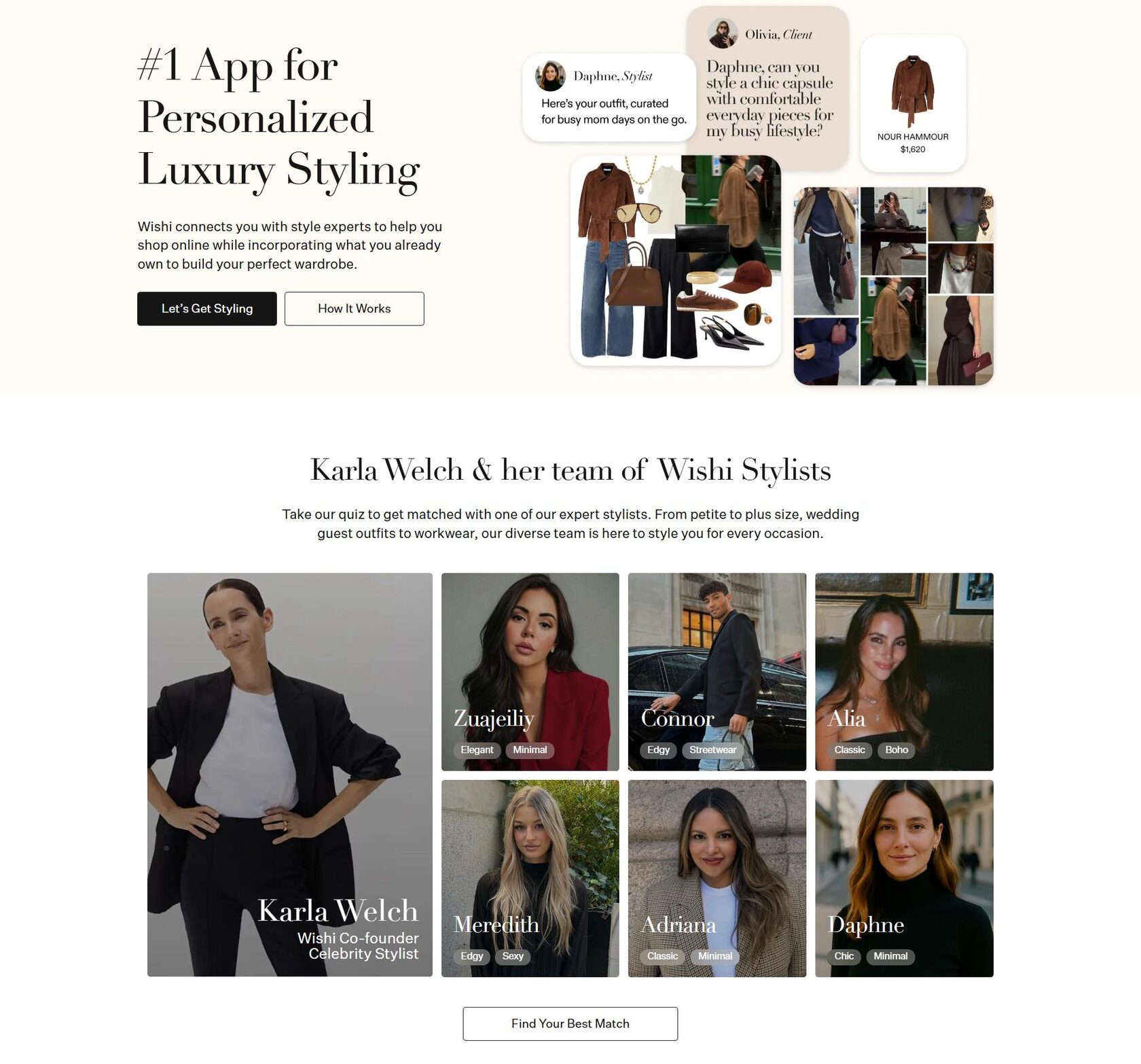
Wishi, a personal styling service that pairs customers with professional fashion stylists, handles this with real precision. Instead of relying on flat, overused buttons like “Start Now,” the site writes CTAs that match the mood and purpose of each section.
The hero section pairs two buttons, “Let’s Get Styling” and “How It Works,” giving visitors a choice between diving in or learning more first. Further down the page, a section introducing the brand’s stylists ends with a CTA reading “Find Your Best Match,” a phrase that speaks directly to what a visitor wants at that point in their journey.
Each button feels like a natural next step rather than a sales tactic, which keeps the experience feeling personal instead of transactional.
Final Thoughts
Small design choices compound into a single outcome – whether customers trust your site enough to act.
Clear navigation, honest messaging, thorough product pages, visible trust signals, and thoughtful CTAs all work toward the same goal. Miss one, and visitors feel it even if they can’t explain why.
So, look at your own site with a visitor’s eyes. Notice where they might hesitate, get confused, or lose interest, then fix those moments one at a time.
Your visitors won’t consciously notice these improvements, and that’s precisely the point. When your website works so intuitively that nobody compliments the design, you’ve built something genuinely effective.
FAQ on website design principles that improve customer experience
What are the most important website design principles for improving customer experience?
The most important website design principles focus on reducing friction and building confidence at every step of the visitor journey. Clear navigation, strong homepage messaging, helpful product pages, visible trust signals, and well-placed calls to action all shape how users feel and whether they convert. For founders and small business owners, these details are not just visual choices, but practical growth levers that directly affect revenue. A website that feels intuitive helps customers move forward without hesitation.
Why does website navigation matter so much for conversions?
Navigation determines how quickly visitors can find what they came for, and every extra second of confusion increases the chance they leave. When menus are simple, labels are clear, and important pages are easy to reach, users feel in control instead of overwhelmed. That sense of ease improves both trust and conversion rates because customers can focus on solving their problem rather than decoding your site. For an entrepreneur, better navigation is one of the fastest ways to stop losing high-intent traffic.
How can a homepage message improve customer experience?
A homepage message improves customer experience by immediately telling visitors what the business offers, who it helps, and why it matters. People make snap judgments online, so vague or overly clever copy often creates doubt instead of interest. Clear, benefit-driven messaging reduces bounce rates because users quickly understand they are in the right place. For startups especially, a sharp homepage message can act like a digital elevator pitch that starts selling within seconds.
What makes a product page more effective for users?
An effective product page answers real customer questions before they become objections. That means showing compatibility, benefits, specs, comparisons, shipping details, and other decision-making information in a format that is easy to scan. When users do not need to open extra tabs or contact support, the buying experience feels smoother and more trustworthy. In business terms, stronger product pages can increase conversions while lowering returns and support costs.
How do trust signals influence customer behavior on a website?
Trust signals reduce uncertainty at the exact moments when customers are deciding whether to take action. Reviews, testimonials, secure checkout badges, transparent shipping information, return policies, and real customer photos all reassure visitors that the business is credible. These elements matter because many people are interested in buying but pause when they are unsure if the company will deliver as promised. For growing brands, trust signals are a low-cost way to increase confidence without relying on aggressive sales tactics.
What are examples of effective calls to action in web design?
Effective calls to action feel like helpful next steps rather than generic commands. Instead of using flat phrases like “Submit” or “Start Now,” stronger CTAs reflect user intent with wording such as “See Your Options,” “Get My Quote,” or “Learn How It Works.” This makes the experience feel more human and aligned with the customer’s decision stage. For founders optimizing conversion funnels, small CTA changes can produce meaningful improvements in click-through rates.
How can website design reduce bounce rates?
Website design reduces bounce rates by removing the friction that makes visitors feel lost, skeptical, or overloaded. Fast clarity, clean layouts, clear headings, intuitive navigation, and relevant calls to action all help users stay engaged longer. The goal is not just to make a website look attractive, but to make every page easier to understand and act on. Businesses that treat design as a performance tool, not just a branding exercise, usually see stronger engagement metrics.
What role does customer psychology play in website design?
Customer psychology is central to website design because people respond emotionally before they respond rationally. A cluttered page can trigger uncertainty, a confusing menu can create stress, and a clear layout can build confidence almost instantly. Good design works by anticipating hesitation and guiding users toward action in a way that feels natural. For entrepreneurs, understanding this psychological layer can turn a website from a passive brochure into an active sales asset.
How can startups improve customer experience through website design?
Startups can improve customer experience by focusing first on clarity over complexity. A simple menu, strong value proposition, transparent trust elements, and action-oriented page structure often outperform flashy design that distracts from the offer. Startups should also test their website with real users to identify where confusion or drop-off happens. If you're shaping both your user experience and your business direction, this guide on how to find a startup idea can help align your offer with real customer needs.
How do small design changes lead to better business results?
Small design changes matter because customer decisions are often influenced by subtle moments of ease or friction. A clearer headline, a better-placed review, a simpler form, or a more relevant CTA can each improve the path to conversion. Over time, these adjustments compound into stronger trust, more sales, and a smoother brand experience. For ambitious business owners, improving customer experience through design is one of the smartest ways to grow without constantly increasing ad spend.
About the Author
Violetta Bonenkamp, also known as MeanCEO, is an experienced startup founder with an impressive educational background including an MBA and four other higher education degrees. She has over 20 years of work experience across multiple countries, including 5 years as a solopreneur and serial entrepreneur. Throughout her startup experience she has applied for multiple startup grants at the EU level, in the Netherlands and Malta, and her startups received quite a few of those. She’s been living, studying and working in many countries around the globe and her extensive multicultural experience has influenced her immensely.

