
TL;DR: ChatGPT for business is a fast drafting and research partner for a first-time founder, and the free plan covers most of your first month. It writes emails, offers, interview questions and website text in minutes, and it stops at three things: it keeps your plan only as well as you set it up, it tends to agree with you, and nobody checks whether you did the work. Pay €8 (Go) or €23 (Plus) a month only when you hit the limits, set up custom instructions and one project per startup, and add an AI co-founder for structure and honest feedback. The free builder below fills in 30 days of prompts with your own business details.
ChatGPT for business is the first tool most new founders open, and OpenAI says more than 1.2 billion people use ChatGPT each week (OpenAI, GPT-6 launch post, 7 October 2026). The real question for you is whether ChatGPT alone can carry you from a rough idea to your first paying customers, or whether you also need something that holds you to a plan.
Two meanings hide behind the search "ChatGPT for business". The first is the practice: using ChatGPT at work to write, research and answer customers. The second is a paid seat plan called ChatGPT Business, built for teams of two or more. This guide covers the first meaning, for a founder building a first startup alone or with one partner: what ChatGPT does well, where it stops, which plan to pay for, a 20-minute setup and 30 days of prompts.
What does ChatGPT do well for a new business?
ChatGPT is a large language model (LLM) chatbot: software trained on huge amounts of text that predicts useful answers to what you type. For a first startup, it is a strong first-draft machine:
- Drafting. Website text, social posts, product descriptions and pitch outlines in your tone, in several versions, in any language your customers speak.
- Research summaries. Paste a long report or your interview notes and get the patterns in a page.
- Customer emails. Replies, payment reminders, follow-ups after a call and the hard email where you say no.
- Offers and prices. Turning "I help people with plants" into three packages with a price logic you can defend.
- Thinking partner. Risks, objections and questions you forgot to ask, late at night when nobody else is awake.
The pattern behind all five: ChatGPT is fast when you bring the facts (your customers' words, your costs, your notes) and it shapes them. "Write me a marketing plan" gets a page that fits every business on earth. A prompt with your customer, city, price and one interview quote gets something you can send today.
Still choosing what to build? Start with our free business ideas generator, then bring your shortlist to ChatGPT to pressure-test it.
How does the 30-day prompt pack builder work?
Type your business name, what you sell, who buys it, your city, your customers' language, your tone and your stage. The builder writes 30 prompts, one per day, in four weeks plus a two-day review, with your business context at the start of every prompt you copy.
Three tips for using the pack:
- Run one prompt a day in the same ChatGPT project (setup below), so each answer builds on the last.
- Fill in the square brackets with real data: interview notes, costs and reply counts.
- Watch the badges. "Elona does this with you" marks days where honest feedback matters more than speed; "free generator" marks days a Fe/male Switch tool does in seconds.
Where does ChatGPT stop being enough for a first startup?
ChatGPT answers the question in front of it. A startup needs the right decisions in the right order for months, and there a general chatbot runs out. Four limits matter most.
It holds your plan only as well as you set it up
Memory helps, and OpenAI's help page on memory says plainly that it "does not retain every detail from every conversation". Projects keep chats, files and instructions together and fix most of this, as long as you create one, feed it your notes and keep working inside it. Skip that and ChatGPT forgets your price from last Tuesday.
Its advice is generic until you make it specific
Ask "how do I find customers?" and you get the ten tactics every blog lists. ChatGPT doesn't know your buyers are office managers in Utrecht who hate cold calls until you tell it, and the more specific your input, the more useful the answer.
It tends to agree with you
In April 2025 OpenAI rolled back a GPT-4o update because, in its own words, the model had become "overly flattering or agreeable". The fix went in, and the lesson stays: a chatbot trained on what people like leans towards telling you your idea is good. For a founder, that is the most expensive habit a helper can have. Ask for pushback in every review prompt ("Do not agree with me to be nice") and test the answers on real customers.
Nobody checks whether you did the work
ChatGPT will never ask on Friday how many of your 20 interviews happened. It has no stake in your startup and no view of the steps you skipped. Accountability is a co-founder's job, and a chatbot skips it unless you build the routine yourself.
ChatGPT, an AI co-founder or doing it alone: which fits your first startup?
An AI co-founder is an AI assistant that works on your startup the way a co-founder would: it asks hard questions, turns a rough idea into plans and documents, and keeps you moving week by week. At Fe/male Switch, that co-founder is Elona, built into our startup game for first-time founders.
Sources: OpenAI pricing and help pages, Fe/male Switch AI co-founder and pricing pages, 29 October 2026.
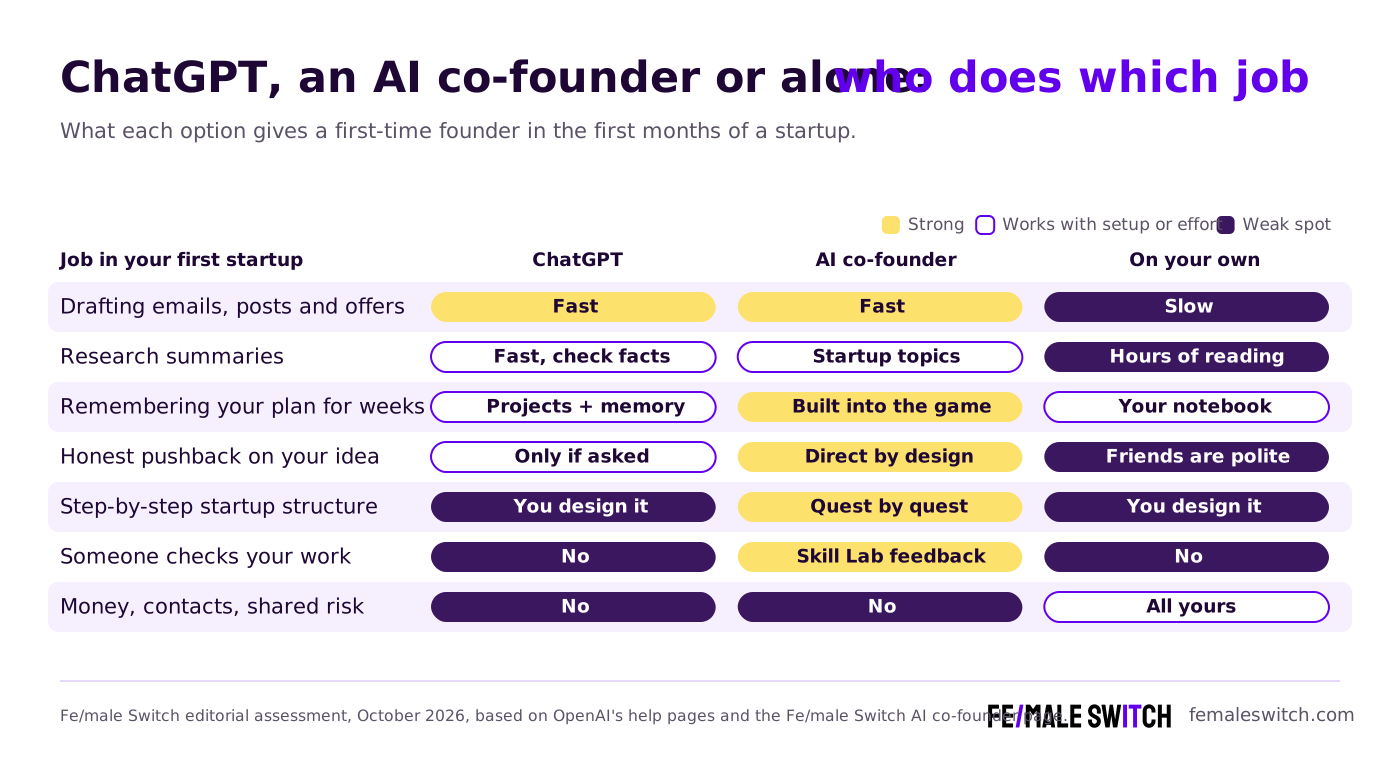
The honest summary: ChatGPT is the better writer, Elona is the better coach, and neither replaces customers or brings money and a network, as our AI co-founder page states openly. Use both: ChatGPT for volume, an AI co-founder for the order of steps and the uncomfortable questions. Our comparison of AI co-founders, agents and other founder tools helps with the rest of your stack.
Which ChatGPT plan does a solo founder need?
These are the plans on OpenAI's pricing page as shown in euros to a European visitor on 29 October 2026. OpenAI sets local prices, so check the page in your country before you pay.
Our advice for a first startup:
- Start on Free. The idea and offer weeks of the prompt pack run fine on it.
- Move to Go at €8 when you keep hitting upload or message limits.
- Move to Plus at €23 when you lean on deep research, or need more room for custom instructions: Free and Go allow 1,500 characters, Plus allows 5,000, according to OpenAI's help page on custom instructions.
- Skip Pro. Your first euros belong in customer tests.
- Look at Business only when you bring in a partner or hire. It starts at 2 users.
One thing to know about personal plans: OpenAI's pricing page states that content on Free, Go, Plus and Pro is used to train its models, with an opt-out. The switch is called "Improve the model for everyone" and sits under Data controls. Under the GDPR (General Data Protection Regulation, the EU privacy law), your customers' personal data stays your responsibility whichever tool you paste it into, so leave out what you don't need.
For which plans get the newest model, see our breakdown of GPT-6.1 Terra for small business.
How do you set up ChatGPT for your business in 20 minutes?
Twenty minutes of setup saves you from retyping your business in every chat. Each step uses a feature described on OpenAI's help pages on 29 October 2026.
- Write your custom instructions. On the web: Settings, then Personalization, switch customization on and fill in the Custom Instructions field (on mobile: Settings, then Customize ChatGPT). They work on every plan.
- Create one project per startup. Select "New project" in the sidebar and give it your business name. Projects keep related chats, files and instructions together.
- Add project instructions. In the project's menu (three dots), choose Project settings. OpenAI notes that project instructions override your global custom instructions inside that project.
- Upload your files: interview notes, price sheet, lean canvas, competitor research, as PDFs, spreadsheets, documents or pasted text. The number of files depends on your plan.
- Choose project-only memory if you test more than one idea (Project settings, then Memory), so idea A doesn't leak into idea B.
- Save the good answers. In the message menu, select "Add to project sources", and your final offer and price stay in the project for later chats.
- Check your data setting under Data controls.
A filled-in example to copy and change:
Copy and edit: I am a first-time founder. My business is Fold & Fern: plant care subscriptions for small offices in Utrecht, the Netherlands. My buyers are office managers at companies with 10 to 50 staff. I am at the idea stage, with no paying customers yet. Answer in English; write anything for customers in Dutch, warm and friendly. Be direct. When I share an idea, list the risks before the benefits. Say "I don't know" when you don't. Mark every fact, price or legal point I must check myself. Keep answers under 300 words unless I ask for more.
Prompt quality matters as much as setup. Our guide on how to become a prompting queen still holds up: give a role, context, a format and an example.
What are the best ChatGPT prompts for the first 30 days of a startup?
The best prompts for a new business follow the order a startup happens in: check the idea, shape the offer, find customers, then sort the admin, the same order as our 30-day validation playbook. The builder writes all 30; here are the ones that matter most each week. Start each with the context line from Day 1 and replace the square brackets with your details.
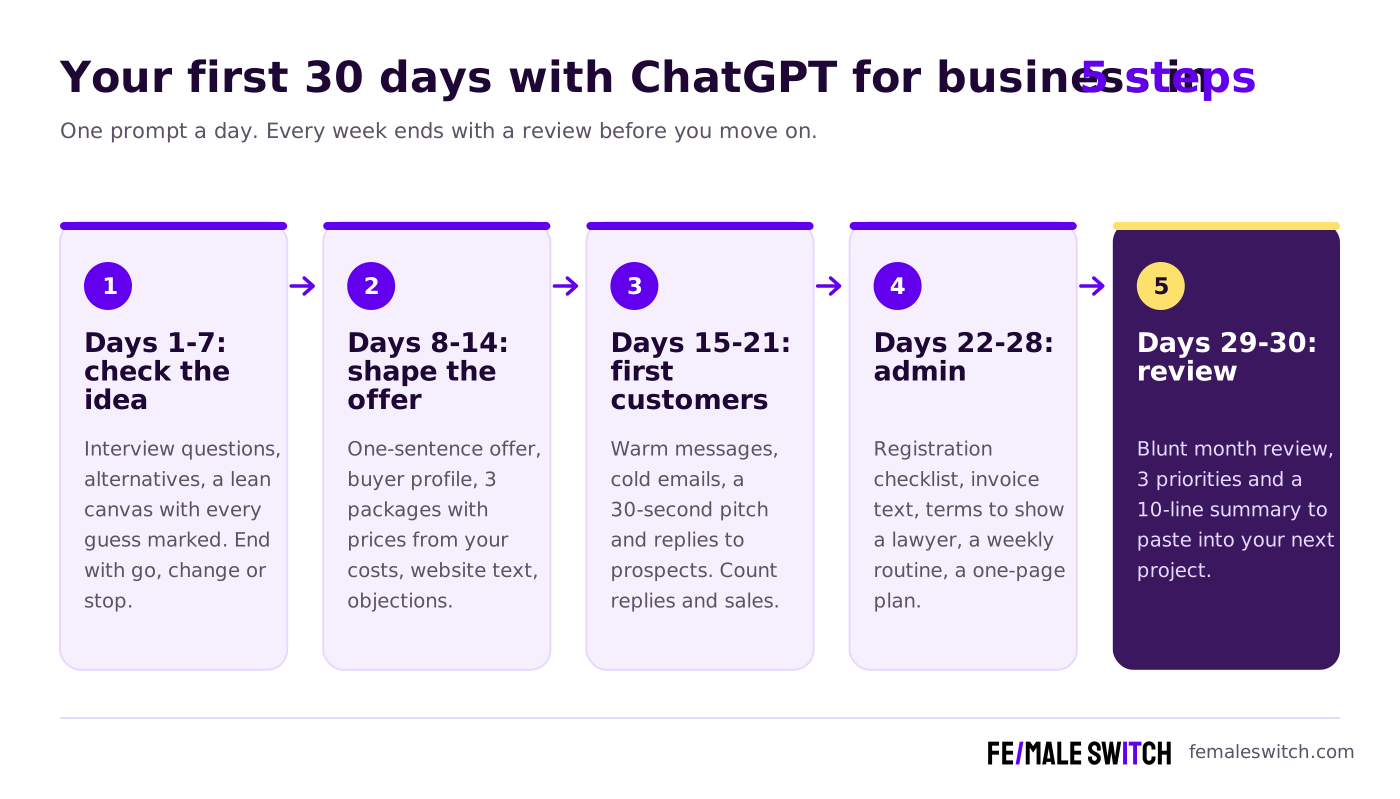
Week 1: check the idea
Day 1, the risk list: My business is [name]. I sell [what] to [who] in [city]. Act as a sceptical investor. List the 5 assumptions my business depends on most, rank them by risk and tell me which one to test first this week. Do not agree with me to be nice.
Day 2, interview questions: Write 10 interview questions for [who] about how they handle this problem today and what it costs them in time and money. No questions about my product and no leading questions.
Then go and talk to people. Our guide to finding your first 10 customers shows where, the free lean canvas template holds what you learn, and the free idea validator gives a second opinion in seconds.
Week 2: shape the offer and price
Day 8, the one-line offer: Write my offer in one sentence: who it is for, the result they get and by when. Give me 5 versions in [language], from plain to bold.
Day 10, three packages: Propose 3 packages (small, standard, premium) with what is inside each and a price in [currency]. Explain each price from my costs and from what people pay for the alternatives today.
ChatGPT is good at price logic and bad at knowing what buyers will pay, so test the numbers on real people. Our guide to pricing your first version covers the psychology, and the free user persona generator and one-line offer generator give you a starting draft to argue with.
Week 3: first customers
Day 16, the cold email: Write a cold email in [language] to one of [who] in [city] that I found through [where]. Under 120 words, one question, no attachment. Add a follow-up to send 5 days later.
Day 21, the funnel review: Messages sent: [number]. Replies: [number]. Calls: [number]. Sales: [number]. Tell me where most people drop off and what to change next week.
Read our cold outreach techniques for women founders before you send the first batch, and try the free elevator pitch generator for the 30 seconds you get at a local event. For channel ideas, the marketing plan generator gives you a customer profile, positioning and 20 marketing ideas.
Week 4: admin and next steps
Day 22, the setup checklist: Make a checklist of what a new business like [name] has to set up in [country]: registration, tax, invoices, insurance, bank account. Mark each item I must confirm with the official source or an accountant.
Day 28, the one-page plan: Turn everything we did this month into a one-page business plan: problem, customer, offer, price, channels, numbers so far and the next 90 days.
ChatGPT's country-level tax and legal answers can be out of date, so treat its checklist as questions for your chamber of commerce or accountant. For the plan itself, the free business plan generator gives you a first draft in seconds, and our startup business plan template walks you through each section. A quick SWOT analysis is a good Day 27 check.
Days 29 and 30: review
Day 29, the blunt review: Month review. My numbers and notes: [paste]. What worked, what did not and what I avoided doing. Be blunt. Then list my 3 priorities for next month.
Day 30 asks ChatGPT for a 10-line summary of your business. Paste it into your project instructions, and next month starts where this one ended.
When does an AI co-founder do the job better than ChatGPT?
ChatGPT is the right tool when you know what to ask. An AI co-founder helps when you don't know yet, or when you know and keep avoiding it. Elona fits three situations:
- You need the order of steps. In the Fe/male Switch game you build a startup quest by quest, and Elona works through it with you.
- You need feedback on your work. In the game's Skill Lab, Elona reviews what you hand in. ChatGPT answers what you type; Elona checks what you did.
- You need startup documents fast. Elona drafts a business model canvas, lean canvas, business plan, pitch deck outline and checklists as a first version you edit.
Elona has limits too, and her page lists them: no network, no money, and she can be wrong, so you check her work.
Try your AI co-founder free. Tell Elona what you're building and in about ten seconds she gives you an honest first take and a plan for the next 7 days, free and without signing up. Want the full structure? The Fe/male Switch startup game adds Skill Lab feedback from Elona on the Intern tier at €2.50 a month, and the Play tier at €10 a month comes with a 14-day trial (early-bird prices with VAT, Fe/male Switch pricing page).
For a wider view of the tools around ChatGPT, our list of 13 AI tools to launch a one-person company puts them in the order you need them.
Which mistakes do first-time founders make with ChatGPT?
These seven mistakes cost first-time founders the most time, and each has a fix.
- Asking for a business plan on day one. A plan built on zero customer conversations is fiction with headings. Run week 1 first, then ask for the plan.
- Treating agreement as validation. Only a stranger paying for your idea counts as proof, whatever ChatGPT says about it.
- Starting a new chat every time. You lose your context and get generic answers. One project per startup fixes it.
- Pasting customer data without thinking. Names, emails and phone numbers don't need to be in a prompt. Replace them with "Customer A" and check your Data controls.
- Publishing unedited text. Edit every customer-facing draft until it sounds like you, and delete claims you can't back up.
- Trusting facts, prices and laws without checking. Confident answers about VAT rules and competitor prices can be out of date. Check every number at the source.
- Using ChatGPT to avoid people. The prompts prepare you for the 20 customer conversations, so book them anyway.
Your first week with ChatGPT for business: what to do now
ChatGPT is enough to write, research and prepare for your first startup, for €0 to €23 a month. The order of steps, the pushback and the check that you did the work come from an AI co-founder, a mentor or a routine you hold yourself to. Your next seven days:
- Today: write your custom instructions and create one project for your startup (20 minutes).
- Tomorrow: fill in the prompt pack builder above and run Day 1 in your project.
- Days 3 to 6: book five conversations with people who match your buyer, using the Day 2 questions.
- Day 7: run the week 1 review, then ask Elona for her honest take on the same idea and compare the two answers.
Feed ChatGPT real material (customer words, real costs, real reply counts) and a free chatbot does the work of a junior assistant. With nothing to go on, it hands back a polite echo of your own idea.
FAQ: ChatGPT for business
Can I use ChatGPT for my business for free?
Yes. The Free plan costs €0 and includes unlimited text chats with GPT-6, with limits on uploads, image creation, deep research and memory, according to OpenAI's pricing page on 29 October 2026. That covers the first month of a new startup. Content on personal plans is used for training unless you switch it off in Data controls.
What is ChatGPT Business and do I need it as a solo founder?
ChatGPT Business is OpenAI's paid plan for teams: €21 per seat a month billed yearly or €26 billed monthly, shown in euros on OpenAI's pricing page, starting at 2 users. It adds a shared workspace, admin controls and no training on your data by default. A solo founder doesn't need it; Go or Plus is enough until you have a team.
How much does ChatGPT Plus cost?
ChatGPT Plus cost €23 a month on OpenAI's pricing page on 29 October 2026, as shown to a European visitor. Go cost €8 a month and Pro started at €103 a month. OpenAI sets prices per country, so check the page where you live.
Is ChatGPT enough to start a business?
ChatGPT is enough to draft, research and prepare. It doesn't set the order of steps, it tends to agree with you, and it doesn't check your work. Pair it with customer conversations and a structure: a mentor, an AI co-founder such as Elona, or the 30-day prompt pack above.
What is the difference between ChatGPT and an AI co-founder?
ChatGPT answers whatever you ask. An AI co-founder inside a startup programme follows your startup step by step and reviews your work as you go. Elona, the Fe/male Switch AI co-founder, gives feedback in the game's Skill Lab and drafts canvases and plans you edit.
Does ChatGPT remember my business between chats?
Partly. Memory brings back some details from earlier chats, and OpenAI's help page says it does not keep every detail. Write custom instructions and work inside one project per startup, with your notes uploaded as files.
Is it safe to put customer data into ChatGPT?
Paste as little personal data as you can. Replace names and contact details with placeholders, and decide whether "Improve the model for everyone" stays on under Data controls. Under the GDPR, your customers' personal data remains your responsibility whichever tool you use.
About the Author
Violetta Bonenkamp, also known as MeanCEO, is an experienced startup founder with an impressive educational background including an MBA and four other higher education degrees. She has over 20 years of work experience across multiple countries, including 5 years as a solopreneur and serial entrepreneur. Throughout her startup experience she has applied for multiple startup grants at the EU level, in the Netherlands and Malta, and her startups received quite a few of those. She’s been living, studying and working in many countries around the globe and her extensive multicultural experience has influenced her immensely.

