
TL;DR: Would a Content Security Policy have stopped the Optimizely malware?
On 16 November 2026 malicious JavaScript rode inside Optimizely snippets onto the sites of 178 organisations. A Content Security Policy (CSP) stopped it at only 24 organisations, and 68 had no CSP at all. Allowing cdn.optimizely.com did nothing, and 'unsafe-eval' and 'strict-dynamic' opened the door. On client sites, start in report-only mode, restrict connect-src, read the reports, then enforce.
Developing story. Last updated 17 Nov 2026, 11:30 CET. We'll update this article as Optimizely publishes more.
A Content Security Policy decides which scripts may run on a website and where they may send data, and the Optimizely vulnerability MeanCEO reported showed how few sites have one that holds up. For a plain-language version to forward to a client, the Fe/male Switch Foundation explains what the Optimizely hack means for a small business.
This guide is for freelancers, web designers, no-code builders and small agencies who add A/B testing, analytics, chat, tag manager and review scripts to client websites. Each of those scripts gets full access to the page. Looking after Java servers too? The 24-hour Java4Shell patch plan covers the Java flaw disclosed a day after the Optimizely hack.
What happened with Optimizely, in short?
Optimizely Web loads a JavaScript snippet from cdn.optimizely.com, and its dashboard field Project JavaScript runs custom code on every page. An attacker wrote malware into that field in customer projects, so the infected code arrived from Optimizely's own CDN with Optimizely's certificate.
Scott Helme's Report URI investigation fetched 1,611 distinct snippets and found 188 infected, belonging to 178 organisations, among them Zoom, BBC, HSBC and ABN AMRO. The code swapped crypto wallet addresses, skimmed cards typed into sites' own forms and stole cookies. Optimizely says it has "fixed the vulnerability and removed the injected code from affected projects", according to its status page notice of 17 November. How the attacker got write access to so many unrelated projects is still unexplained.
Helme's lesson applies to every tool you install for a client: "The important lesson here is that trusted JavaScript doesn't always remain trustworthy."
What is a Content Security Policy, in plain words?
A Content Security Policy is an HTTP response header listing rules, and the browser refuses whatever the list leaves out. Six parts of it decided what happened on 16 November.
What did Report URI's crawl find about CSP on affected sites?
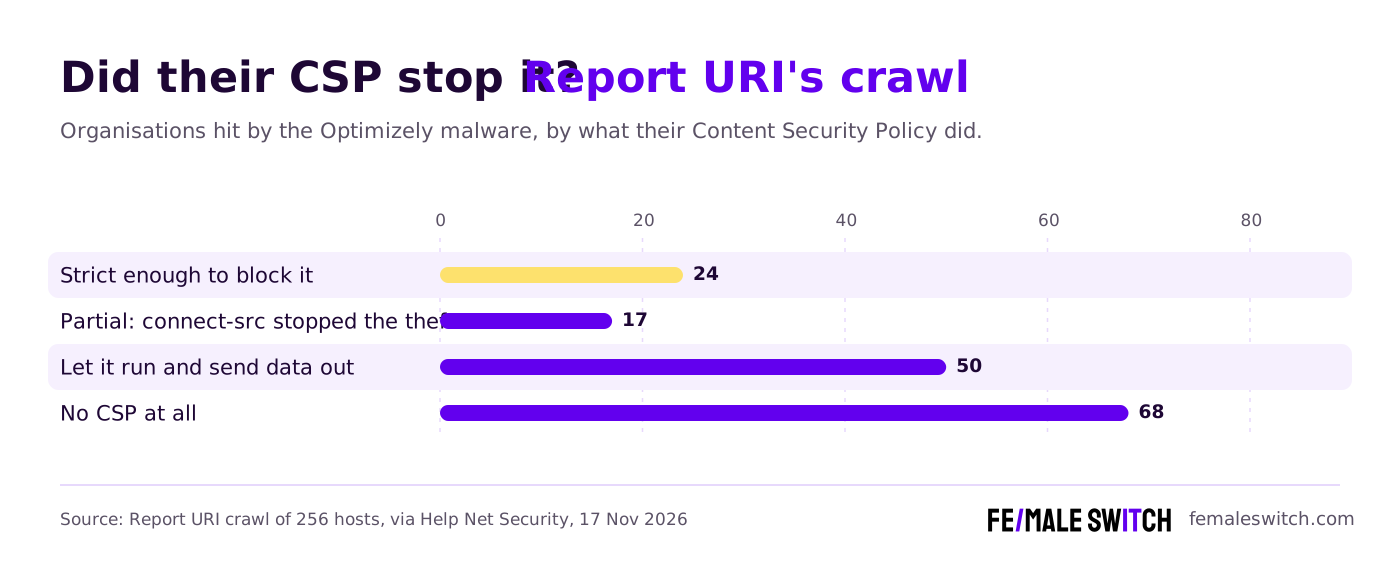
Report URI crawled 256 hosts of the affected organisations. As Help Net Security summarised the results, only 24 organisations (15%) had a policy strict enough to block the malware. 68 had no CSP at all, and in 50 cases the policy let the malware run and send data out.
Another 17 sites landed in between. Their connect-src rule blocked the card, cookie and screenshot theft, and the wallet address swapping still worked inside the page. A client site with a tag manager and four widgets has no head start on these brands.
Why didn't allowing cdn.optimizely.com protect anyone?
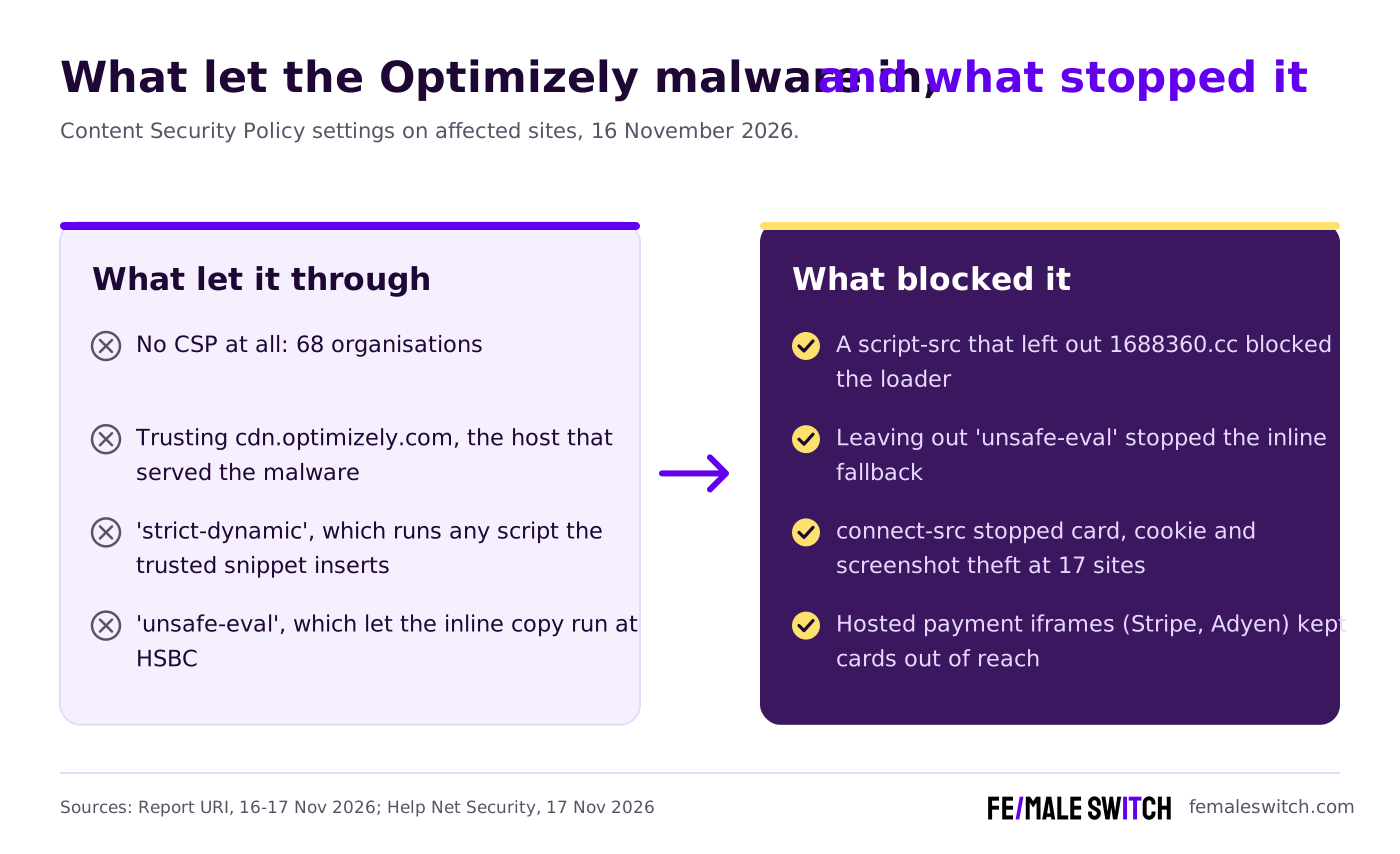
Most policies trust hosts. A script-src that lists cdn.optimizely.com trusts everything that host serves, and on 16 November that host served the malware. Report URI rules out cache poisoning: "Optimizely's CDN served exactly what it was given".
Two settings made it worse. 'strict-dynamic' tells the browser to trust any script a trusted script inserts, so once the snippet added the attacker's loader, the browser ran it. 'unsafe-eval', which Optimizely's own documentation tells customers to allow, let the inline fallback copy run. At HSBC the CSP blocked track.js and the data theft, and the inline copy still ran.
How did the three loader versions test each policy?
The attacker shipped three versions of the loader, and each one tests a different part of a policy.
Smartsheet's snippet was cleaned and then re-infected with the base64 version, so the attacker still had access after the first clean-up. Base64 hides the address from a person skimming the code, so search for atob( as well as the domain.
What does a starter Content Security Policy look like?
Start in report-only mode: the browser reports what it would have blocked, and nothing breaks while you learn what the site loads. Below is an example to adapt: swap each example.com placeholder for the site's real tools, and send each header as one line (split here for reading).
- script-src lists each tool's script host and leaves out 'unsafe-eval' and 'strict-dynamic'. Inline snippets show up in the reports; a nonce or hash lets each one run.
- connect-src kept card data in place at 17 sites. List only hosts that really receive data.
- frame-src allows the payment provider's hosted iframe. Cards typed into Stripe or Adyen iframes stayed out of the malware's reach.
- report-uri and report-to send violations to a reporting service or your own endpoint.
How do you roll out a CSP on a client site?
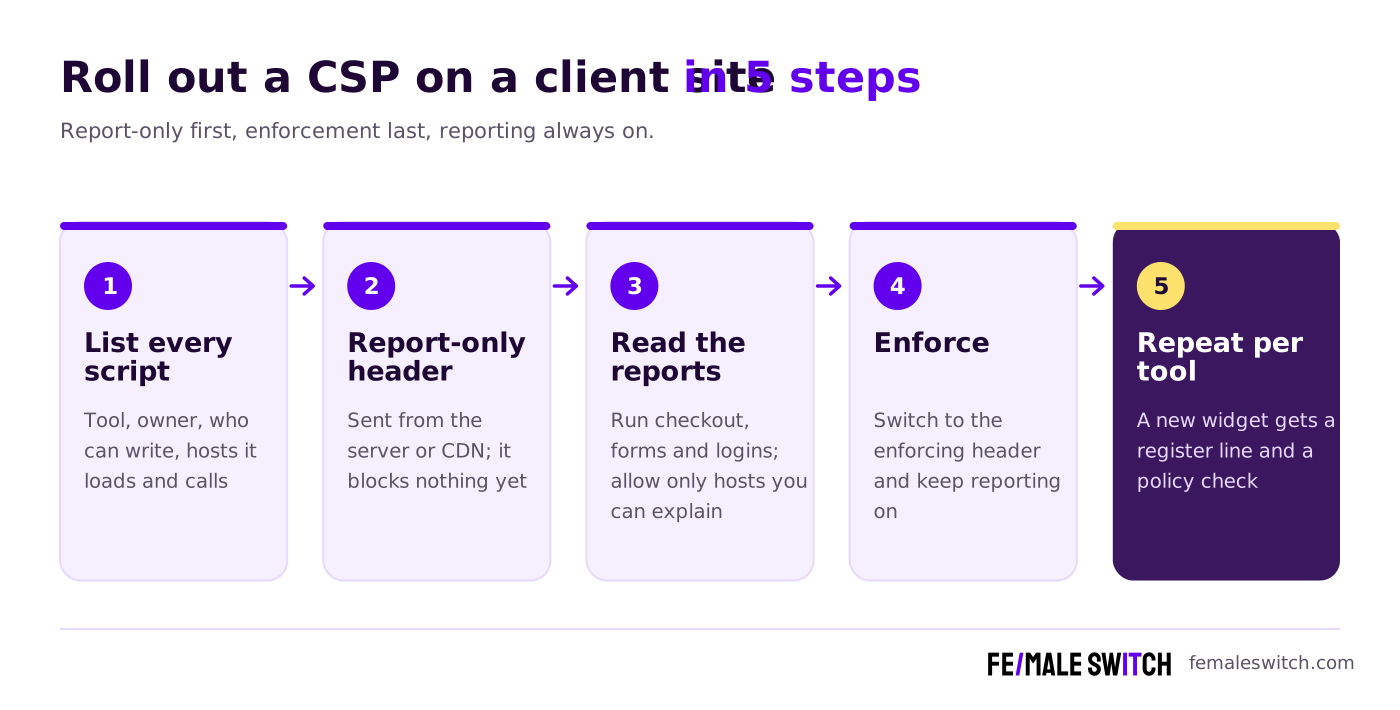
- Build a script register: one sheet per client listing every third-party script, its account, who has write access, and the hosts it loads from and sends data to.
- Send the report-only header from the server, CDN or hosting settings. It works only as an HTTP header.
- Read the reports while you click through checkout, forms and logins. Allow the hosts you can explain.
- Switch to enforcement by renaming the header Content-Security-Policy, and keep reporting on.
- Repeat for every new tool before it goes live.
What should you check in every third-party tool today?
A CSP is the safety net. The hole on 16 November was a writable code field inside a vendor dashboard, and A/B testing tools, tag managers and chat widgets have similar fields.
- Open the custom code fields: Project JavaScript and experiment code in Optimizely, custom HTML tags in a tag manager, script boxes in widgets. Search for 1688360.cc, atob( and any script nobody on the team wrote.
- List who can write: users, API tokens and connected apps. Remove former freelancers and unexplained tokens; our Ogi Networks breach guide for freelancers shows how logins outlive the project.
- Rotate credentials the same day, as with stolen AI API keys, and treat session tokens in cookies without HttpOnly as exposed.
- Check card fields. If the client takes cards in its own form fields, treat cards entered on 16 November as possibly exposed.
- Keep the reports. StepSecurity advises, via iTWire, checking historical browser and security-policy reports, since a script fetched after the clean-up looks clean.
Add the script register to the monthly care plan from our PHP vulnerability guide for freelancers.
How do you tell the client?
Tell them the same day, in writing: which tools run on their site, whether Optimizely was one of them, what you checked and what you changed. Report URI also advises affected owners to consider telling customers.
As general guidance for EU clients: skimmed card data is a personal data breach, and GDPR Article 33 asks the controller to notify the supervisory authority within 72 hours where feasible, unless the breach is unlikely to result in a risk. The client and their lawyer decide; your dated notes help. For wider habits, share our cybersecurity guide for women-led startups.
What don't we know yet?
- How the attacker got write access to unrelated projects. Optimizely told Gizmodo the flaw was in the account signup flow.
- How many visitors were exposed and how many cards were skimmed.
- Whether Optimizely will publish a post-incident report.
Turn your skills into your first startup
The Fe/male Switch startup game takes you from idea to first paying customers in weekly quests, with an AI co-founder and a community of founders.
👉 Start the game
FAQ: Content Security Policy after the Optimizely hack
Would a Content Security Policy have stopped the Optimizely malware?
At 24 organisations it did. Blocking all three loaders takes a script-src without 1688360.cc or 'strict-dynamic' and no 'unsafe-eval', and a tight connect-src stops data leaving. Allowing cdn.optimizely.com alone did nothing.
Does report-only mode protect a site?
Report-only mode only logs what an enforced policy would block. Use it to build the allow list, then switch to the enforcing header.
What is the difference between script-src and connect-src?
script-src decides which code may run. connect-src decides where running code may send data. At 17 sites connect-src stopped the theft even though the malware ran.
Should my client stop using Optimizely?
Optimizely says it fixed the flaw and secured affected accounts. If the client is weighing options anyway, compare A/B testing tools that replace Optimizely. Any tool with a custom code field needs the same checks.
Was only Optimizely affected?
Report URI links an earlier wave of injections through Kissmetrics, StorifyMe and Minute Media scripts to the same injector, webshell.lol. Run the checks for every third-party script on the site.
What should visitors of affected sites do?
Update iPhones and iPads to iOS 18.7.3 or later, or 26.3 or later, check crypto transfers made on 16 November, and watch card statements.
About the Author
Violetta Bonenkamp, also known as MeanCEO, is an experienced startup founder with an impressive educational background including an MBA and four other higher education degrees. She has over 20 years of work experience across multiple countries, including 5 years as a solopreneur and serial entrepreneur. Throughout her startup experience she has applied for multiple startup grants at the EU level, in the Netherlands and Malta, and her startups received quite a few of those. She’s been living, studying and working in many countries around the globe and her extensive multicultural experience has influenced her immensely.

