
Free CorelDRAW Alternatives for Print, Signs, Layout and Old CDR Files
CorelDRAW is still a favourite for flyers, signs, vinyl graphics, packaging and print layouts, but it is a paid product: the desktop suite is sold by subscription or one-time licence, and the browser-based CorelDRAW Go is a subscription too. Both come with a 15-day free trial, and after that you pay. If you only design now and then, or you have a folder of old .cdr files and no licence, a free tool is usually enough. We checked every tool below on its official website or code repository in October 2026, with two questions in mind: can it open CorelDRAW files, and can it produce files a print shop will accept?
Quick answer: for an all-round free replacement, use Affinity (now free for individuals) or Inkscape; for brochures, books and anything that needs CMYK and spot colours, use Scribus; to open old .cdr files, try Inkscape, Scribus or LibreOffice Draw; for quick flyers and social posts from templates, use Canva Free.
Boost Your SEO by Getting Featured in Our Blogs and get a backlink.
We publish content about startups, education, tech, funding, etc. that ranks well not only in Google but also in Perplexity, ChatGPT, Grok and other AI tools.
👉 Get featured now!
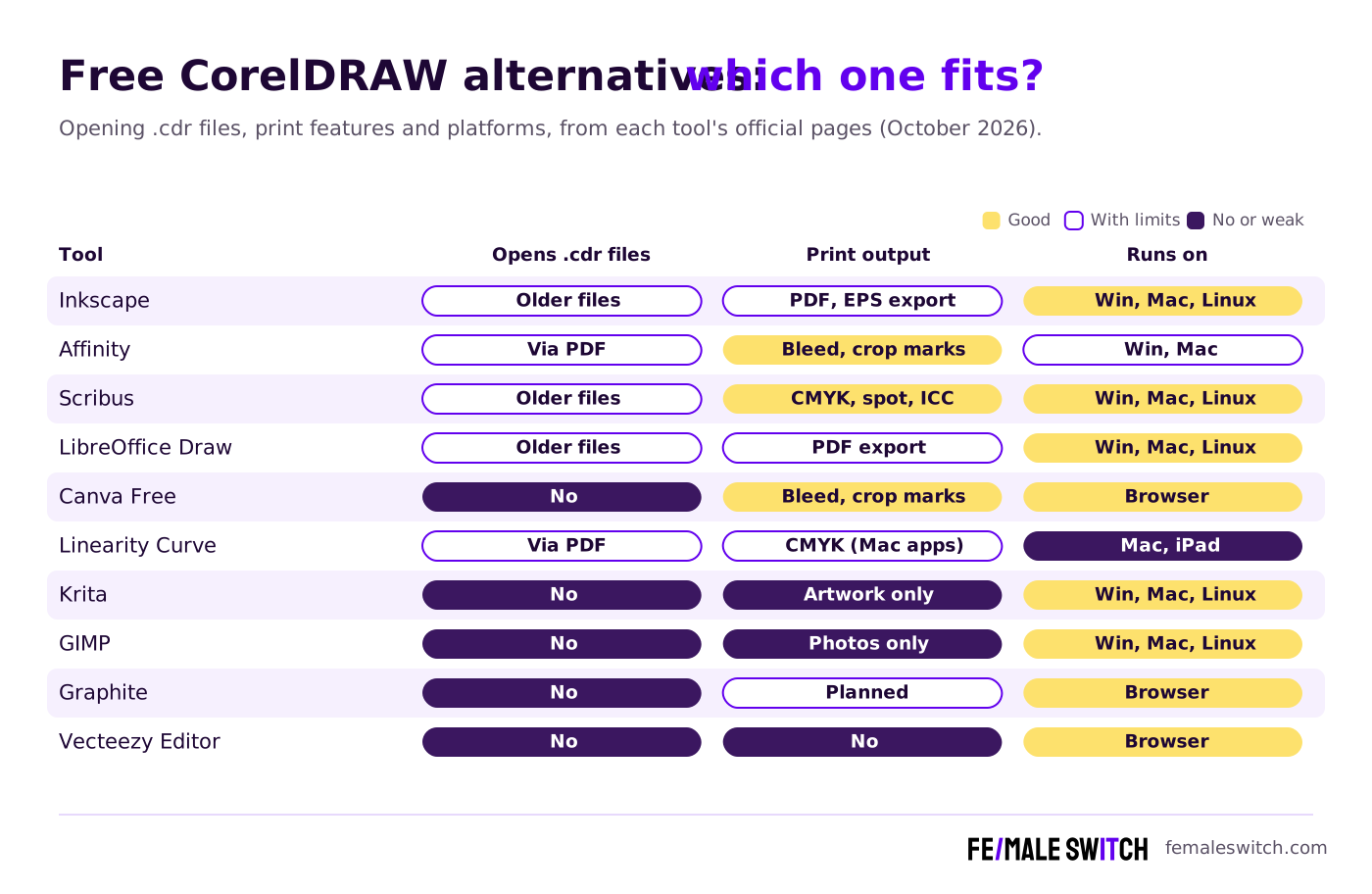
Free CorelDRAW Alternatives Compared
Sources: each tool's official website, help pages or code repository, checked 26 October 2026. CDR import works through the open-source libcdr library; Inkscape labels its filter for CorelDRAW 7 to X4 files, so files from newer versions may not open.
The 10 Best Free CorelDRAW Alternatives in 2027
1. Inkscape: the best free vector editor that opens CDR files
Inkscape is a free, open-source vector editor (GPL) for Windows, Mac and Linux, and the closest free match for CorelDRAW's drawing tools: shapes, nodes, text on paths, layers, boolean operations and precise alignment. Its source code includes an import filter for CorelDRAW files built on libcdr. The filter is labelled for files from CorelDRAW 7 to X4 (plus CMX, CCX and CDT files), so it is great for archives of older artwork, while files from newer versions may not open. It also imports Visio and WordPerfect Graphics files. The 1.4 series added Affinity Designer file import, modular grids and new templates for folding booklets; version 1.4.4 was tagged in Inkscape's official repository in May 2026. It works natively in SVG and exports PDF, EPS and PNG, which makes it a good fit for logos, signs and files for vinyl cutters and laser cutters.
2. Affinity: a free professional suite for vector, photo and layout
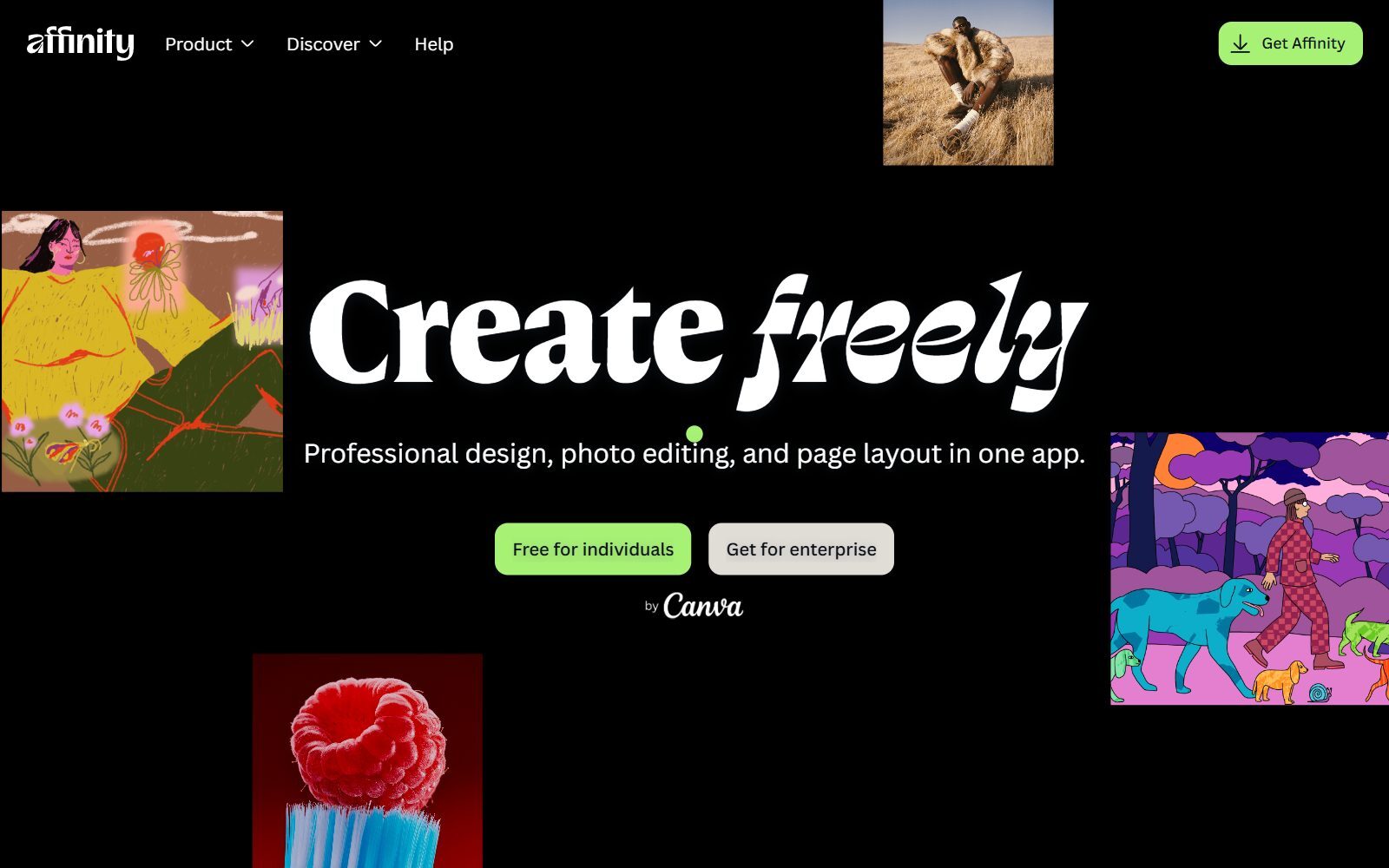
Affinity used to be three paid apps. Since Canva relaunched it as one app, it is free for individuals: you sign in with a free Canva account and get every tool in its Vector, Pixel and Layout studios, with no restrictions on its tools or export features. Only the optional Canva AI tools need a Canva premium plan. It runs on Windows and macOS (an iPad version is announced), and a 15 September 2026 update added a Blend Tool, scripting and more than 60 other improvements. For print, it exports PDF with bleed and crop marks, and it imports InDesign IDML files and Illustrator or other files saved with PDF compatibility. It does not open .cdr files, so export your CorelDRAW work to PDF first. For a CorelDRAW user, this is the most complete free replacement.
3. Scribus: free desktop publishing with CMYK and spot colours
Scribus is open-source page layout software (GPL) for brochures, magazines, menus, posters and books. Its project description lists the features print shops ask for: colour separations, CMYK and spot colours, ICC colour management and versatile PDF creation. Its source code includes import plugins for CorelDRAW, Adobe Illustrator and InDesign IDML files. Version 1.6.6 was published in April 2026, for Windows, Mac and Linux. Use it for multi-page layouts; for drawing logos and illustrations, pair it with Inkscape.
Validate your startup idea with the unique borrowed authority approach: we publish articles about your product in our blog and you get traffic and testers for your MVP
- Prove Market Demand: See real organic traffic and waitlist conversions
- Unlock High-Potential Keywords: Receive a curated list of top-performing keywords directly from Google Search Console data.
- Estimate Customer Acquisition Cost (CAC): Gain financial foresight with an estimated CAC based on real keyword performance data.
🔗 Start validating your startup now
4. LibreOffice Draw: the free way to open an old CDR file
LibreOffice Draw is the drawing app in the free, open-source LibreOffice suite. It handles simple posters, flyers, flowcharts and diagrams, exports PDF, and can open CorelDRAW files through libcdr, the CorelDRAW import library developed in the LibreOffice project. The current version is LibreOffice 26.8. It is not a full design tool, but if a client sends a .cdr file and you just need to see it, edit some text or export a PDF, it is often the quickest free option. For diagrams specifically, see our guide to open-source draw.io alternatives.
5. Canva Free: quick flyers, cards and social posts
Canva works in the browser and on mobile, and it is the fastest route from a template to a finished flyer, business card or poster. According to Canva's pricing page (October 2026), the free plan includes 1.6 million+ templates, 4.7 million+ photos, videos, graphics and audio files, one Brand Kit with three colours and 5 GB of storage. For print, Canva's help centre explains how to download a PDF Print file with crop marks and bleed. It cannot open .cdr files, and it is not a precision vector tool, but for everyday marketing material many founders need nothing more. If you want Canva Pro features without paying, see our guide to free Canva Pro alternatives.
6. Linearity Curve: print-ready vector design on Mac and iPad
Linearity Curve (formerly Vectornator) is a vector design app for Mac, iPad and iPhone. Its official page lists CMYK support, export to PDF, SVG and EPS, editing PDFs as native files, and import and export to Figma, Illustrator and Sketch. The free plan includes Curve with usage limits, basic export options and 5 GB of cloud storage; the Pro plan costs €10 a month or €8 a month billed annually, including VAT, and adds advanced export options and unlimited use. Choose it if you work on a Mac or iPad and want a modern, touch-friendly tool; Windows users should look at Affinity or Inkscape.
7. Krita: free painting for illustrated artwork
Krita is a free, open-source painting program (GPL) for Windows, Mac and Linux. It is not a layout tool, but it replaces the illustration side of a design suite: hand-painted artwork, textures, comic panels and mascots that you then place in Scribus, Affinity or Inkscape. Its built-in vector tools store shapes as SVG, which helps for speech bubbles and clean outlines. Krita 5.3.4 and 6.0.4 were released on 15 September 2026.
8. GIMP: a free replacement for Corel PHOTO-PAINT
GIMP is the best-known free, open-source image editor, for Linux, macOS and Windows. CorelDRAW Graphics Suite includes Corel PHOTO-PAINT for photo work; GIMP covers that job: retouching product photos, removing objects, cropping and preparing images before you place them in a print layout. GIMP 3.2.6 was released on 10 September 2026. For more photo editors, see our lists of free Photoshop alternatives and open-source Photoshop alternatives.
9. Graphite: open-source procedural design to watch
Graphite is a free, open-source vector graphics editor and animation engine (Apache 2.0 and MIT licences) that combines layers with node-based, procedural design. It is still in alpha: the web app is live, and desktop apps for Windows, Mac and Linux are at the release-candidate stage. Its website previews a coming focus on desktop publishing, but today it is a tool for experiments and generative art, not for print jobs with deadlines.
10. Vecteezy Editor: customise stock vectors in the browser
Vecteezy Editor is a free SVG editor in the browser. It is designed for customising Vecteezy's stock graphics before you download them, or for simple vector designs from scratch. It is basic compared with the tools above, but it is handy when you need to change the colours or text of a stock illustration quickly. Check the licence of each stock file before you use it commercially.
CorelDRAW Alternatives That Are Discontinued or No Longer Free
Several tools from older lists, including earlier versions of this article, have changed:
- Gravit Designer: gone. Its old website, designer.io, now redirects to CorelDRAW Go, which is a paid subscription with a 15-day free trial.
- Vectr: still online, but it has turned into an AI design tool. Its homepage links to a free trial of the editor, and opening AI, EPS, PDF and SVGZ files uses credits.
- Autodesk Sketchbook: now made by Sketchbook, Inc. The desktop app, Sketchbook Pro for Windows and macOS, is sold as a paid licence (organisations pay $24.99 a year per seat for direct licences).
- Lunacy: still free for Windows, Mac and Linux, but it is a UI design tool, so we moved it to our list of free Adobe Illustrator alternatives.
How to Move From CorelDRAW to a Free Tool
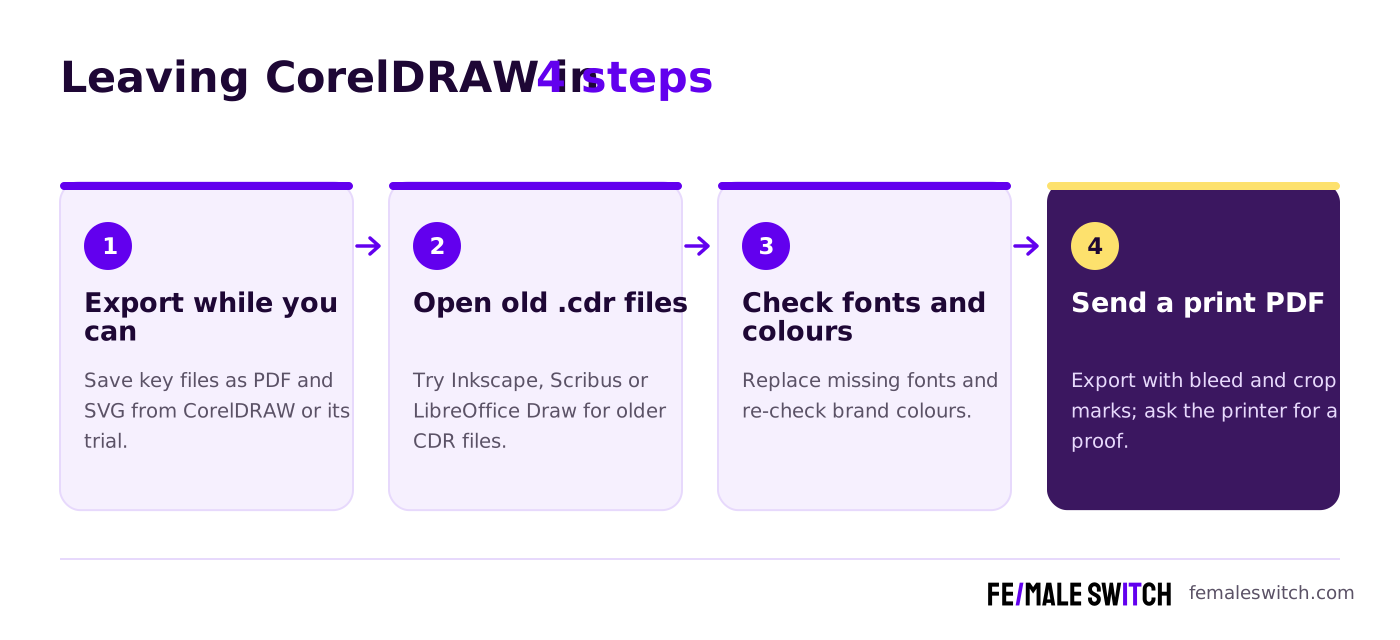
- Export while you can. If you still have CorelDRAW (or start its 15-day trial), save your important files as PDF and SVG as well as CDR. Every tool on this list reads at least one of those formats.
- Open old .cdr files. Try Inkscape first, then Scribus or LibreOffice Draw. All three read CDR through libcdr, which works best with older files (Inkscape labels its filter for CorelDRAW 7 to X4). If a newer file will not open, ask the sender for a PDF or SVG.
- Check fonts and colours. Missing fonts are replaced on import, and effects such as lenses or blends may be simplified. Re-check your brand colours before printing.
- Send a print PDF. Export with bleed and crop marks (Affinity, Scribus and Canva all support this) and ask your print shop for a proof before a big run.
Which Free CorelDRAW Alternative Should You Choose?
- You want one free app for everything CorelDRAW did: Affinity, on Windows or Mac.
- You draw logos, signs or cutting files: Inkscape.
- You lay out brochures, menus or books for a print shop: Scribus, with CMYK and spot colours.
- You just need to open or convert a .cdr file: Inkscape or LibreOffice Draw.
- You make quick marketing material from templates: Canva Free.
- You work on a Mac or iPad: Linearity Curve, or Affinity on the Mac.
- You edit photos for your designs: GIMP, plus Krita for painted artwork.
Working mostly on logos, icons and Illustrator files instead? Our guide to free Adobe Illustrator alternatives covers .ai compatibility. For open-source tools only, see our list of open-source CorelDRAW alternatives, and for a wider view, the top design tools for startups.
How Founders Use Free Design Tools
Most early-stage founders do their own design for a while: a logo, a flyer for a market stall, a pitch-deck graphic, packaging for a first batch. Free tools are enough for all of it if you pick the right one for each job. Our Canva logo guide shows how to make a simple logo in minutes, and if you want to sell designs, print-on-demand lets you start without stock. Before you spend on printing, test demand with a cheap prototype or landing page; our 30-day validation sprint walks you through it. Need 3D renders too? See our free Blender alternatives.
Once your materials are ready, people need to find you. The F/MS AI SEO Tool writes search-optimised blog articles about your product for free, so your new brand gets traffic from Google and AI assistants.
FAQ About Free CorelDRAW Alternatives
Is there a free version of CorelDRAW?
No. CorelDRAW Graphics Suite and the browser-based CorelDRAW Go are paid, and both offer a 15-day free trial. Free alternatives such as Affinity, Inkscape and Scribus cover most of the same work.
What is the best free alternative to CorelDRAW?
Affinity is the most complete free replacement, with vector, photo and layout tools in one app for Windows and Mac. Inkscape is the best open-source vector editor, and Scribus is best for print layouts.
How can I open a CDR file without CorelDRAW?
Open it in Inkscape, Scribus or LibreOffice Draw, which all read CorelDRAW files through the open-source libcdr library. It works best with older files: Inkscape labels its filter for CorelDRAW 7 to X4. For newer files, ask for a PDF or SVG export.
Is Affinity really free?
Yes. Affinity's official FAQ says every tool in its Vector, Pixel and Layout studios is free with a free Canva account. Only the optional Canva AI tools need a Canva premium plan.
Can Affinity open CorelDRAW files?
Affinity does not list CDR among its imports. Export your CorelDRAW files to PDF first; Affinity imports PDF, Illustrator files saved with PDF compatibility, and InDesign IDML files.
Which free program supports CMYK for printing?
Scribus supports CMYK, spot colours, ICC colour management and colour separations. Linearity Curve also lists CMYK support for its Mac and iPad apps.
Is Gravit Designer still free?
No. Gravit Designer's old website now redirects to CorelDRAW Go, a paid subscription with a 15-day free trial.
Can I make print-ready flyers in Canva Free?
Yes. Canva lets you download a PDF Print file with crop marks and bleed. Check your printer's colour requirements before ordering.
What is a free alternative to Corel PHOTO-PAINT?
GIMP, a free and open-source image editor for Linux, macOS and Windows. For more options, see our list of free Photoshop alternatives.
Is Inkscape good enough for professional work?
For logos, signs, illustrations and cutting files, yes: it is a full vector editor that exports SVG, PDF, EPS and PNG. For multi-page print layouts, pair it with Scribus.
About the Author
Violetta Bonenkamp, also known as MeanCEO, is an experienced startup founder with an impressive educational background including an MBA and four other higher education degrees. She has over 20 years of work experience across multiple countries, including 5 years as a solopreneur and serial entrepreneur. Throughout her startup experience she has applied for multiple startup grants at the EU level, in the Netherlands and Malta, and her startups received quite a few of those. She’s been living, studying and working in many countries around the globe and her extensive multicultural experience has influenced her immensely.

