

Free Adobe XD Alternatives for UI Design, Wireframes and Prototypes
Adobe XD was the design and prototyping app many founders and freelancers learned first. It is still installed on a lot of laptops, but Adobe has stopped building new features for it, so 2027 is a good year to move your screens, components and prototypes somewhere that is still growing. This guide lists the free options: tools that are free outright, open-source tools, and freemium tools with a free plan you can use without a time limit. We checked every free plan on the official pricing page in October 2026 (default view), and we list tools that only offer a trial separately, together with the tools from the 2025 version that no longer exist.
Quick answer: if you want the closest free replacement for Adobe XD, use Penpot (open source, free and fully featured in the browser) or Figma Starter (the industry standard, but limited to 3 team files). For a free desktop app that also works offline, use Lunacy. For website design you can publish, use Framer's free plan; for AI-generated mockups, Uizard; for quick wireframes, Pencil Project, Moqups or Draftium; and for advanced mobile interaction prototypes on a Mac, Origami Studio.
Boost Your SEO by Getting Featured in Our Blogs and get a backlink.
We publish content about startups, education, tech, funding, etc. that ranks well not only in Google but also in Perplexity, ChatGPT, Grok and other AI tools.
👉 Get featured now!
What Is Happening to Adobe XD?
Adobe's own Adobe XD help pages say XD is in maintenance mode. In Adobe's words, that means it is not investing in ongoing development or shipping new features. Adobe says it keeps supporting existing customers by fixing bugs and handling security and privacy updates, and that it will decide when to end support for XD with a significant notice period. Adobe has not published an end date. In practice, your XD files still open today, but no new design or prototyping features are coming, so plan your move on your own schedule rather than Adobe's.
Before you switch, export what you need from XD: artboards as SVG or PNG, your colours and character styles, and a list of your components. Most tools below import SVG; Lunacy and Origami Studio can also take content from Figma, so some teams move through Figma first. If you only want open-source tools you can self-host, see our guide to open-source Adobe XD alternatives.
Free Adobe XD Alternatives Compared
Sources: each tool's official pricing and product pages, default view, checked 31 October 2026. Prices in US dollars; they can differ by region and billing cycle.
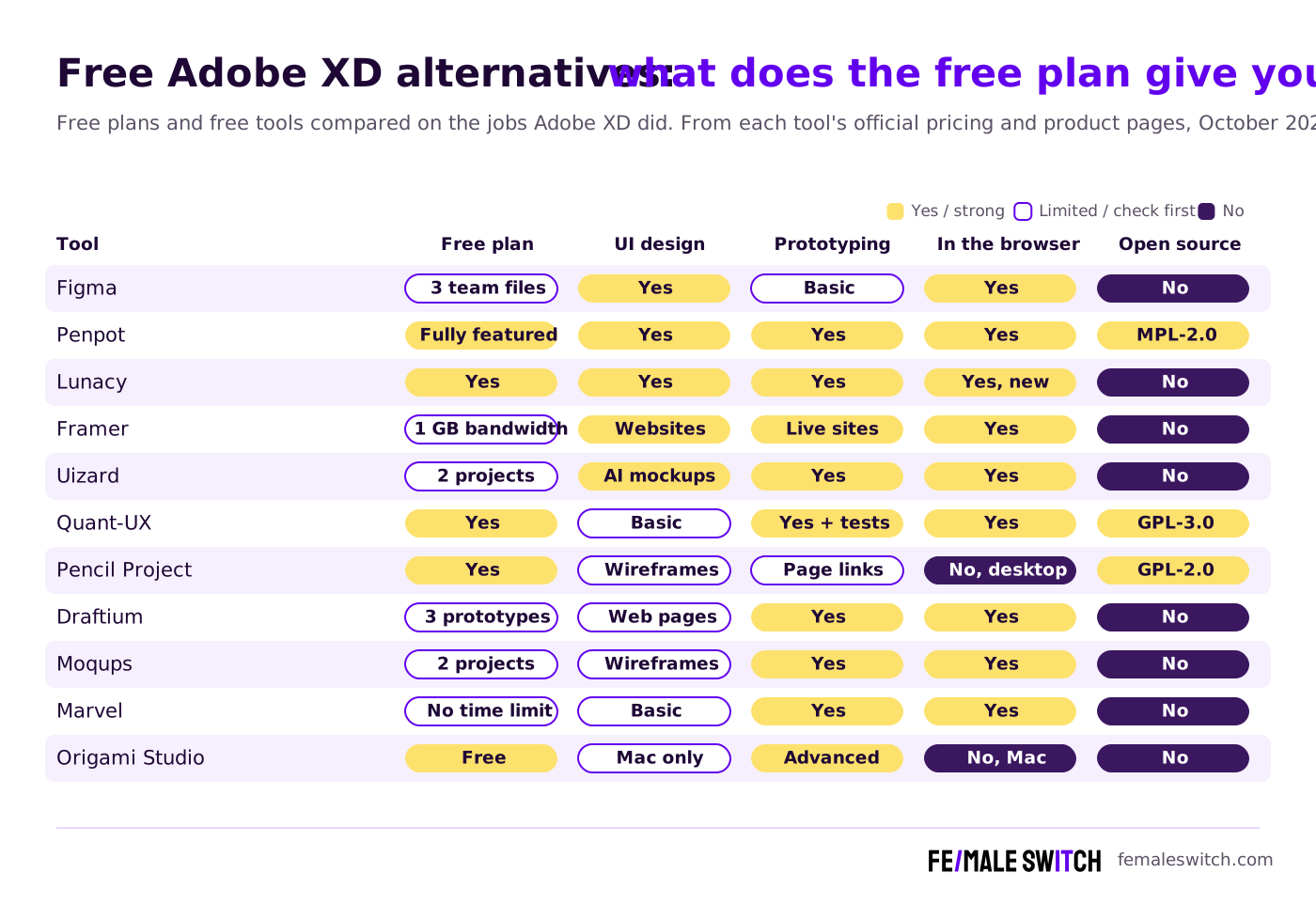
The Best Free Adobe XD Alternatives in 2027
1. Penpot: the closest free replacement for Adobe XD
Penpot calls itself the open-source design platform for teams, and for most former XD users it is the best free place to land. You get boards, components, shared libraries, prototyping with flows and an Inspect view for developers, all in the browser. On the Penpot pricing page the hosted Professional plan costs $0 and is described as free and fully featured, with no limits and no missing tools; the optional Unlimited plan is $7 per editor a month, capped at $175 a month for the whole team. Because the code is open source (MPL-2.0), you can also self-host it on your own server, and it now offers an open MCP server so AI agents can work on your designs. Version 2.18.5 is the current stable release (October 2026). If you want only open-source tools, see our full list of open-source Figma alternatives.
2. Figma Starter: the industry standard, with a small free plan
Figma is where most UI design teams work now, so learning it is useful even if you never pay. The Figma pricing page lists the Starter plan as free limited access with unlimited drafts, UI kits and templates, and 150 AI credits a day, up to 500 a month. Figma's plans help article adds the limits that matter: one team with one folder and 3 files, 30 days of version history and basic prototyping, without variables or conditional logic in prototypes. When you outgrow it, a Professional Full seat costs $16 a month. Figma is not open source, and your files live in Figma's cloud.
3. Lunacy: a free desktop design app that works offline
Lunacy, made by Icons8, presents itself as free graphic design software for desktop. It is a native app for Windows, macOS and Linux and is now also available in the browser. It covers the XD basics: auto layout, components and variables, clickable prototypes and real-time collaboration, and it imports Figma files. Two things set it apart: it works offline, and it has built-in icons, illustrations and photos plus AI helpers such as an image upscaler and a background remover. Teams that need their files on their own server can deploy Lunacy Cloud themselves. Lunacy is free to use but not open source.
4. Framer: design websites and publish them on the free plan
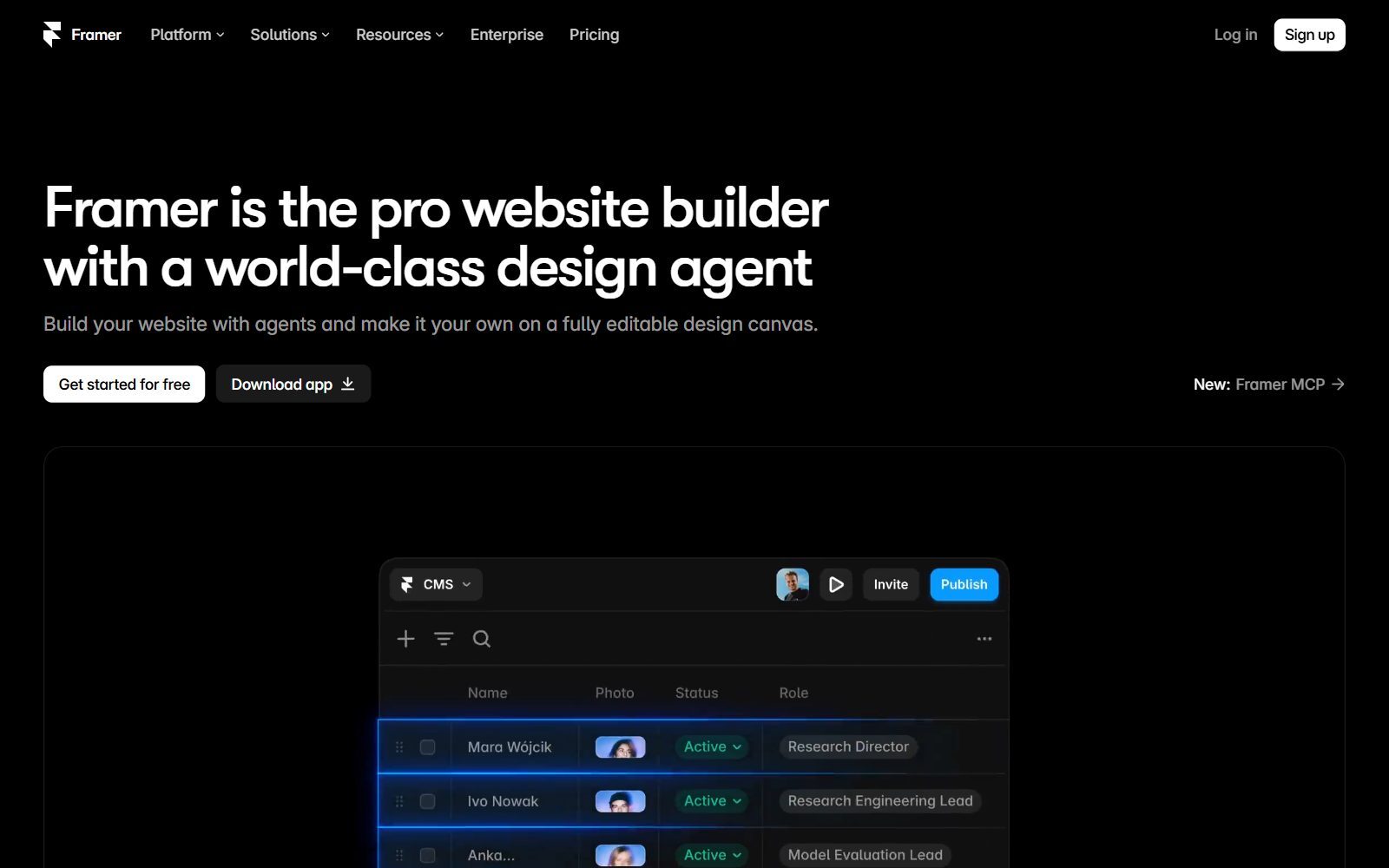
Framer is a website builder with a design canvas, so it suits founders who used XD mainly to design landing pages. Instead of handing a prototype to a developer, you publish the real site. The Framer pricing page (yearly billing view) lists a Free plan at $0 with 500 AI credits to try, a free Framer domain, 1 GB of bandwidth, design pages and an MCP server. To use your own domain you need a paid plan; Basic starts at $10 a month. It is not a general app design tool, so pair it with Penpot or Figma for product screens.
5. Uizard: AI-generated mockups for non-designers
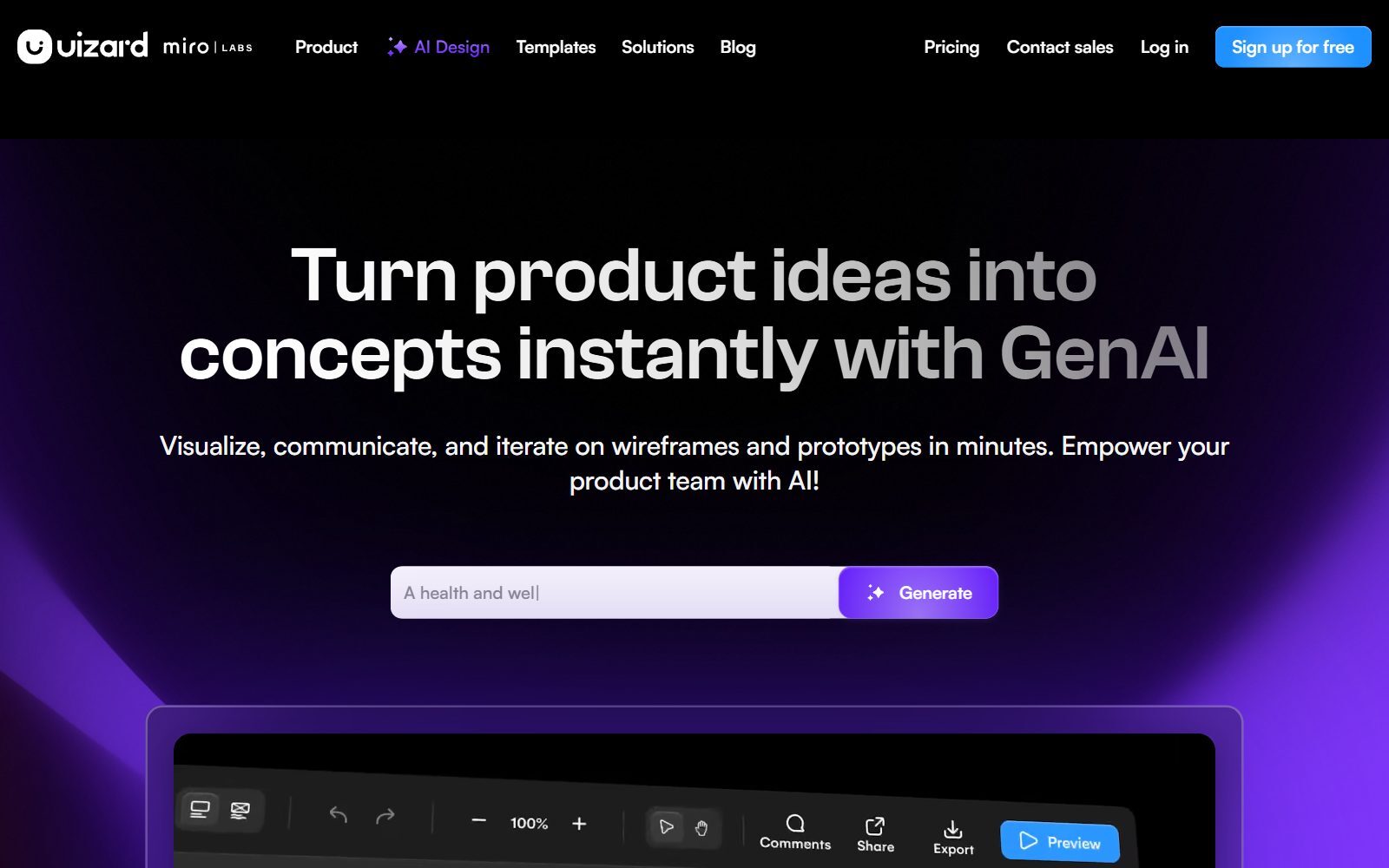
Uizard turns a text prompt into editable wireframes and app screens, which helps founders who need a first mockup for a pitch or a user interview and have never used a design tool. Its site now carries Miro Labs branding. The Uizard pricing page lists a Free plan at $0 with 2 projects, 3 AI generations a month, 10 free templates and unlimited free viewers and commenters; Pro costs $12 a month billed annually and adds 500 AI generations a month and developer handoff. The free plan is enough to test the idea, not to design a full product.
6. Quant-UX: free prototypes with built-in user testing
Quant-UX describes itself as a research, usability and prototyping tool, and it is free to start. You build a clickable prototype, send the link to testers, and get data back: user tasks, screen recordings and heatmaps. That makes it a good companion to any design tool when you want to check whether people understand your screens before you build them. Its front end is open source under GPL-3.0, so technical teams can self-host it.
7. Pencil Project: free, open-source wireframes on your desktop
Pencil Project is a free and open-source GUI prototyping tool (GPL-2.0) for Windows, macOS and Linux. After several quiet years it shipped version 4.0.0 on 23 October 2026 with built-in AI support, so AI assistants can create and edit mockups on the canvas. It comes with stencils for mobile, desktop and web interfaces, flowchart shapes, links between pages, and export to PNG, PDF and web pages. Use it for wireframes, not for polished visual design. More tools like it are in our list of open-source Pencil Project alternatives.
Validate your startup idea with the unique borrowed authority approach: we publish articles about your product in our blog and you get traffic and testers for your MVP
- Prove Market Demand: See real organic traffic and waitlist conversions
- Unlock High-Potential Keywords: Receive a curated list of top-performing keywords directly from Google Search Console data.
- Estimate Customer Acquisition Cost (CAC): Gain financial foresight with an estimated CAC based on real keyword performance data.
🔗 Start validating your startup now
8. Draftium: free website wireframes from templates
Draftium is a prototyping tool for websites: pick a template, add ready-made blocks, and share an interactive, responsive prototype where clients comment on any element. The Draftium pricing page lists a Free plan, free forever, with up to 3 prototypes, 50 generic templates and unlimited editing; Pro is listed at $99 a year and adds unlimited prototypes, custom domains and branding removal. It is not a tool for app screens.
9. Moqups: wireframes, diagrams and a whiteboard in one app
Moqups combines wireframing, mockups, diagrams and an online whiteboard. The Moqups pricing page lists a Free plan for one seat with 2 projects, 400 objects, more than 150 free templates, synced components and over 20 preloaded icon sets, with no credit card required. The 400-object limit fills up quickly, so treat the free plan as a way to sketch a few screens.
10. Marvel: simple click-through prototypes
Marvel covers prototyping, wireframing, user testing and developer handoff in the browser. Its pricing FAQ says the free plan has no time limits, so you can use it for as long as you need before deciding to upgrade. The limits of the free plan are not shown on the pricing page, so check them when you sign up. It suits simple click-through prototypes made from screens you designed elsewhere.
11. Origami Studio: free advanced interaction prototypes on a Mac
Origami Studio is a free design tool from Meta for the Mac. Where XD's auto-animate stopped, Origami goes further: a Canvas for layouts, a Patch Editor for logic and animation, and patches that use the phone's camera roll, haptics, GPS and motion sensors. You can paste vector shapes and text from Figma, record videos of your prototype, and test it on a phone with the Origami Live viewer. It takes time to learn, so it is worth it mainly for mobile apps where the interaction is the product.
Not Free: Tools That Only Offer a Trial
Three tools from the 2025 version of this list are good, but they are not free, so we moved them here:
- Sketch: a Mac design app. The Sketch pricing page offers a 30-day free trial with no credit card; after that, Standard costs $12 per editor a month billed yearly, or you buy a one-time licence.
- UXPin: code-based prototyping with AI. The UXPin pricing page offers a free trial; the Core plan costs $49 per seat a month.
- Proto.io: mobile app prototyping in the browser. The Proto.io pricing page offers a 15-day free trial and no free plan.
Discontinued or Changed Since the 2025 Version
- InVision: shut down its design collaboration services, including prototypes, at the end of 2024, and invisionapp.com now redirects to Miro. We cover replacements in our open-source InVision alternatives.
- Wondershare Mockitt: its website did not respond when we checked on 31 October 2026, and we could not confirm on an official page that it is still offered, so it is removed.
- Visily: often suggested as a free AI wireframing tool, but its website and pricing page now redirect straight to the web app, so we could not check its free plan and did not add it.
- Prices from 2025: the old figures for Figma, Sketch, Marvel and Proto.io are replaced with the prices on their pricing pages in October 2026.
Which Free Adobe XD Alternative Should You Choose?
- You want one free tool that does what XD did: Penpot.
- You work with designers or agencies who use Figma: Figma Starter, and upgrade when 3 files are not enough.
- You prefer a desktop app or often work offline: Lunacy, or Pencil Project for plain wireframes.
- You are designing your startup's website: Framer, or Draftium for a quick wireframe to agree the structure first.
- You have never designed anything: Uizard, to get a first AI mockup from a description.
- You want to test a prototype with real users: Quant-UX.
- You are building a mobile app with complex gestures and animations: Origami Studio on a Mac.
How Founders Use Free Design Tools
Most early-stage founders do not need a perfect design. They need clickable screens they can show to ten potential customers this week. A practical path: sketch the flow as a wireframe, turn the key screens into a clickable prototype in Penpot or Figma, and put it in front of users. Our guide to rapid prototyping with AI shows how to go from idea to a working prototype fast, and our MVP user acquisition SOP explains how to find your first testers. Once your landing page is live, run it through a free landing page analyzer.
For the visual side, see our lists of free Illustrator alternatives for logos and icons, free Canva Pro alternatives for social graphics, and free Miro alternatives for workshops and user-flow whiteboards. If your team also used Flow to manage design tasks, our free Flow alternatives cover what to use now. And before you polish pixels, validate your startup idea with real customers, then turn what you learn into articles with the F/MS AI SEO Tool so people find you in Google and AI assistants.
Join ElonaHunt (like ProductHunt but for women) and explore the coolest women-focused startups out there!
Discover your next big inspiration and connect with like-minded female entrepreneurs!
👉 Join the Hunt Here
FAQ About Free Adobe XD Alternatives
Is Adobe XD discontinued?
Not officially. Adobe's help pages say XD is in maintenance mode: no new features or ongoing development, but bug fixes and security and privacy updates for existing customers. Adobe says it will give significant notice before it ends support, and it has not published an end date.
What is the best free alternative to Adobe XD?
Penpot. Its hosted Professional plan costs $0 and is described as free and fully featured, it runs in the browser, and because it is open source you can also self-host it.
Is Figma free?
Figma has a free Starter plan. According to Figma's help centre it gives you one team with one folder and 3 files, 30 days of version history and basic prototyping; the pricing page adds unlimited drafts and 150 AI credits a day, up to 500 a month.
Is there a free Adobe XD alternative that works offline?
Yes. Lunacy is a free native app for Windows, macOS and Linux with an offline mode, and Pencil Project is a free, open-source desktop app for wireframes.
Which free Adobe XD alternative is open source?
Penpot (MPL-2.0), Quant-UX (GPL-3.0 front end) and Pencil Project (GPL-2.0). Figma, Lunacy, Framer, Uizard, Draftium, Moqups, Marvel and Origami Studio are free to use but not open source.
How do I move my Adobe XD designs to another tool?
The safest route is to export your artboards from XD as SVG or PNG, import them into the new tool, and rebuild your colours, text styles and components there. Check the import options of the tool you choose before you start.
What is the best free tool for AI-generated app mockups?
Uizard. Its free plan includes 3 AI generations a month and 2 projects, enough to test an idea; Pro costs $12 a month billed annually.
Is Sketch free?
No. Sketch offers a 30-day free trial; after that, Standard costs $12 per editor a month billed yearly, or you can buy a one-time licence. It runs on Mac only.
What happened to InVision?
InVision shut down its design collaboration services, including prototypes, at the end of 2024, and its website now redirects to Miro. Penpot, Quant-UX and Marvel cover the prototyping side for free.
Where can I get a backlink by writing about my startup?
You can publish a guest post in one of the Fe/male Switch startup blogs, which rank in Google and in AI tools. Get a quality backlink.
About the Author
Violetta Bonenkamp, also known as MeanCEO, is an experienced startup founder with an impressive educational background including an MBA and four other higher education degrees. She has over 20 years of work experience across multiple countries, including 5 years as a solopreneur and serial entrepreneur. Throughout her startup experience she has applied for multiple startup grants at the EU level, in the Netherlands and Malta, and her startups received quite a few of those. She’s been living, studying and working in many countries around the globe and her extensive multicultural experience has influenced her immensely.

