

Loomly vs CoSchedule: Social Media Calendar or Marketing Calendar for Your Startup?
Loomly and CoSchedule both put your social posts on a calendar, schedule them to Instagram, LinkedIn, TikTok and the other big networks, and let a teammate approve them before they go out. The difference is in how they charge and what sits around the calendar. Loomly sells plans by the number of social accounts and gives you 3 users from the cheapest plan. CoSchedule is cheaper for one person and puts social posts on the same calendar as your campaigns, blog posts and projects. We checked plans, prices, free plans, trials, networks and AI features on loomly.com, coschedule.com and both help centers on 1 November 2026, so this comparison shows what a founder or a small team actually gets and pays in 2027.
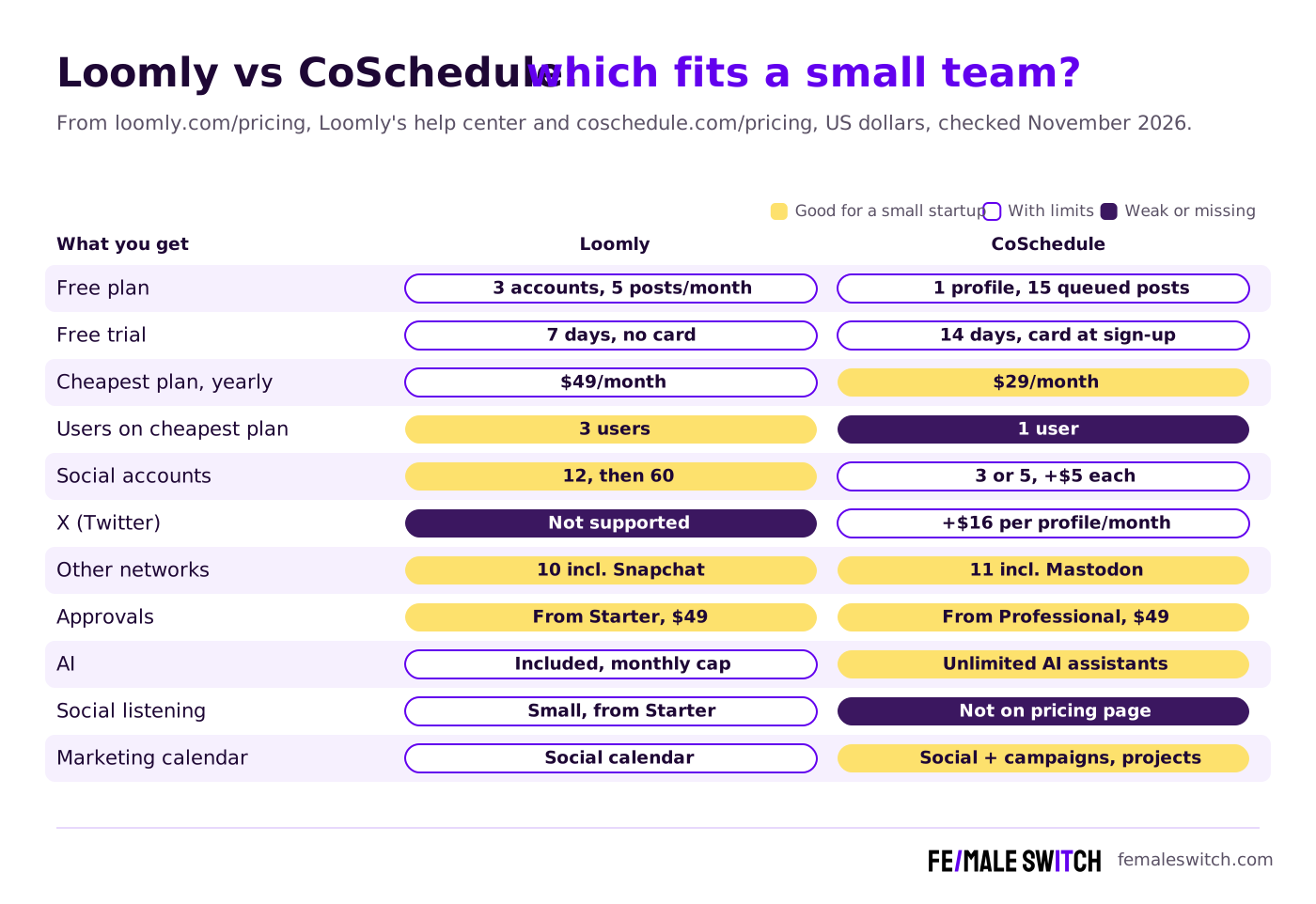
Quick answer: a solo founder with up to 3 social profiles pays least with CoSchedule Starter ($29 a month, billed annually), and CoSchedule is also the only one of the two that still publishes to X (as a $16 add-on per profile). A team of 2 or 3 people with many accounts gets more for the money from Loomly Starter: $49 a month billed yearly for 3 users, 12 social accounts and approvals, where the same setup on CoSchedule Professional comes to about $113 a month. Both have a small free plan; Loomly's trial lasts 7 days without a card, CoSchedule's 14 days with a card.
Are you getting customers from ChatGPT yet?
More and more traffic is coming from Perplexity, ChatGPT, Grok and other AI tools.
👉 Rank on ChatGPT
Loomly vs CoSchedule at a Glance
Sources: loomly.com/pricing (default Yearly view), the Loomly homepage and help center, coschedule.com/pricing and CoSchedule's free plan help article, checked 1 November 2026. Prices in US dollars before tax.
Loomly: A Social Media Calendar With Room for a Small Team
Loomly was founded in 2015, according to its About page, and is built around one calendar per brand, client or location, with as many calendars as you like on every plan. It now belongs to Bending Spoons, the Milan company behind Evernote, WeTransfer and Meetup: the law firm Willkie Farr & Gallagher announced on 10 January 2025 that it advised Bending Spoons on buying Loomly, and loomly.com's footer now names Bending Spoons Operations S.p.A. Since then the homepage has moved to AI: it promises posts, images and captions generated for each platform, AI help with comments and DMs, and AI analysis of what performs.
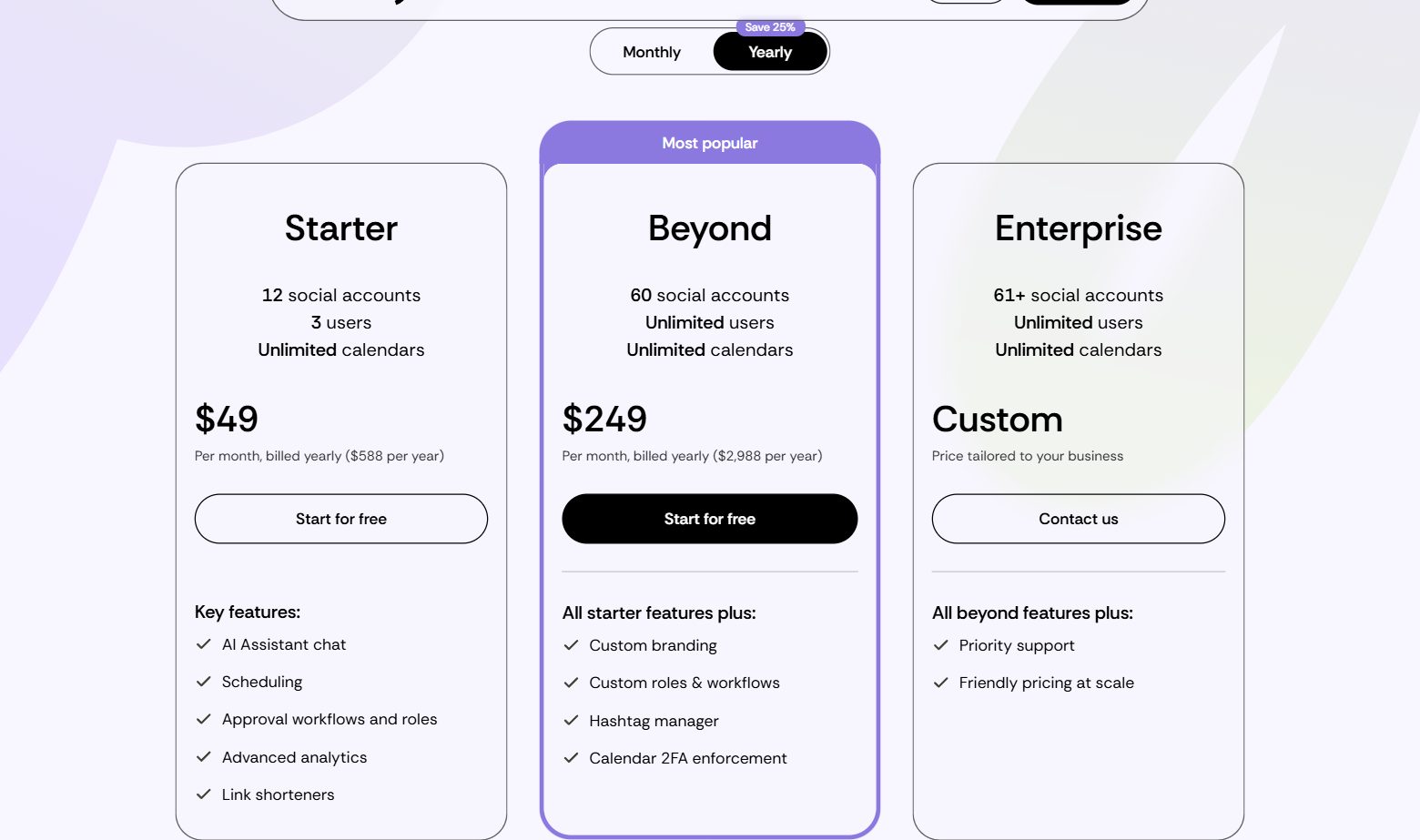
Plans (checked 1 November 2026, billed yearly, the pricing page's default view):
- Starter, $49 a month ($588 a year): 12 social accounts, 3 users and unlimited calendars, unlimited scheduling, approval workflows and roles, advanced analytics, link shorteners, recurring and bulk posts, best time to post, Slack and Microsoft Teams alerts, Canva, Google Drive, Unsplash and Giphy, replies from one inbox and the AI assistant with a limited monthly allowance.
- Beyond, $249 a month ($2,988 a year): 60 social accounts and unlimited users, plus custom branding (your own subdomain, logo and favicon), custom roles and workflows, the hashtag manager, scheduled reports, two-factor enforcement for each calendar and a larger AI allowance.
- Enterprise, custom: 61 or more accounts, priority support and volume pricing.
- Billing: Loomly says yearly billing saves 25%, is charged upfront and cannot be ended early; monthly billing costs more and can be stopped any time. Sales tax may apply. Nonprofits get a 50% lifetime discount.
- Trial and free plan: the homepage offers a 7-day free trial without a credit card. Loomly's help article on the Free plan describes a free plan for 1 user and 3 social accounts with 5 posts a month (a rolling month, counted by the day you create each post), but adds that it might not be available for all users.
Networks: Loomly's list of supported platforms names Facebook, Instagram, Pinterest, LinkedIn, Google Business Profile, YouTube, Snapchat, TikTok, Threads and Bluesky. X (Twitter) is not on that list, so if X matters to you, Loomly is out. Snapchat, on the other hand, is something CoSchedule does not publish to.
Comparing Loomly with other schedulers? See Loomly vs Hootsuite, Loomly vs Buffer, Loomly vs Sprout Social and Loomly vs Agorapulse.
Is your startup on ChatGPT?
More and more traffic is coming from Perplexity, ChatGPT, Grok and other AI tools.
👉 Rank on ChatGPT
CoSchedule: Social Publishing on a Marketing Calendar
CoSchedule was founded in 2013 in Bismarck, North Dakota, by Garrett Moon and Justin Walsh, who still run it as CEO and CTO. It calls itself social media management software built on the best calendar: you plan whole campaigns on a drag-and-drop calendar, move a launch date and its posts move with it, publish to 11 networks, recycle evergreen posts with ReQueue, reply from a Social Inbox and measure results in the same tool. That suits a founder or small team who runs social media next to blog posts, emails and launches.
Plans (checked 1 November 2026, coschedule.com/pricing, USD):
- Free: up to 15 scheduled posts at a time on 1 social profile. CoSchedule's free plan help article says drafts and failed posts count toward the 15, and X, social analytics, ReQueue and bulk CSV scheduling need a paid plan. You get the free plan by starting a trial and cancelling before it ends.
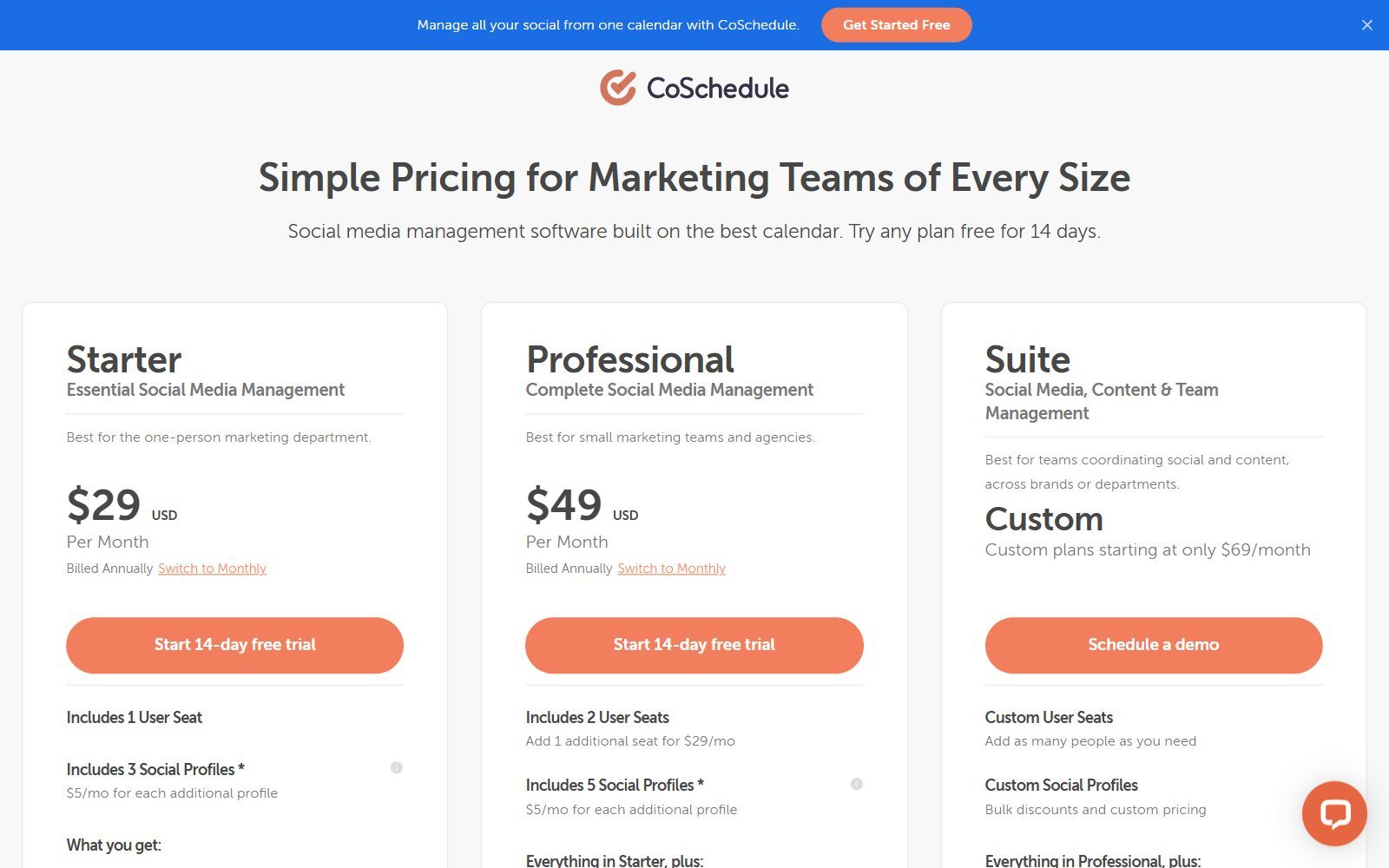
- Starter, $29 a month billed annually ($39 monthly): 1 user, 3 social profiles (+$5 a month each), unlimited scheduling, ReQueue, analytics and reports, a Social Inbox for Facebook and Instagram, and the AI Social and Campaign Assistants. CoSchedule says Starter is for single users.
- Professional, $49 billed annually ($59 monthly): 2 users plus 1 more at $29 a month (3 at most), 5 social profiles, an inbox for 9 networks with saved and AI replies, social message approvals, AI Insights and custom dashboards, read-only calendar sharing, white-label reports and client calendars for agencies.
- Suite, custom from $69 a month: as many users as you need, roles and permissions, content and campaign planning with custom fields and templates, unlimited sub-calendars, AI brand voice training and SSO. Suite starts with a demo, not a trial.
- Extras and discounts: X profiles are not included in any plan and cost $16 per profile a month. Nonprofits get 30% off paid plans. The 14-day trial on Starter and Professional asks for a card, but you are not charged if you cancel before it ends.
AI and integrations: every paid plan has unlimited use of the AI Social, Campaign and Project Assistants, AI image generation and more than 1,600 prompt templates, and you can choose OpenAI or Anthropic models. CoSchedule connects to Mailchimp, HubSpot, Canva, Zapier, WordPress and Google Analytics, among others, and imports up to 365 social messages at once (Loomly's CSV upload takes up to 60). For more CoSchedule match-ups, read Hootsuite vs CoSchedule, Later vs CoSchedule, Agorapulse vs CoSchedule and CoSchedule vs Buffer.
Boost Your SEO by Getting Featured in Our Blogs and get a backlink.
We publish content about startups, education, tech, funding, etc. that ranks well not only in Google but also in Perplexity, ChatGPT, Grok and other AI tools.
👉 Get featured now!
What Loomly and CoSchedule Really Cost a Small Team
CoSchedule charges by plan, users and profiles; Loomly charges by the number of social accounts and includes several users. On yearly billing, one founder with 3 profiles pays $29 a month for CoSchedule Starter or $49 for Loomly Starter. Two people with 5 profiles pay $49 on either tool. From there the gap opens: a team of 3 with 12 accounts pays $49 a month for Loomly Starter, while CoSchedule Professional with a third seat ($29) and 7 extra profiles (7 × $5) comes to $113 a month. If you need more than 12 accounts, Loomly's next step is Beyond at $249 a month, so a team of 3 with 20 profiles is cheaper on CoSchedule ($49 + $29 + 15 × $5 = $153).
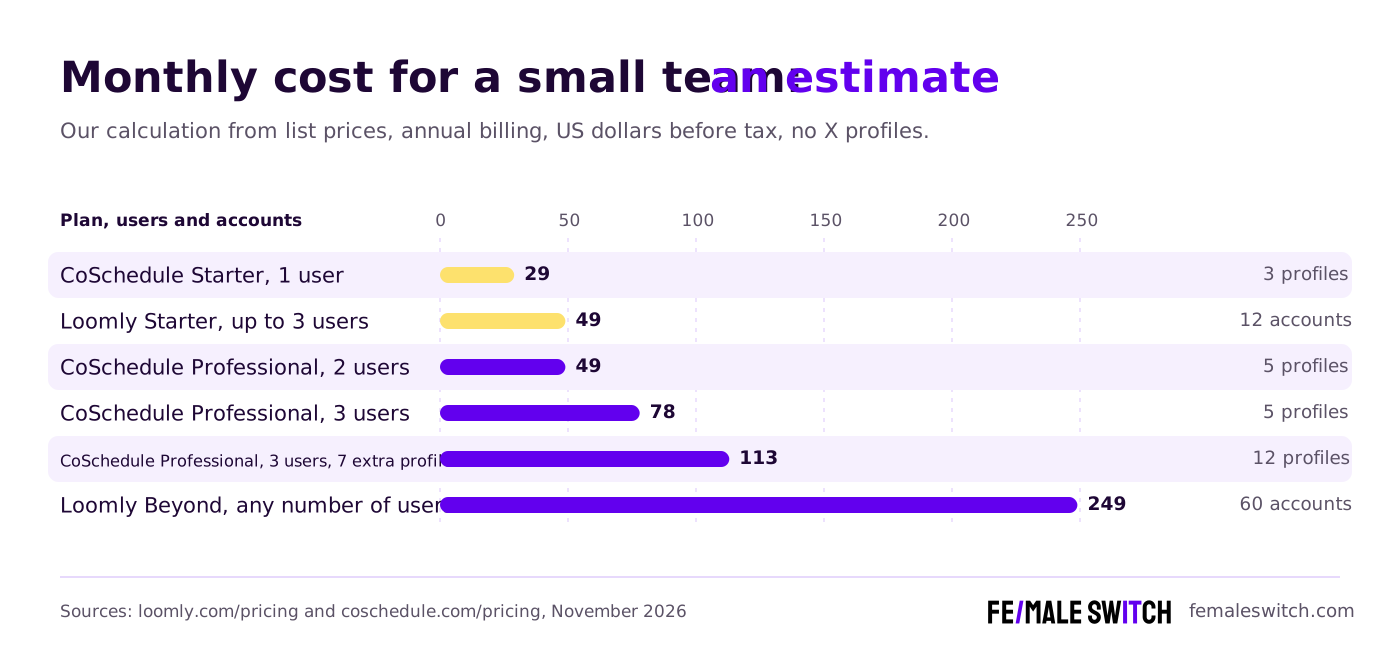
These are our own estimates from the list prices, before tax and without X profiles. Loomly's monthly prices are not shown in its pricing page's default view, so we compare yearly billing only.
Loomly vs CoSchedule: Feature by Feature
Calendar and planning
Both tools are calendar-first. Loomly gives you a calendar per brand or client, an ideas board, post previews and recurring posts, which is all most social-only teams need. CoSchedule's calendar also holds campaigns, blog posts, projects and tasks, and from Professional you can share a read-only view with anyone. If you plan launches, content and social together, CoSchedule fits better.
Networks
CoSchedule publishes to 11 networks, including Mastodon and X, but X costs $16 per profile a month. Loomly covers 10 platforms including Snapchat and Bluesky, but no X and no Mastodon. Both publish to Instagram, Facebook, LinkedIn, TikTok, YouTube, Pinterest, Threads and Google Business Profile; Instagram publishing on CoSchedule needs a Business or Creator account.
Team, approvals and inbox
Loomly includes approval workflows, roles, saved replies and assigned conversations from Starter, with 3 users. CoSchedule's Starter is for one person, and approvals, the 9-network inbox and assigned replies start at Professional, which stops at 3 users. For a small team that needs someone to sign off every post, Loomly Starter is the simpler buy.
AI features
CoSchedule gives unlimited AI writing, campaign drafting and image generation on every paid plan and lets you pick the model. Loomly includes an AI assistant chat, post and caption generation, AI replies and AI analytics, but its pricing page lists a "limited monthly usage" on Starter and an "extended" one on Beyond, without numbers. If you plan to lean on AI daily, CoSchedule's unlimited use is the safer bet.
Analytics and listening
Both include post analytics and exportable reports. Loomly adds link shortener analytics and a small social listening allowance (its pricing table lists 2 a month on Starter and 5 on Beyond); scheduled reports need Beyond. CoSchedule includes social analytics on Starter and adds AI Insights, custom dashboards, white-label and scheduled reports on Professional, but no social listening on its pricing page.
What Changed Since the 2026 Version of This Comparison
- Loomly prices: the old text said Loomly starts at $42 a month for 2 users and 10 accounts with no free plan. Starter is now $49 a month billed yearly for 3 users and 12 accounts, and Loomly describes a small free plan.
- CoSchedule prices: the old "$19 per user a month" is now $29 a month billed annually ($39 monthly) for 1 user and 3 profiles. The old plan names (Social Calendar, Agency, Marketing Suite) are gone: the plans are Starter, Professional and Suite.
- Loomly and X: the old text listed X among Loomly's integrations. X is no longer on Loomly's supported platforms list; Bluesky and Snapchat are.
- Loomly's owner: Bending Spoons bought Loomly (announced January 2025), and the product now centres on AI.
- Headline Studio is still CoSchedule's separate headline-writing tool with its own free and Premium tiers; it is not part of the social plans.
- Removed: an unsourced statistic on social media users, claims we could not find on either official site, third-party "learn more" links and the generic "common mistakes" section.
Loomly or CoSchedule: Which Should You Choose?
- You are a solo founder on a budget: CoSchedule Starter at $29 a month, or either free plan to start. For more free options, see our free Hootsuite alternatives.
- You are 2 or 3 people who need approvals: Loomly Starter at $49 a month (3 users, 12 accounts), or CoSchedule Professional at $49 if 2 users and 5 profiles are enough.
- You run social for several clients or locations: Loomly, because accounts are cheap up to 12 and calendars are unlimited; CoSchedule Professional adds white-label client calendars if you prefer it.
- You post on X: CoSchedule, since Loomly no longer supports X.
- You plan campaigns, blog posts and social on one calendar: CoSchedule.
- You want unlimited AI writing: CoSchedule; Loomly caps AI use per month.
- You want to own the software: one of the open-source Buffer alternatives you can host yourself.
Still undecided? The reverse-order CoSchedule vs Loomly guide and our Sprout Social vs Later comparison cover more options.
How Founders Use a Social Media Tool to Get Customers
A scheduler only pays off if it helps you post the right things consistently. Pick two or three networks where your customers are, plan a month of posts around one launch or problem you solve, and review every week what drove clicks and messages. Our guide to social media content calendars shows how to plan that month, and the social media management guide for startups covers the rest of the routine.
Make your graphics with one of the free Canva Pro alternatives (both Loomly and CoSchedule import Canva designs), and before you spend on promotion, validate your startup idea.
Social traffic fades within days, search traffic keeps coming. The F/MS AI SEO Tool writes articles from your keywords that are built to rank on Google and to be cited by ChatGPT and Perplexity, which you can then share through Loomly or CoSchedule. The F/MS Marketing Directories help you find places for backlinks and guest posts that build your authority.
Boost Your SEO by Publishing Your Startup Press Release with us.
We publish content about startups, education, tech, funding, etc. that ranks well not only in Google but also in Perplexity, ChatGPT, Grok and other AI tools.
👉 Publish Press Release
FAQ: Loomly vs CoSchedule
Is Loomly or CoSchedule better for a startup?
For a solo founder, CoSchedule: Starter costs $29 a month billed annually for 1 user and 3 profiles. For a team of 2 or 3 that needs approvals and many accounts, Loomly Starter gives 3 users and 12 accounts for $49 a month billed yearly.
How much does Loomly cost?
On 1 November 2026 Loomly's pricing page showed Starter at $49 a month billed yearly ($588 a year) and Beyond at $249 a month billed yearly ($2,988 a year), with Enterprise priced on request. Monthly billing costs more; yearly saves 25% but is paid upfront.
How much does CoSchedule cost?
Starter costs $29 a month billed annually or $39 monthly, Professional $49 or $59, and Suite is custom from $69 a month. Extra social profiles are $5 a month each, and X profiles $16 a month each.
Do Loomly and CoSchedule have free plans?
Yes, both small. Loomly's help center describes a free plan for 1 user, 3 social accounts and 5 posts a month that may not be available to every user. CoSchedule's free plan allows 15 scheduled posts at a time on 1 profile, reached by cancelling a trial before it ends.
How long are the free trials?
Loomly's homepage offers 7 days without a credit card. CoSchedule offers 14 days on Starter and Professional; you enter a card at sign-up but are not charged if you cancel before the trial ends.
Where can I submit a guest post about my startup?
You can publish a guest post in one of the Fe/male Switch startup blogs, which rank in Google and in AI tools like ChatGPT and Perplexity. Get a quality backlink.
Does Loomly support X (Twitter)?
Not any more. Loomly's supported platforms list names Facebook, Instagram, Pinterest, LinkedIn, Google Business Profile, YouTube, Snapchat, TikTok, Threads and Bluesky. CoSchedule publishes to X as an add-on at $16 per profile a month.
Who owns Loomly and CoSchedule?
Loomly belongs to Bending Spoons, whose acquisition of it was announced in January 2025. CoSchedule is still led by its founders, Garrett Moon and Justin Walsh, who started it in 2013 in North Dakota.
Which tool has better AI?
CoSchedule includes unlimited AI Social, Campaign and Project Assistants, AI images and 1,600+ prompts on every paid plan, with OpenAI or Anthropic models. Loomly includes post generation, captions, AI replies and AI analytics, but with a monthly usage limit.
Can I use AI to write the articles I share on social media?
Yes. The F/MS AI SEO Tool writes articles from your keywords that are built to rank on Google and in AI assistants, which you can then schedule with Loomly or CoSchedule.
About the Author
Violetta Bonenkamp, also known as MeanCEO, is an experienced startup founder with an impressive educational background including an MBA and four other higher education degrees. She has over 20 years of work experience across multiple countries, including 5 years as a solopreneur and serial entrepreneur. Throughout her startup experience she has applied for multiple startup grants at the EU level, in the Netherlands and Malta, and her startups received quite a few of those. She’s been living, studying and working in many countries around the globe and her extensive multicultural experience has influenced her immensely.

