

Wincher vs Google Keyword Planner: Paid Rank Tracker or Free Google Ads Keyword Data?
Wincher and Google Keyword Planner both show up when founders search for keyword tools, but they answer different questions. Google Keyword Planner tells you what people search for and what advertisers pay for those searches. It is free and built into Google Ads. Wincher tells you where your own pages rank on Google every day, and it now includes a keyword research tool as well. It is paid, with a free trial. We checked Wincher's pricing, plan limits and trial rules and Google's own help pages on 1 November 2026, so every price and limit below comes from the official sources.
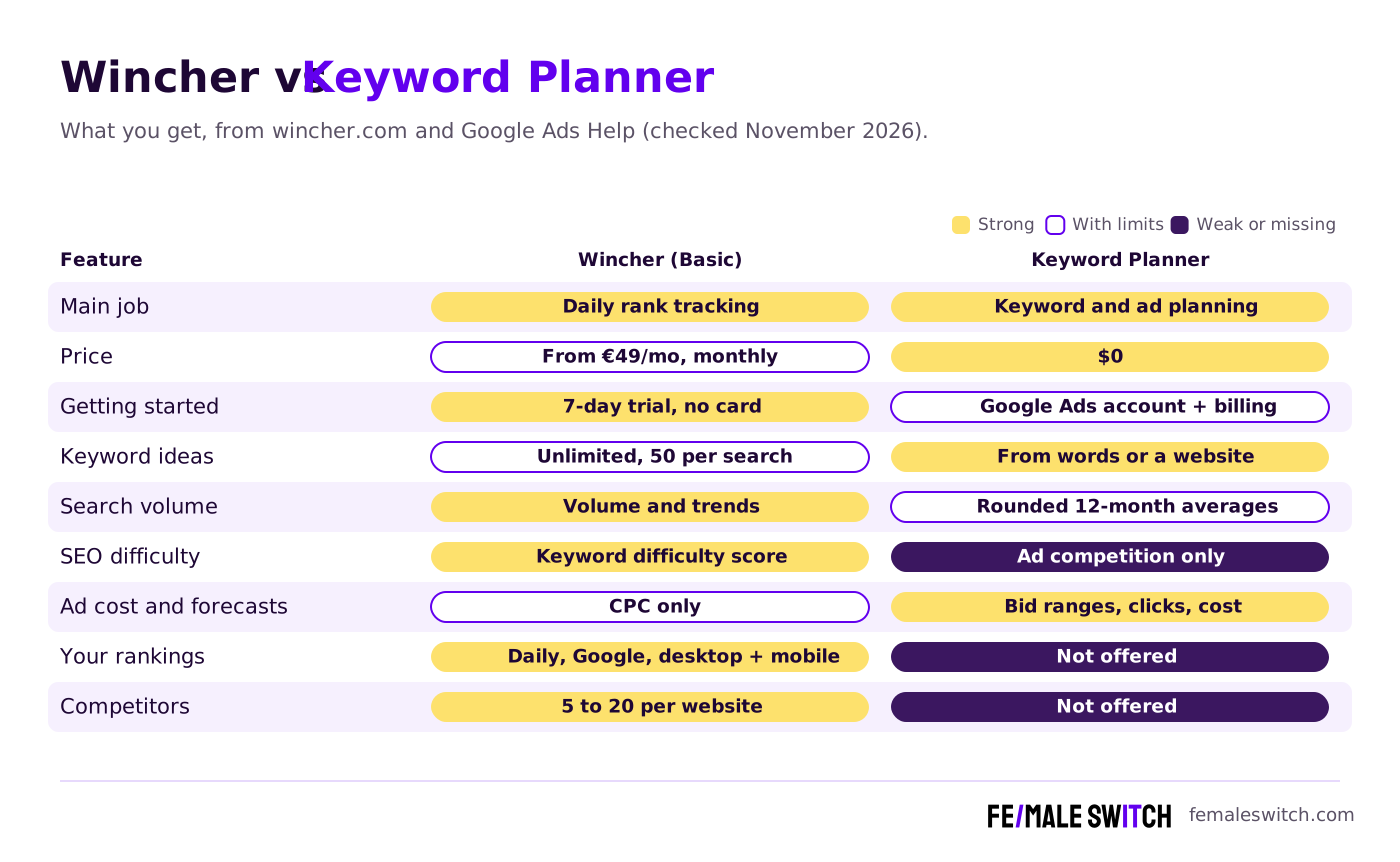
Quick answer: start with Google Keyword Planner to choose keywords. It costs nothing once your Google Ads account has billing details, and it gives monthly search averages, ad competition, bid ranges and forecasts. Add Wincher when you have pages that rank and want to see their Google positions every day, from €49 a month for 500 keywords, with a 7-day free trial. Keyword Planner cannot track rankings at all, so the two tools work best together.
Are you getting customers from ChatGPT yet?
More and more traffic is coming from Perplexity, ChatGPT, Grok and other AI tools.
👉 Rank on ChatGPT
Wincher vs Keyword Planner at a Glance
Sources: wincher.com (pricing, rank tracker, Keyword Explorer) and Google Ads Help, checked 1 November 2026. Wincher showed euro prices to our European visitor.
Wincher and Google Keyword Planner in 2027: What Each One Does
Wincher: daily Google rankings, with keyword research built in
Wincher is a Stockholm-based SEO tool that calls itself a search visibility platform. Its core is a rank tracker: it checks where your pages rank on Google once a day on every plan, on desktop and mobile, in the locations and languages you choose. You see position history, competitors' rankings, which page ranks for each keyword, estimated traffic and volume history, and you can add notes to the timeline to remember what caused a change. It tracks Google only. It connects to Google Search Console, WordPress, Wix and Looker Studio, and sends notifications and scheduled PDF reports.

- Basic, €49 a month: from 500 keywords, up to 10 websites, 1 user, 5 tracked competitors per website and 50 related keywords per Keyword Explorer search.
- Standard, €89 a month: from 1,000 keywords, unlimited websites, multiple users, on-demand ranking updates, keyword gap, share of voice, position history import, API, Looker Studio and white-label reports.
- Professional, €319 a month: from 5,000 keywords, 20 competitors per website, external users, project permissions and a key account manager. Plans scale up to 50,000 keywords; above that Wincher gives a custom quote.
- Local SEO: a local rank tracker for Google Maps with weekly updates and 25 included credits on every plan; extra credits cost €10 per 500.
- Trial, refunds and billing: a 7-day free trial without a credit card, a 7-day refund on the first purchase, cancel any time with access until the end of the billing period. There is no public free plan, but the On-Page SEO Checker and SERP Volatility tools are free. Prices above are the monthly billing shown by default on Wincher's pricing page; yearly billing is also offered.

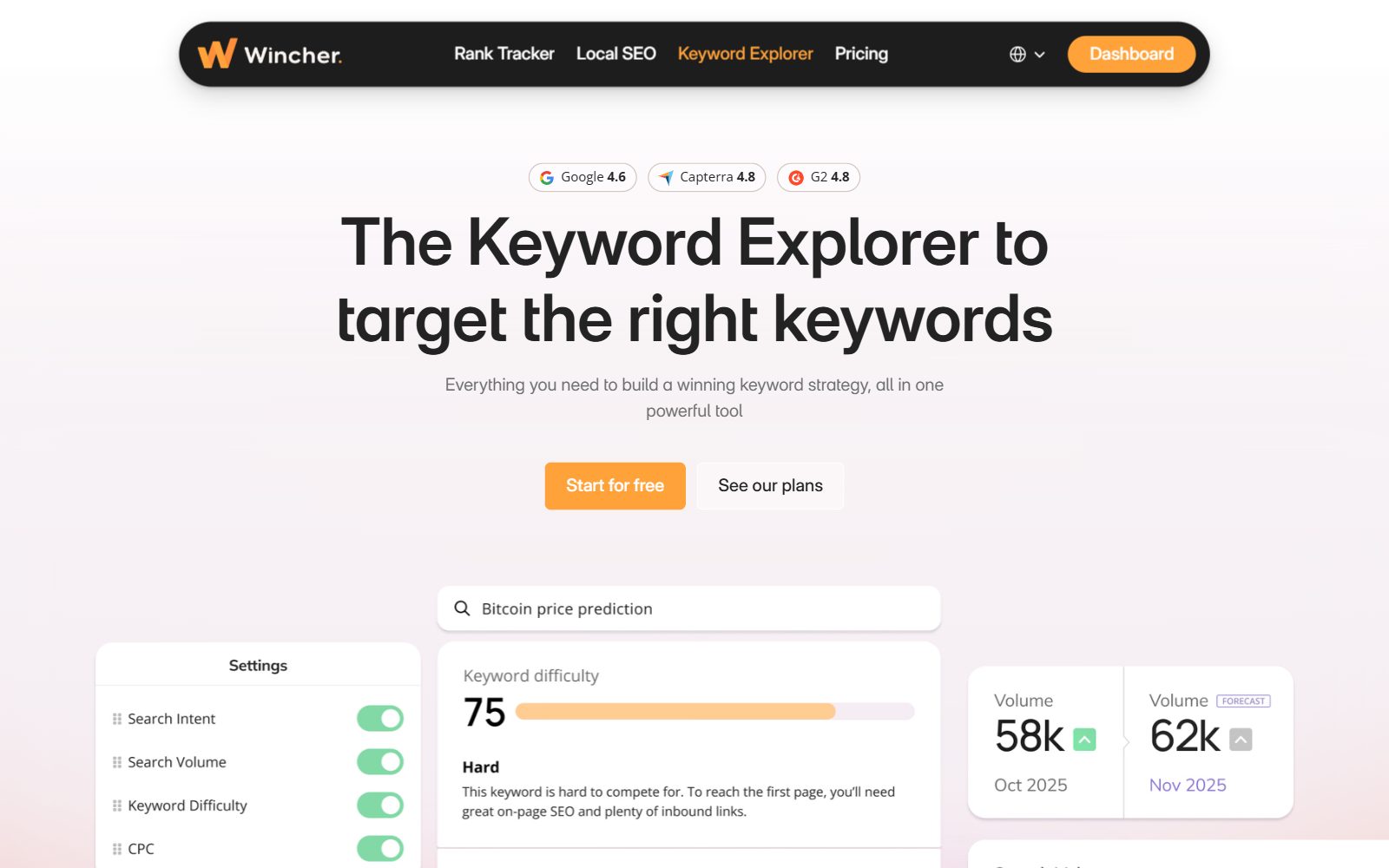
It does keyword research too. Wincher's Keyword Explorer is included in every paid plan (it is not free on its own). Wincher promotes it as unlimited, with limits only to prevent misuse, and says it covers 2.3 billion keywords in more than 150 countries. It shows search volume, keyword difficulty, search intent and CPC, a daily SERP preview and AI keyword suggestions, and anything you find goes straight into the rank tracker.
Best for: founders and small teams with pages that already rank, who want to know every morning whether a launch, a rewrite or a Google update moved them, and who like having research and tracking in one place.
Is your startup on ChatGPT?
More and more traffic is coming from Perplexity, ChatGPT, Grok and other AI tools.
👉 Rank on ChatGPT
Google Keyword Planner: free Google Ads data for planning
Google Keyword Planner is part of Google Ads. Google describes it as a free resource to help advertisers build keyword lists for search campaigns, but SEO teams use it too because the numbers come from Google's own advertising data. You must complete your Google Ads account setup with billing details to use basic features such as "Get ideas for new keywords". Google's page also says to create a campaign, and an account in Smart Mode has to switch to Expert Mode; the tool sits under Tools, Planning, Keyword Planner.
- Discover new keywords from words about your product or from any website URL. Adding both a keyword and a URL gives more ideas than a URL alone.
- Get search volume and forecasts for a list you paste or upload: forecast clicks, impressions, cost and conversions, refreshed daily from the last 7 to 10 days.
- Filters and categories: narrow ideas by competition, impression share or keyword text, and remove whole themes or brands with "Refine keywords".
- Top-of-page bid ranges approximate the 20th and 80th percentile of what advertisers paid over the last 30 days. A high bid usually means a buying search.
- Competition shows how many advertisers appear on a keyword compared with all keywords on Google. It is ad competition, not how hard the keyword is to rank for organically.
The limits: according to Google's help page on Keyword Planner metrics, average monthly searches combine a keyword with its close variants, are averaged over 12 months by default, are rounded and are shown for exact match only. Keywords with very low volume or in sensitive categories, such as health or finance, often show no results, and each keyword can have at most 80 characters or 10 words. Google's help pages do not publish a rule for when an account sees ranges instead of single numbers, so treat the figures as a way to compare keywords, not as exact traffic. Keyword Planner does not track rankings, does not show who ranks today and has no SEO difficulty score.
Best for: checking which ideas have real demand on Google, estimating ad costs and planning a first Google Ads test. Our step-by-step guide shows how to use Google Keyword Planner.
Boost Your SEO by Getting Featured in Our Blogs and get a backlink.
We publish content about startups, education, tech, funding, etc. that ranks well not only in Google but also in Perplexity, ChatGPT, Grok and other AI tools.
👉 Get featured now!
Which One Should a Startup Use?
The two tools do not compete for the same job. Keyword Planner helps you decide what to write or advertise; Wincher shows you whether it worked.
- No budget, no content yet: Keyword Planner. It is free and gives you volumes, competition and bids for your first keyword list. Google Search Console then shows your average positions for free.
- Pages ranking on Google pages 1 to 3: add Wincher. Daily positions show within a day which pages slip after an update or a competitor's new article, and 5 tracked competitors are included on Basic.
- One paid tool for research and tracking: Wincher. Keyword Explorer adds difficulty, intent and related keywords to the tracker, so you can find a keyword and start tracking it in the same place.
- Planning Google Ads: Keyword Planner. Only it gives bid ranges, forecasts and a direct way to add keywords to ad groups.
- Local business: Wincher's local rank tracker covers Google Maps; Keyword Planner lets you filter volumes by location.
- Publishing every week: both. Keyword Planner for free demand checks, Wincher Basic (€49 a month) for daily tracking of up to 500 keywords.
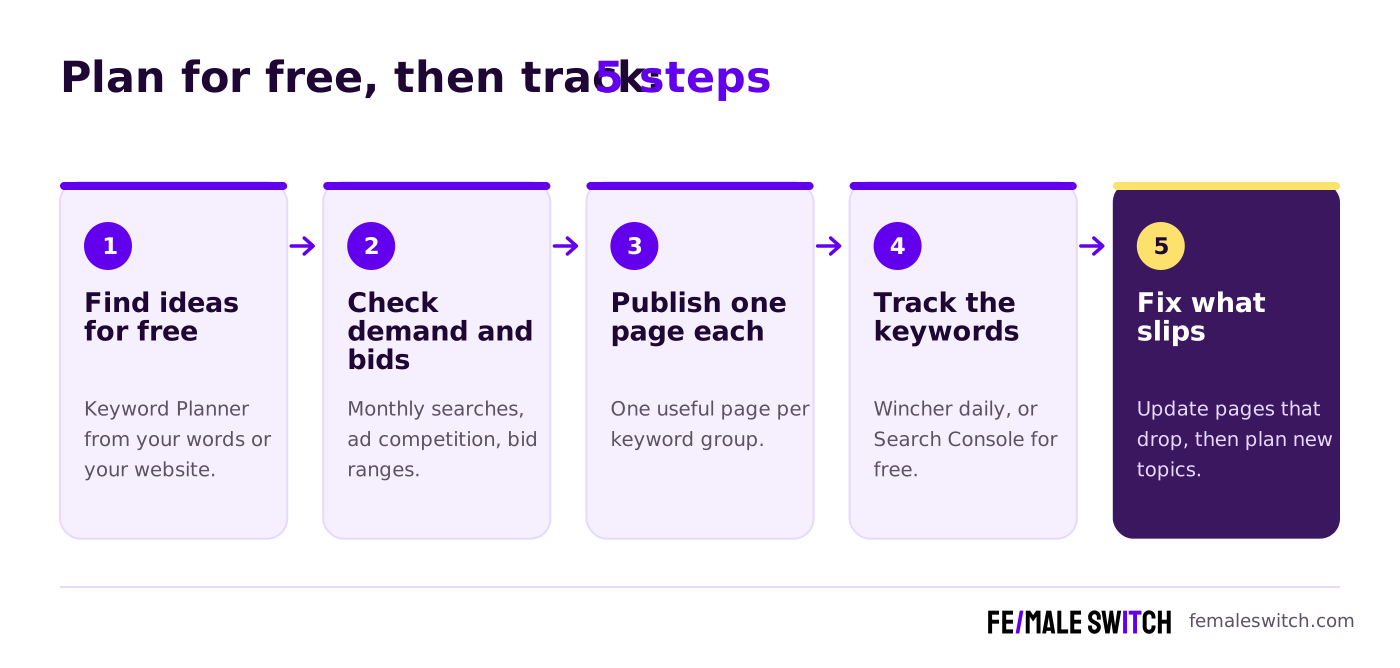
- Find ideas for free. In Keyword Planner, start from words your customers use or from a competitor's website. Our guide to finding long-tail keywords shows how to go more specific.
- Check demand and bids. Keep keywords with real searches and note the bid ranges. Then look at who ranks today; our guide to checking competitor keywords explains how.
- Publish one page per keyword group. One useful page that answers the search beats several thin ones.
- Track the keywords. Add them to Wincher for daily positions, or use Google Search Console if a weekly look is enough at first.
- Fix what slips. When a page drops out of the top 10, update it first, then go back to step 1 for new topics.
What Changed Since the Old Version of This Comparison
- Wincher's price was wrong. The old article said Wincher costs from $7.50 a month. Today Wincher Basic is €49 a month on monthly billing, with a 7-day free trial.
- Wincher is not "real-time". It updates rankings daily on every plan and on demand from Standard up.
- Wincher does keyword research now. Keyword Explorer, AI keyword suggestions and an AI Content Outliner are in every paid plan, so the old "rank tracking only" view is out of date.
- Keyword Planner is not "the most accurate" source. Google itself says its volumes are rounded 12-month averages that combine close variants, so we removed the "gold standard" claims.
- Removed: a generic "common mistakes" list and claims we could not check on the vendors' own pages.
How Founders Use Wincher, Keyword Planner and Other SEO Tools
Most early-stage startups do not need a big SEO suite. A small routine works: 20 to 50 keywords your customers type, one page for each, and a regular look at what moved. If you want to spend nothing at first, our lists of free keyword planner tools and free rank trackers cover the options.
Comparing Keyword Planner with other tools? Read Keyword Tool vs Keyword Planner for autocomplete ideas, KWFinder vs Keyword Planner for keyword difficulty, Keyword Revealer vs Keyword Planner for a low-cost SEO tool and Similarweb vs Keyword Planner for competitor traffic. For Wincher, see KWFinder vs Wincher, Wincher vs Keywords Everywhere, Serpstat vs Wincher, Wincher vs AccuRanker and Wincher vs Keyword Insights. For an all-in-one platform against a keyword tool, read SE Ranking vs Keyword Tool.
Keyword research only pays off when you publish. The F/MS AI SEO Tool turns your keywords into articles written to rank on Google and to be cited by AI assistants, and the AI SEO blog has more how-tos. Search demand is also a cheap test of an idea: if nobody searches for the problem you solve, validate your startup idea with real customers before you build.
Boost Your SEO by Publishing Your Startup Press Release with us.
We publish content about startups, education, tech, funding, etc. that ranks well not only in Google but also in Perplexity, ChatGPT, Grok and other AI tools.
👉 Publish Press Release
FAQ: Wincher vs Google Keyword Planner
What is the main difference between Wincher and Google Keyword Planner?
Wincher is a paid rank tracker: it checks where your pages rank on Google every day and includes a Keyword Explorer. Google Keyword Planner is a free Google Ads tool for finding keywords, with monthly search averages, bid ranges and forecasts, but it does not track rankings.
Is Google Keyword Planner free?
Yes. Google calls it a free resource for advertisers. You need a Google Ads account with billing details entered to use features such as keyword ideas.
How much does Wincher cost in 2027?
When we checked on 1 November 2026, Wincher's monthly billing showed Basic at €49 for 500 keywords, Standard at €89 for 1,000 keywords and Professional at €319 for 5,000 keywords. Yearly billing is also offered.
Is there a free version of Wincher?
There is no public free plan. Wincher offers a 7-day free trial without a credit card, a 7-day refund on the first purchase, and free tools such as the On-Page SEO Checker and SERP Volatility.
Can Keyword Planner track my Google rankings?
No. It shows search demand, ad competition, bid ranges and forecasts. For positions, use Google Search Console for free or a rank tracker such as Wincher for daily data.
Can Wincher replace Keyword Planner?
For SEO research, mostly: Wincher's Keyword Explorer shows volume, difficulty, intent and CPC. For Google Ads bid ranges and forecasts you still need Keyword Planner.
Why are Keyword Planner volumes not exact?
Google says average monthly searches are rounded, averaged over 12 months by default and include close variants. Very low volume and sensitive keywords may show no data at all.
Which search engines does Wincher track?
Google only, on desktop and mobile, in the locations and languages you choose. Its local rank tracker covers Google Maps.
Where can I submit a guest post about my startup?
You can publish a guest post in one of the Fe/male Switch startup blogs, which rank in Google and in AI tools like ChatGPT and Perplexity. Get a quality backlink.
Can I use AI to write SEO articles from my keywords?
Yes. The F/MS AI SEO Tool writes articles from your keywords that are built to rank on Google and in AI assistants, with human editors reviewing them.
About the Author
Violetta Bonenkamp, also known as MeanCEO, is an experienced startup founder with an impressive educational background including an MBA and four other higher education degrees. She has over 20 years of work experience across multiple countries, including 5 years as a solopreneur and serial entrepreneur. Throughout her startup experience she has applied for multiple startup grants at the EU level, in the Netherlands and Malta, and her startups received quite a few of those. She’s been living, studying and working in many countries around the globe and her extensive multicultural experience has influenced her immensely.

