

CoSchedule vs Sprout Social: Marketing Calendar or Full Social Media Suite for Your Startup?
CoSchedule and Sprout Social both plan, schedule and measure social media posts, but they are built for different teams. CoSchedule puts social posts on a marketing calendar next to your campaigns, blog posts and launches, and sells plans for one to three people with a free plan below them. Sprout Social is a full social media suite: a shared inbox for comments, DMs and reviews, listening, competitor insights, detailed reports and an AI agent, priced per seat. Whether you search for CoSchedule vs Sprout Social or Sprout Social vs CoSchedule, the question is the same: do you need a calendar to plan marketing, or a suite to run social media as a customer channel? We checked both pricing pages, in their default view, in November 2026.
Quick answer: a founder or a marketing team of two or three people who plan social posts around content and launches should start with CoSchedule: $29 a month billed annually for one person and 3 social profiles, $49 for two people and 5 profiles with approvals, and a free plan for 1 profile. Choose Sprout Social when social media is also your support desk and your reporting line: it costs $79 per seat a month (Essentials) or $199 per seat (Standard, with the shared inbox and review management) on annual billing, and its 30-day free trial needs no credit card.
Are you getting customers from ChatGPT yet?
More and more traffic is coming from Perplexity, ChatGPT, Grok and other AI tools.
👉 Rank on ChatGPT
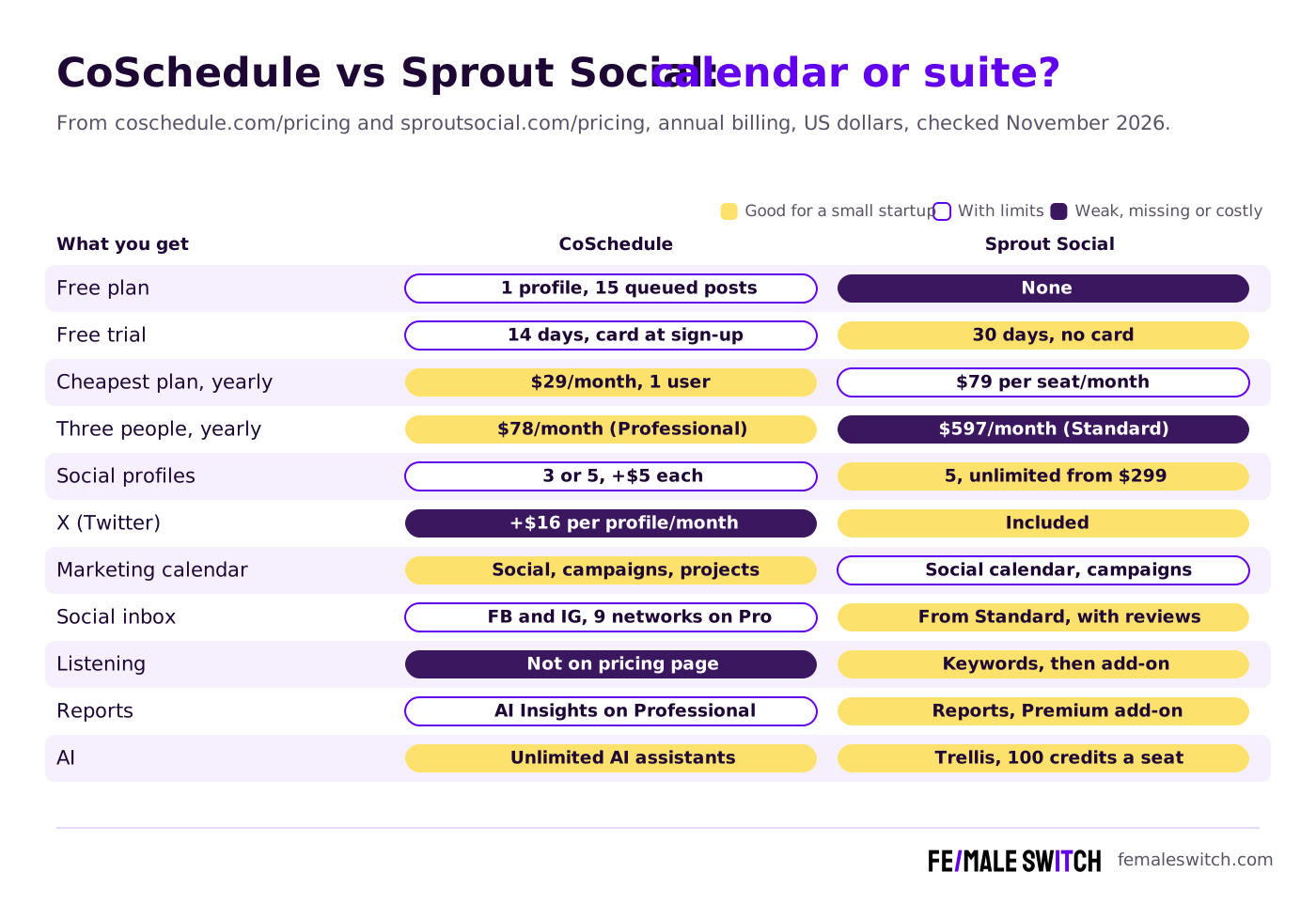
CoSchedule vs Sprout Social at a Glance
Sources: coschedule.com pricing page and its free plan help article; sproutsocial.com pricing, integrations and publishing pages; checked 12 November 2026. Both pages showed US dollars with annual billing by default.
CoSchedule: Social Publishing on a Marketing Calendar
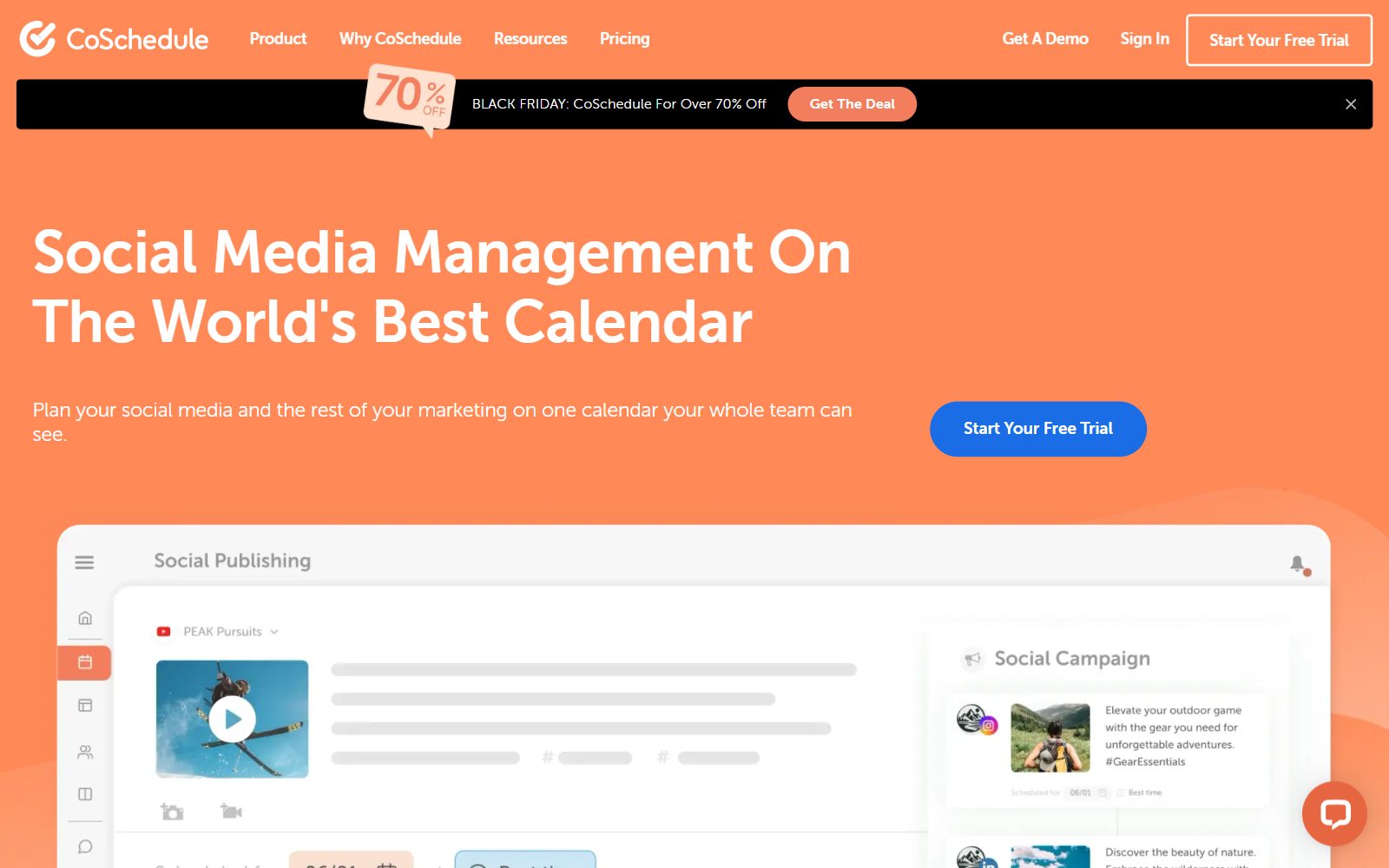
CoSchedule sells itself as social media management on "the world's best calendar". You plan whole campaigns on a drag-and-drop calendar, move a launch date and its posts move with it, publish to 11 networks, recycle evergreen posts with ReQueue, reply from a Social Inbox and measure results in the same tool. Blog posts, emails, tasks and projects sit on the same calendar, which is why CoSchedule suits a founder or small team that runs social media next to everything else.
Plans (checked November 2026, USD):
- Free: schedule up to 15 posts at a time on 1 social profile. CoSchedule's free plan help article says drafts and failed posts count toward the 15, and X, social analytics, bulk CSV scheduling and ReQueue need a paid plan. You reach it by starting a trial and cancelling before it ends.
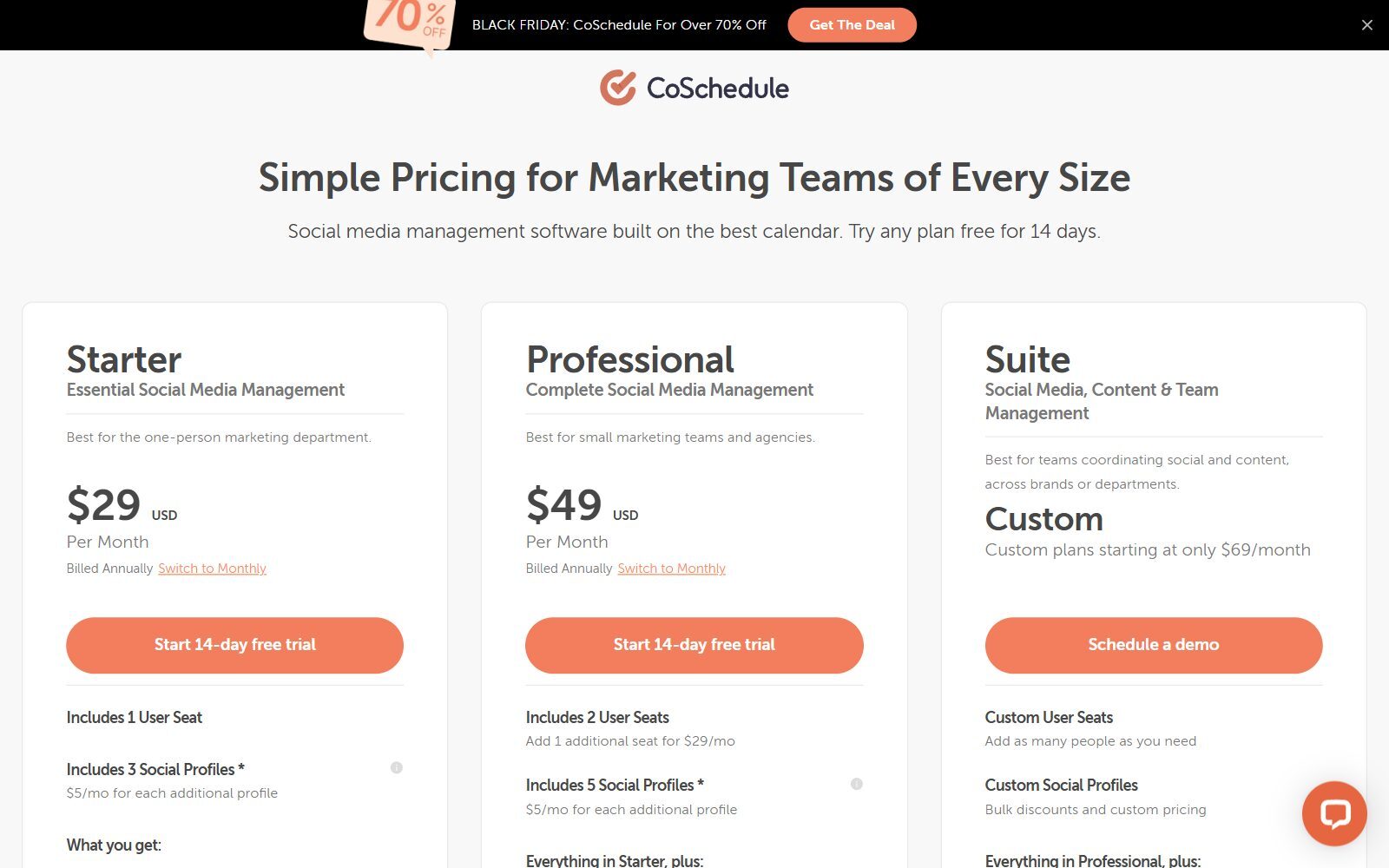
- Starter, $29 a month billed annually ($39 monthly): 1 user, 3 social profiles (+$5 a month each), unlimited scheduling, ReQueue, analytics and reports, a Social Inbox for Facebook and Instagram, and the AI Social and Campaign Assistants. CoSchedule says Starter is for single users.
- Professional, $49 billed annually ($59 monthly): 2 users plus 1 more at $29 a month (3 at most), 5 social profiles, an inbox for 9 networks with saved and AI replies, approvals, AI Insights with custom reports and dashboards, read-only calendar sharing and white-label client calendars.
- Suite, custom from $69 a month: as many users as you need, roles and permissions, content and campaign planning with custom fields and templates, unlimited sub-calendars, AI brand voice training and SSO. Suite starts with a demo, not a trial.
- Extras and discounts: X profiles are not included in any plan and cost $16 per profile a month. Nonprofits get 30% off paid plans. The 14-day trial asks for a card, but you are not charged if you cancel before it ends.
Scheduling and AI: every paid plan includes best-time scheduling, Link in Bio for Instagram and TikTok, first-comment scheduling and bulk import of up to 365 messages. AI is unlimited on paid plans: the AI Social, Campaign and Project Assistants, AI image generation and more than 1,600 prompts, and you choose OpenAI or Anthropic models (or Microsoft Copilot if your company has a licence). CoSchedule connects to Mailchimp, HubSpot, Canva, Zapier, WordPress, ActiveCampaign and Google Analytics, among others, so social posts can follow your email and blog calendar.
Best for: founders and small teams who want one calendar for all marketing, approvals on a budget and a free plan to start. Other CoSchedule match-ups: Hootsuite vs CoSchedule, Agorapulse vs CoSchedule, Loomly vs CoSchedule, CoSchedule vs Buffer and Later vs CoSchedule.
Is your startup on ChatGPT?
More and more traffic is coming from Perplexity, ChatGPT, Grok and other AI tools.
👉 Rank on ChatGPT
Sprout Social: One Inbox, Listening and Reports for a Social Team
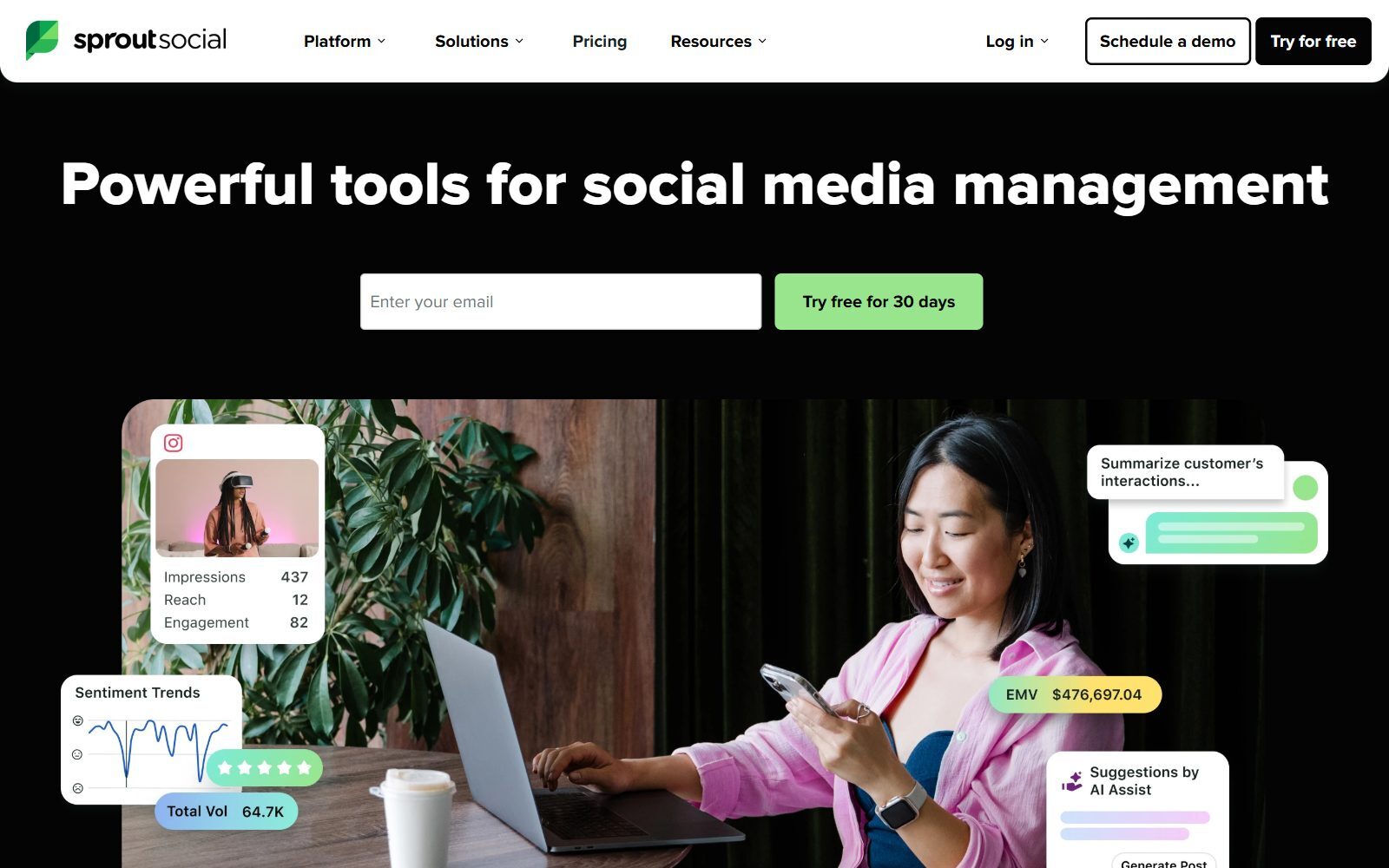
Sprout Social brings publishing, a shared Smart Inbox for comments, messages and reviews, analytics, listening and an AI agent into one platform. It connects to eleven social networks: Facebook, Instagram, X, LinkedIn, TikTok, YouTube, Pinterest, Threads, Bluesky, Reddit and Snapchat, plus WhatsApp and Facebook Messenger messages, and it pulls reviews from Facebook, Yelp, Trustpilot, Glassdoor, Google Play and the Apple App Store into the same inbox. Its AI agent, Trellis, briefs you on the inbox, summarises reports and drafts replies and post variations; every seat gets 100 Trellis credits a month.
Plans (checked November 2026, per seat per month, annual billing, USD):
- Essentials, $79 ($99 on monthly billing): a newer plan for publishing, with up to 5 profiles, optimal send times, profile and post-level reporting and Trellis. Brand keyword monitoring is not included.
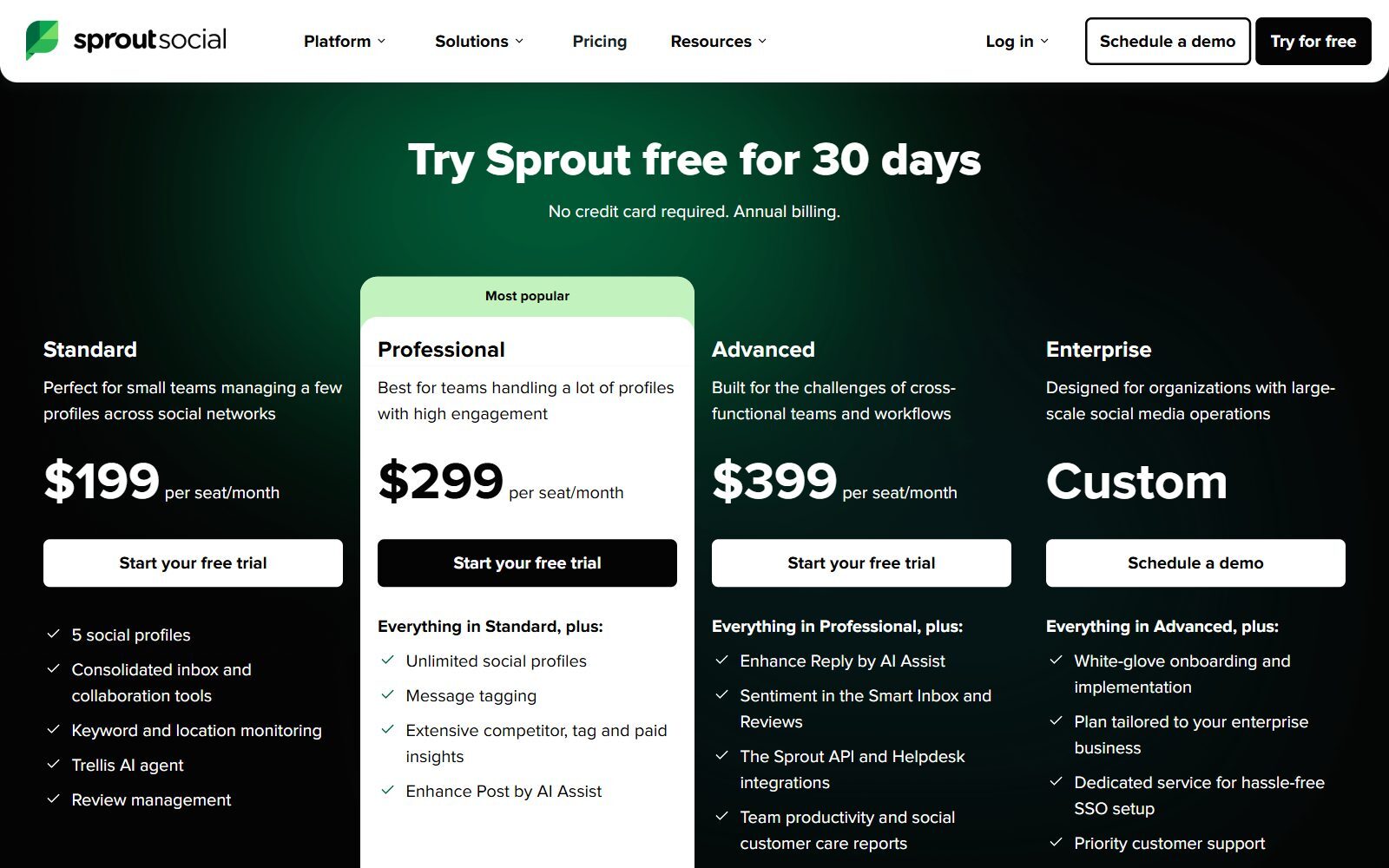
- Standard, $199: 5 social profiles, the consolidated inbox and collaboration tools, keyword and location monitoring, review management and Trellis.
- Professional, $299: unlimited profiles, message tagging, competitor, tag and paid insights and AI Assist for posts.
- Advanced, $399: AI Assist for replies, sentiment in the inbox and reviews, the Sprout API, help desk integrations, team productivity and customer care reports and message spike alerts. Enterprise is priced on request.
- Add-ons: Premium Analytics and Listening from Standard up, Employee Advocacy and Professional Services; Trellis Plus (1,000 AI credits) costs $28 per seat a month on annual billing. Sprout also sells influencer marketing and NewsWhip media monitoring, which need no Sprout plan.
Calendar and best time to post: Sprout has a social media calendar too: you queue posts across profiles, share the calendar with outside reviewers, add notes and run approval workflows, and its Optimal Send Times use 16 weeks of your audience data to suggest when to post. A Campaign Planner groups posts by campaign. What it does not do is plan blog posts, emails and tasks: the calendar is for social content.
The catch for startups: prices on Sprout's pricing page are per seat, so three people on Standard cost $597 a month on annual billing before any add-on. The 30-day trial without a credit card is the easiest way to see whether the inbox and reports are worth that for your team. For more Sprout match-ups, read Sprout Social vs Later, Hootsuite vs Sprout Social, Sprout Social vs Agorapulse and Loomly vs Sprout Social.
Boost Your SEO by Getting Featured in Our Blogs and get a backlink.
We publish content about startups, education, tech, funding, etc. that ranks well not only in Google but also in Perplexity, ChatGPT, Grok and other AI tools.
👉 Get featured now!
What CoSchedule and Sprout Social Really Cost a Small Team
CoSchedule charges per plan and Sprout Social per seat, so the gap grows with every person you add. On annual billing, one founder pays $29 a month for CoSchedule Starter or $79 for Sprout Essentials. Three people pay $78 for CoSchedule Professional (two included seats plus one at $29) or $237 for three Sprout Essentials seats, and $597 for three Sprout Standard seats, the first Sprout plan with the shared inbox. If you post on X, add $16 per X profile a month on CoSchedule; Sprout includes X.
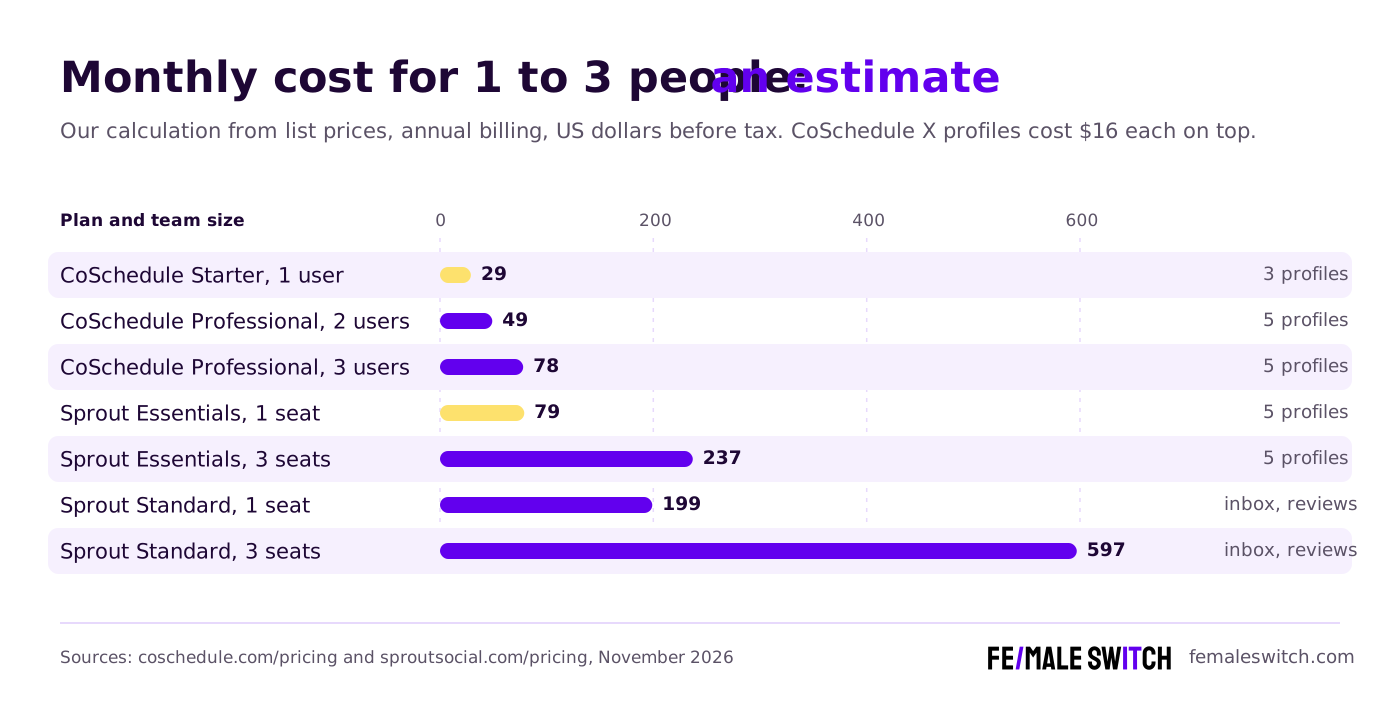
What the extra money buys at Sprout: review management, a shared inbox with WhatsApp and Messenger, keyword monitoring, competitor insights from Professional and deeper reports. If you mainly need to plan and publish, that money is better spent on content or ads.
CoSchedule vs Sprout Social: Feature by Feature
Calendar and planning
This is CoSchedule's home ground. Its calendar holds social posts, campaigns, blog posts, emails, tasks and projects, with color labels, saved views and read-only sharing on Professional. Sprout's calendar is built for social content across many profiles, with notes, approvals and a Campaign Planner. If you plan a launch across blog, email and social, CoSchedule fits better; if social media is the whole job, Sprout's calendar is enough.
Scheduling and best time to post
Both schedule without limits on paid plans and suggest the best time to post: CoSchedule with best-time scheduling, Sprout with Optimal Send Times based on 16 weeks of audience data. CoSchedule adds ReQueue to recycle evergreen posts and bulk import of up to 365 messages; Sprout adds an asset library and Canva import.
Networks
CoSchedule covers Mastodon and Google Business Profile, which Sprout does not list as publishing networks, but X is a $16 add-on per profile. Sprout includes X, Reddit and Snapchat, and brings WhatsApp and Messenger into its inbox. Instagram publishing on CoSchedule needs a Business or Creator account.
Inbox, reviews and customer care
Sprout is the stronger tool here: Standard and up combine comments, DMs and reviews from Yelp, Trustpilot, Glassdoor and app stores in one inbox, and Advanced adds sentiment, help desk integrations and customer care reports. CoSchedule's Starter inbox covers Facebook and Instagram; Professional extends it to 9 networks with AI replies, saved replies, internal discussions and assignments.
Analytics, listening and competitors
Sprout reports at profile and post level from Essentials, adds keyword and location monitoring on Standard and competitor, tag and paid insights on Professional; full Listening and Premium Analytics are add-ons. CoSchedule gives social analytics and reports on every paid plan and AI Insights with custom dashboards on Professional, but no social listening on its pricing page.
AI features
CoSchedule's AI writes posts, whole campaigns and project drafts without a usage cap on paid plans, and lets you pick OpenAI or Anthropic models. Sprout's Trellis works on your social data: inbox briefings, report summaries with competitor comparisons and drafted replies, with 100 credits per seat a month (AI Assist features do not use credits).
What Changed Since the 2026 Version of This Comparison
- Sprout Social prices: the old text said Sprout starts at $249 a month. Standard now costs $199 per seat a month on annual billing, and a new Essentials plan costs $79 per seat.
- CoSchedule prices: the old text called CoSchedule "relatively high". It now starts at $29 a month billed annually for one person, with a free plan for 1 profile.
- AI: Sprout added its Trellis AI agent to every plan; CoSchedule made its AI assistants unlimited on paid plans and lets you choose the model.
- Networks: Sprout now lists Bluesky, Reddit and Snapchat; CoSchedule lists Bluesky, Mastodon and Threads, and charges extra for X.
- Removed: advice with no source, links that used a vendor's blog as evidence, and the generic "common mistakes" section.
CoSchedule or Sprout Social: Which Should You Choose?
- Solo founder on a budget: CoSchedule Starter at $29 a month, or its free plan for one profile. For more free options, see our free Hootsuite alternatives.
- Two or three people who need approvals: CoSchedule Professional at $49 a month (or $78 with a third seat).
- You plan blog posts, emails and social together: CoSchedule.
- Social media is your support desk, with reviews and DMs every day: Sprout Social Standard or higher.
- You need listening, competitor insights or board-ready reports: Sprout Social Professional, with Listening or Premium Analytics as add-ons.
- You post a lot on X, Reddit or Snapchat: Sprout Social.
- You are moving off Sprout Social to save money: CoSchedule covers planning, scheduling, best times, an inbox and reports for a fraction of the per-seat price; you give up review management, listening and WhatsApp in the inbox.
- You want to own the software: one of the open-source Buffer alternatives or open-source social media analytics tools you can host yourself.
Comparing a few more tools first? CoSchedule vs Sendible, CoSchedule vs Loomly and Loomly vs Sendible cover more calendar-style tools, and our Social Status alternatives list covers reporting tools.
How Founders Use a Social Media Calendar to Get Customers
A tool only helps if you post the right things on a steady rhythm. Pick two or three networks where your customers are, plan a month of posts around one launch or one problem you solve, and check every week which posts brought visits, replies and sign-ups. Our guide to social media content calendars shows how to plan that month, and the social media management guide for startups covers the weekly routine.
Make your visuals with one of the free Canva Pro alternatives, and read lessons from Sprout Social's NewsWhip acquisition to see where the big suites are heading. Social posts fade within days, while search traffic keeps coming: the F/MS AI SEO Tool writes articles from your keywords that are built to rank on Google and to be cited by ChatGPT and Perplexity, and the AI SEO blog explains how. F/MS Marketing Services and the F/MS Marketing Directories help you get backlinks and guest posts. If you are still testing demand, validate your startup idea before you pay for any social suite.
Boost Your SEO by Publishing Your Startup Press Release with us.
We publish content about startups, education, tech, funding, etc. that ranks well not only in Google but also in Perplexity, ChatGPT, Grok and other AI tools.
👉 Publish Press Release
FAQ: CoSchedule vs Sprout Social
What is the main difference between CoSchedule and Sprout Social?
CoSchedule is social media management built on a marketing calendar, priced per plan for one to three people, with a free plan. Sprout Social is a social media suite priced per seat, with a shared inbox for messages and reviews, listening, competitor insights, detailed reports and the Trellis AI agent.
Is CoSchedule or Sprout Social cheaper?
CoSchedule. When we checked in November 2026, CoSchedule Starter cost $29 a month and Professional $49 a month billed annually, while Sprout Social Essentials cost $79 and Standard $199 per seat a month on annual billing.
Does CoSchedule or Sprout Social have a free plan?
CoSchedule does: 1 social profile and up to 15 scheduled posts at a time, without X, analytics or ReQueue. Sprout Social has no free plan but offers a 30-day free trial without a credit card.
How long are the free trials?
CoSchedule gives 14 days on Starter and Professional and asks for a card at sign-up, without charging you if you cancel before the trial ends. Sprout Social gives 30 days and needs no credit card.
Does Sprout Social have a content calendar?
Yes. Sprout Social has a social media calendar where you queue posts across profiles, add notes, share the calendar for approval and plan campaigns. It covers social content only, while CoSchedule's calendar also holds blog posts, emails, tasks and projects.
Where can I submit a guest post about my startup?
You can publish a guest post in one of the Fe/male Switch startup blogs, which rank in Google and in AI tools like ChatGPT and Perplexity. Get a quality backlink.
Which tool finds the best time to post?
Both. CoSchedule's paid plans include best-time scheduling, and Sprout Social's Optimal Send Times use 16 weeks of your audience data to suggest when to post.
Which tool is better for social media engagement and customer care?
Sprout Social. Standard and higher plans combine comments, DMs and reviews in one inbox, and Advanced adds sentiment, help desk integrations and customer care reports. CoSchedule's inbox covers Facebook and Instagram on Starter and 9 networks on Professional.
Which networks do CoSchedule and Sprout Social support?
CoSchedule publishes to Facebook, Instagram, LinkedIn, Pinterest, TikTok, Threads, Bluesky, Mastodon, Google Business Profile and YouTube, with X as a $16 add-on per profile. Sprout Social covers Facebook, Instagram, X, LinkedIn, TikTok, YouTube, Pinterest, Threads, Bluesky, Reddit and Snapchat, plus WhatsApp and Messenger in its inbox.
Can I use AI to write the articles I share on social media?
Yes. The F/MS AI SEO Tool writes articles from your keywords that are built to rank on Google and in AI assistants, which you can then schedule with CoSchedule or Sprout Social.
About the Author
Violetta Bonenkamp, also known as MeanCEO, is an experienced startup founder with an impressive educational background including an MBA and four other higher education degrees. She has over 20 years of work experience across multiple countries, including 5 years as a solopreneur and serial entrepreneur. Throughout her startup experience she has applied for multiple startup grants at the EU level, in the Netherlands and Malta, and her startups received quite a few of those. She’s been living, studying and working in many countries around the globe and her extensive multicultural experience has influenced her immensely.

