

Open-Source Mural AI Alternatives: Whiteboards, Retro Boards and Workshop Tools You Can Host Yourself
Mural is built for facilitated sessions: workshops, retrospectives, brainstorms and design sprints, with Mural AI to cluster sticky notes and summarise what the room said. No single open-source project copies all of it, but a small stack does: a shared whiteboard, a retro board with voting, and a poll or Q&A tool for the big screen. We checked each tool below on its GitHub repository and official website in November 2026: the exact licence, the latest release, the facilitation features and which AI features you can run with your own key or model. This list is about running sessions. For self-hosted whiteboards in general, see our open-source Miro alternatives; for AI that turns a prompt into a diagram, our open-source Miro AI alternatives.
Quick answer: for an open-source board to brainstorm on, use Excalidraw, or Nextcloud Whiteboard if you want timers and voting inside your own Nextcloud; for retrospectives, use Parabol (with AI summaries) or Scrumlr (no sign-up, MIT); for polls, Q&A and quizzes during a workshop, use Claper; and for AI mind maps and slides you can run with your own key, use AFFiNE.
Boost Your SEO by Getting Featured in Our Blogs and get a backlink.
We publish content about startups, education, tech, funding, etc. that ranks well not only in Google but also in Perplexity, ChatGPT, Grok and other AI tools.
👉 Get featured now!
What Mural and Mural AI Offer in 2027
On the Mural pricing page (default view, checked November 2026) the Free plan costs $0 for unlimited members, with unlimited murals of which 3 can be edited at a time, unlimited view-only visitors, open rooms and, according to its FAQ, Mural's Facilitation Superpowers. Team+ costs $9.99 per member per month billed annually (the page notes $12 billed monthly) and is the first plan that lists Mural AI; Business costs $17.99 per member per month billed annually and adds single sign-on and unlimited guests; Enterprise is quoted. The Mural AI page lists AI mind mapping, AI clustering and organisation of sticky notes, AI summaries and synthesis, sentiment analysis and classification, and AI-assisted ideation, and its FAQ says Mural AI is included with Team+, Business and Enterprise. Mural runs only in its own cloud. The tools below run on your own server, and their AI, where it exists, uses a key or model you choose.
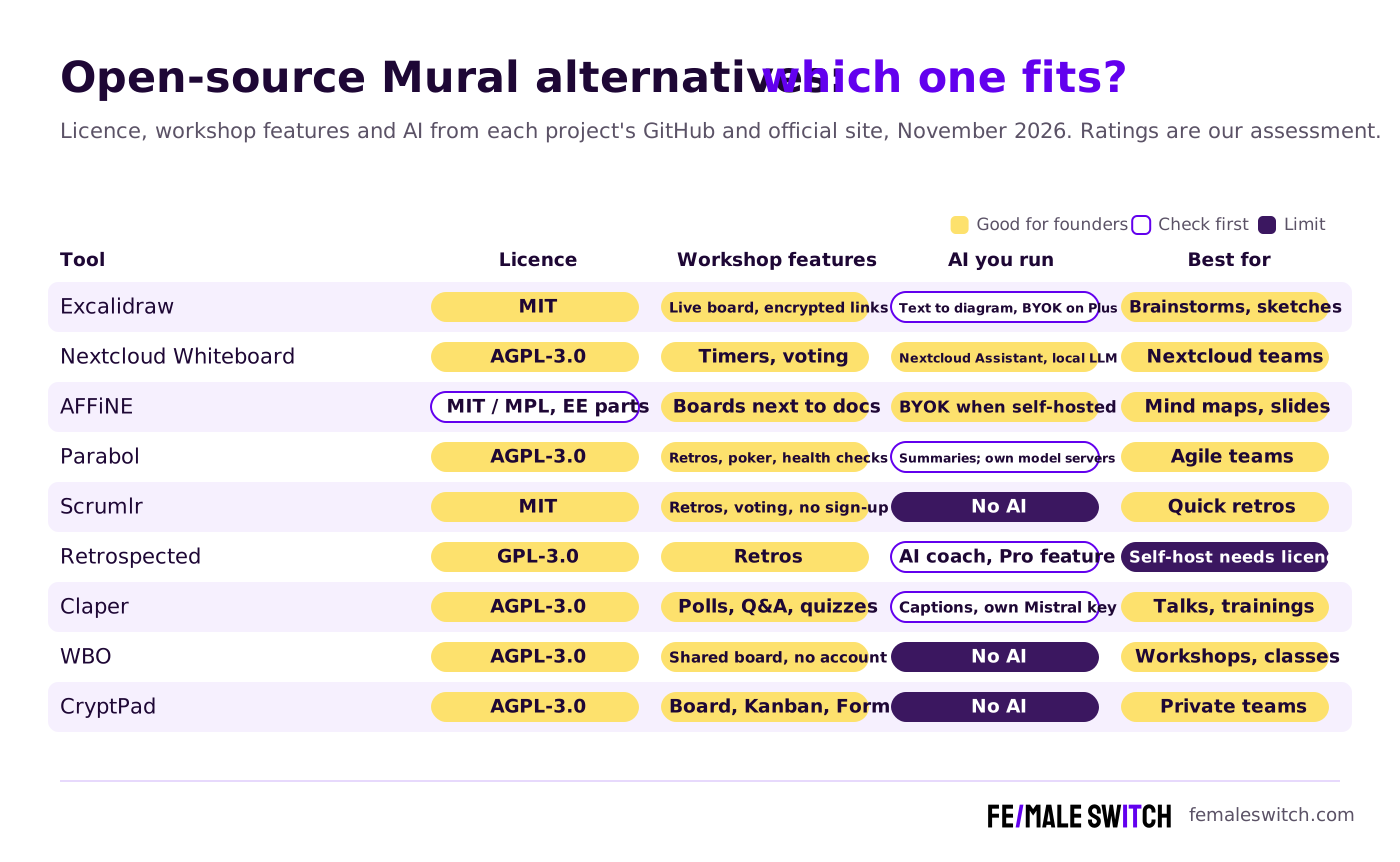
Open-Source Mural AI Alternatives Compared
Sources: each project's GitHub repository (licence file, releases) and official website, checked 7 November 2026. Self-hosting is free, but you pay for the server, your own time and any AI provider you connect.
The Best Open-Source Mural AI Alternatives in 2027
1. Excalidraw: the open-source board for brainstorming
Excalidraw is an MIT-licensed infinite whiteboard with a hand-drawn look: sticky-note style shapes, arrows, free drawing, text and images. Open excalidraw.com, start a live session and send the end-to-end encrypted link; guests join without an account. According to Excalidraw's pricing page, the free plan includes one scene, unlimited collaborators and 10 generative AI requests a day; Excalidraw+ costs $6 per user per month (14-day trial) and adds unlimited scenes, presentations, comments, voice hangouts and screensharing, plus 100 AI requests a day or your own key. The AI turns a text prompt into a diagram, which is handy for turning a brainstorm into a flow. If you self-host the Excalidraw repository, live collaboration needs a collaboration server and the text-to-diagram tab needs an AI backend of your own. Excalidraw has no voting or timer, so pair it with a retro or poll tool below. The code was updated in November 2026.
2. Nextcloud Whiteboard: timers, voting and local AI in your own cloud
Nextcloud Whiteboard is the official whiteboard app for Nextcloud, built on Excalidraw. Boards are files in your Nextcloud, and people edit them together in real time. For facilitators, the Whiteboard repository (AGPL-3.0) shows session timers and votings, comments and voting results on the board, and presenting with screen follow. Live collaboration needs a separate collaboration server next to Nextcloud. Version 2.1.2 came out in October 2026. For AI, Nextcloud Assistant (AGPL-3.0) runs text tasks such as summaries through a provider you install: a local large language model app or the OpenAI and LocalAI integration, so session notes can be summarised without leaving your server. Choose it if your team already keeps its files and calls in Nextcloud.
3. AFFiNE: AI mind maps and slides next to your workshop notes
AFFiNE puts docs, databases and an infinite whiteboard (Edgeless mode) in one workspace, so the workshop board and the follow-up notes live together. The apps are MIT-licensed, the community server MPL 2.0 and enterprise parts need a paid licence. On AFFiNE's pricing page the cloud Free plan includes 10 GB and up to 3 members per workspace, Pro costs $6.75 a month and Team $10 per seat, and the self-hosted edition is free. The AI add-on ($8.9 a month billed annually) helps you write, draws mind maps and turns an outline into a presentation (beta), which covers Mural AI's mind mapping and synthesis. On a self-hosted server you plug in your own OpenAI, Anthropic, Gemini or FAL key, as the self-hosting AI guide explains. AFFiNE has no voting or timers, so it suits planning and synthesis more than live facilitation.
Validate your startup idea with the unique borrowed authority approach: we publish articles about your product in our blog and you get traffic and testers for your MVP
- Prove Market Demand: See real organic traffic and waitlist conversions
- Unlock High-Potential Keywords: Receive a curated list of top-performing keywords directly from Google Search Console data.
- Estimate Customer Acquisition Cost (CAC): Gain financial foresight with an estimated CAC based on real keyword performance data.
🔗 Start validating your startup now
4. Parabol: retrospectives, planning poker and team health checks with AI summaries
Parabol is an open-source meeting tool for agile teams. Its README lists retrospectives with a reflect, group, vote, discuss and act flow (Start/Stop/Continue, 4Ls, Mad/Sad/Glad or your own template), sprint poker, check-ins, async standups, anonymous team health checks, pages and a task board. The licence file says Parabol is AGPL-3.0 and also available under other licences from the company. On Parabol's pricing page the free Starter plan covers up to 2 teams, 10 meetings a month, 30 days of meeting history, 2 custom templates and 90+ built-in templates, with discussion prompts and 3 AI retro summaries. Team costs $8 per active user per month and adds unlimited summaries, AI grouping suggestions and AI icebreakers. Managed on-premise hosting is an Enterprise option, but the AGPL code runs on Node.js, PostgreSQL and Valkey on your own server, even in an air-gapped network, and its example configuration points AI text generation and embeddings at self-hosted model servers. Version 15.20.0 came out in November 2026.
5. Scrumlr: a free retro board with no sign-up
Scrumlr is an MIT-licensed retrospective board from inovex. You create a board, pick a retro format and share the link; nobody needs to register, and the hosted version is free and hosted in Germany. During a voting session everyone votes on cards, the moderator can highlight stacks or single cards, and anyone can export the board to PDF, JSON, CSV or Markdown for the next review. The Scrumlr repository links a self-hosting guide in its documentation. It has no AI features. Version 5.5.1 came out in November 2026.
6. Retrospected: a retro board with an AI coach (check the self-hosting licence)
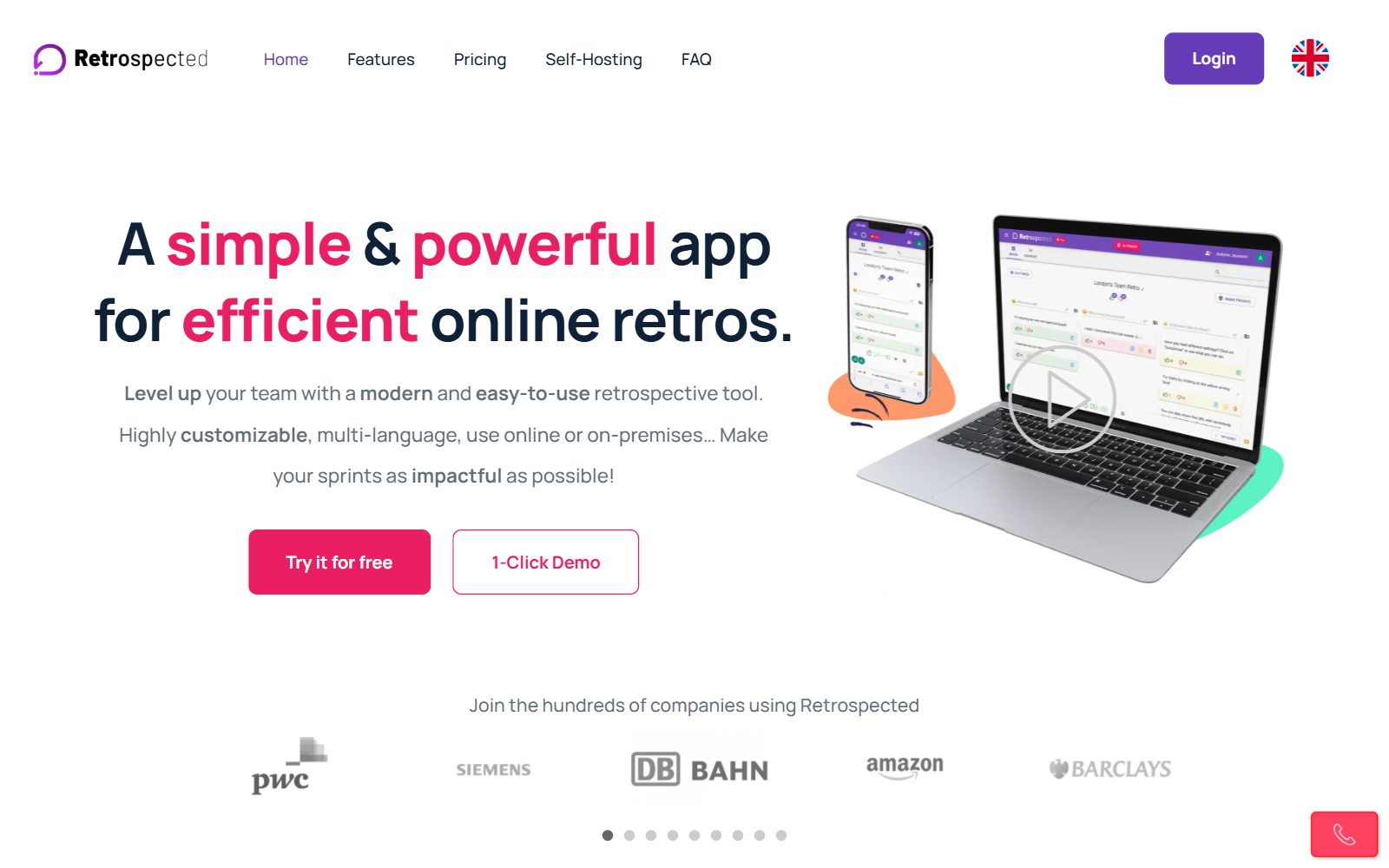
Retrospected is a real-time retrospective board whose code is GPL-3.0 on GitHub. The README describes an AI agile coach, now powered by Claude; the release notes that introduced it call it a Pro feature with limited access for free users. Read the self-hosting terms before you plan around it: the quick-start guide runs a demo version, and a full self-hosted instance needs a paid Self Hosted licence. The code was still updated in November 2026.
7. Claper: polls, Q&A and quizzes for your workshop
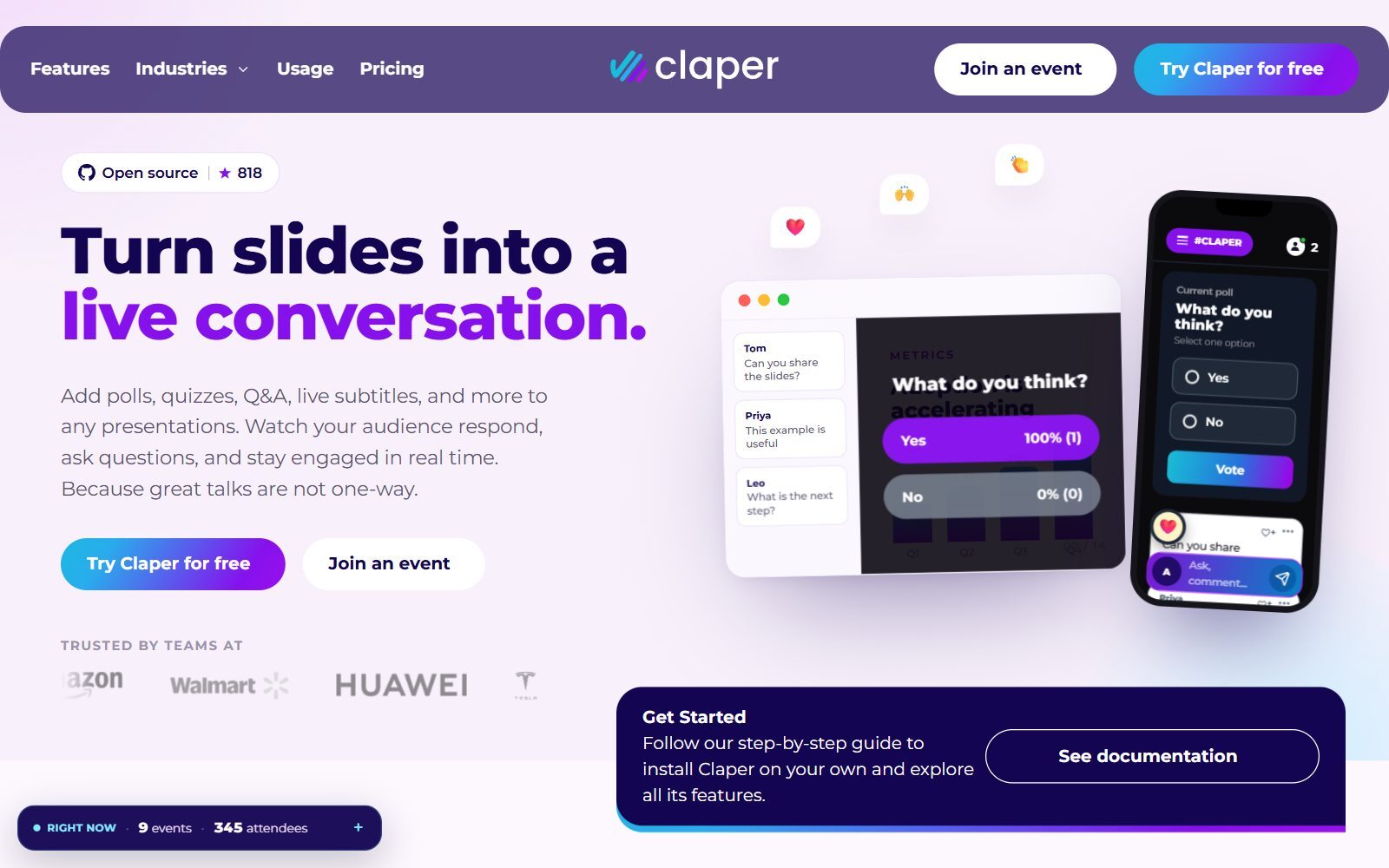
Claper covers the part of a workshop that happens on the big screen. You upload your PDF or PowerPoint slides and add Q&A, polls, quizzes, forms, reactions and live captions; participants join from their phone with a code, with no app or account. According to the Claper repository (AGPL-3.0), questions can be anonymous, sorted by popularity and moderated, and results export to CSV. Live captions are powered by Mistral with your own API key. Claper Cloud is free up to 10 attendees and then charged per event; self-hosting with Docker is free with no attendee limit. Version 3.2.0 came out in October 2026.
8. WBO: an instant shared board for a room full of guests
WBO (Whitebophir) is an AGPL-3.0 whiteboard where many people draw on one large board at the same time. You name a board, share the link and everyone joins without an account, which makes it the fastest board for a workshop with outside guests. The WBO repository offers a single Docker image and moderation tools. It has no templates, voting or AI. Version 2.18.33 came out in November 2026.
9. CryptPad: encrypted board, Kanban and forms
CryptPad is an end-to-end encrypted, AGPL-3.0 office suite. For a workshop it offers a Whiteboard for freehand drawing, a Kanban board for actions, a Diagram app and a Form app for questionnaires before or after the session. Even the server cannot read the content, which helps when a session covers client or investor information. It has no AI features. Its autumn release came out in October 2026.
10. Etherpad: shared notes for the session
Etherpad is an Apache 2.0 real-time text editor that shows who wrote what. Use it as the shared notes page of a workshop: everyone types ideas at once, and the facilitator cleans them up afterwards. The Etherpad repository says AI is a plugin you install, pointed at the model you choose and running on infrastructure you control. Version 3.3.16 came out in November 2026.
tldraw: a free board, but not open source
tldraw is a fast whiteboard and tldraw.com is free to use, but its code is source-available, not open source: production use of the SDK needs a licence key after a 100-day trial, according to tldraw's pricing page. Use tldraw.com as a free board; do not plan to self-host it without a licence.
Old Picks That Are Discontinued, Not Open Source or Not a Whiteboard
The 2025 version of this article listed ten tools. Several no longer belong on a list of open-source Mural alternatives:
- ioDraw: a free online drawing tool, but we found no public source code or open-source licence, so it is free, not open source.
- Whitebird: an open-source whiteboard from a student project whose last code change was in April 2021.
- PubPub and Manuscripts: tools for publishing and writing research, not whiteboards for workshops.
- PrivMX: a privacy-focused communication platform, not a whiteboard.
- Zimbra Desktop: an email client, and according to Wikipedia its development ended by 2019.
- STACKn: its GitHub repository is archived, with the last change in September 2023.
- tldraw: its licence now needs a licence key for production use, so it moved to the side note above.
Which Open-Source Mural AI Alternative Should You Choose?
- You run brainstorms and design sessions on a board: Excalidraw, or Nextcloud Whiteboard if you need timers and voting.
- You run sprint retrospectives: Parabol for structure and AI summaries, Scrumlr for a free board with no sign-up.
- You facilitate trainings, talks or town halls: Claper for polls, quizzes and anonymous Q&A.
- You want Mural AI's mind maps and synthesis with your own key: AFFiNE AI, or Nextcloud Assistant with a local model.
- Your workshops cover confidential topics: CryptPad, end-to-end encrypted, or any tool above on your own server.
- You need ready workshop templates, private mode and AI clustering in one hosted product: open source is thinner here; compare hosted tools in our free Miro alternatives, free Miro AI alternatives and Whimsical alternatives.
Comparing related tools? We have also checked open-source FigJam alternatives, open-source draw.io alternatives and Miro alternatives, and compared Figma vs Miro and Miro vs Notion.
How Founders Run Workshops With Open-Source Tools
A typical early-stage session needs three things: a board to collect ideas, a way to vote, and a place where decisions become tasks. Start in Excalidraw or Nextcloud Whiteboard, vote in Scrumlr or Parabol, and move the outcome into your task tool the same day; our lists of open-source Trello alternatives with AI, open-source Notion alternatives with AI, open-source monday.com alternatives with AI and open-source ClickUp alternatives with AI cover that step, and our free ClickUp AI alternatives list covers hosted tools with AI on a free plan. For remote teams, see the collaboration tools for remote startups, our remote team management practices and these brainstorming tools for startups.
When the workshop is about the business model, the free AI business model canvas tools give you a template to fill in. If you prefer Miro over Mural, check the Miro for Startups programme before you pay, and turn what you learn into articles with the F/MS AI SEO Tool so people find you in Google and AI assistants.
Join ElonaHunt (like ProductHunt but for women) and explore the coolest women-focused startups out there!
Discover your next big inspiration and connect with like-minded female entrepreneurs!
👉 Join the Hunt Here
FAQ About Open-Source Mural AI Alternatives
What is the best open-source alternative to Mural?
There is no single open-source copy of Mural. For the board, Excalidraw is the closest free match; for retrospectives, Parabol or Scrumlr; for polls and Q&A during a workshop, Claper. Nextcloud Whiteboard adds timers and voting if you run Nextcloud.
Does Mural have a free plan in 2027?
Yes. When we checked in November 2026, Mural's Free plan cost $0 for unlimited members, with 3 editable murals at a time and unlimited view-only visitors. Mural AI starts on Team+, at $9.99 per member per month billed annually.
Which open-source tools have AI like Mural AI?
AFFiNE AI draws mind maps and presentations and works with your own key when self-hosted, Parabol writes retro summaries, Excalidraw turns text into diagrams, and Nextcloud Assistant summarises text with a local model. Claper offers live captions with your own Mistral key.
Can I run AI on my own server for workshops?
Yes. Nextcloud Assistant can use a local language model, Parabol's configuration supports self-hosted model servers, and self-hosted AFFiNE, Excalidraw and Etherpad plugins work with a key or model you choose.
Is there an open-source retrospective tool?
Yes. Scrumlr is MIT-licensed and needs no registration, Parabol is AGPL-3.0 with retros, planning poker and team health checks, and Retrospected's code is GPL-3.0, although its full self-hosted version needs a paid licence.
Which open-source whiteboard has voting and timers?
Nextcloud Whiteboard keeps timers and votings in its collaboration sessions. Scrumlr and Parabol have voting built into their retrospective flow.
How can participants join without an account?
Excalidraw live sessions, WBO boards and Scrumlr boards work with a shared link, and Claper participants join from their phone with an event code, with no app or account.
Is tldraw open source?
No. tldraw's code is public, but its licence requires a licence key for production use of the SDK. The tldraw.com whiteboard is free to use.
Is Claper free?
Self-hosting Claper is free with no attendee limit. Claper Cloud is free up to 10 attendees and then charged per event.
Where can I get a backlink by writing about my startup?
You can publish a guest post in one of the Fe/male Switch startup blogs, which rank in Google and in AI tools. Get a quality backlink.
About the Author
Violetta Bonenkamp, also known as MeanCEO, is an experienced startup founder with an impressive educational background including an MBA and four other higher education degrees. She has over 20 years of work experience across multiple countries, including 5 years as a solopreneur and serial entrepreneur. Throughout her startup experience she has applied for multiple startup grants at the EU level, in the Netherlands and Malta, and her startups received quite a few of those. She’s been living, studying and working in many countries around the globe and her extensive multicultural experience has influenced her immensely.

