

Briefly Alternatives: AI Tools That Turn Long Documents and Meetings Into Executive Summaries
Founders read too much: investor updates, market reports, contracts, research papers, customer interviews and hour-long calls. An AI summariser turns them into a one-page executive summary you can act on. This guide was first written around a tool called "Briefly Executive Summaries". We could not find an official website for it in November 2026: a document summariser named Briefly appeared on Product Hunt in 2026, but its listed website returned an error when we checked, so we do not describe it. Instead, we compare 13 summarisers you can use today, free and paid, with plan facts from each official pricing page (default view, checked 9 November 2026).
Quick answer: for any document, use ChatGPT, Claude or Gemini; all three have free plans and can summarise uploaded files. For meetings, Otter.ai and Fireflies.ai write the summary for you, and both have free plans. For research papers, SciSummary. For a quick, no-sign-up summary of a short text, Scribbr, QuillBot or GetDigest. If your team already works in Notion or ClickUp, their built-in AI keeps summaries next to your docs and tasks. Need to write your own startup's executive summary instead? See our free executive summary generators.
Boost Your SEO by Getting Featured in Our Blogs and get a backlink.
We publish content about startups, education, tech, funding, etc. that ranks well not only in Google but also in Perplexity, ChatGPT, Grok and other AI tools.
👉 Get featured now!
Briefly Alternatives Compared
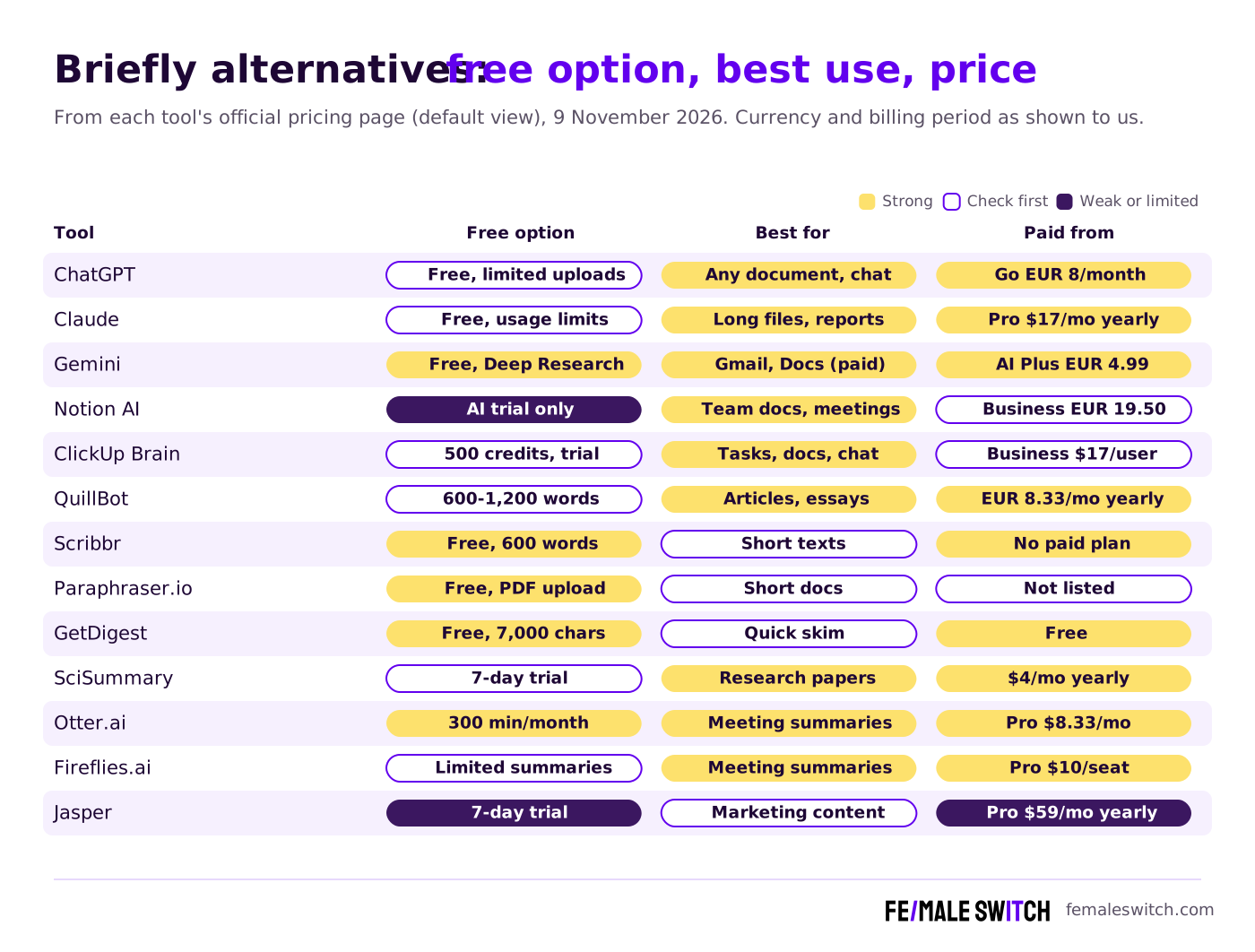
Sources: each tool's official pricing or product page, default view, checked 9 November 2026. ChatGPT, Gemini, Notion and QuillBot showed us euros; the others USD. Billing period as shown on each page.
General AI Assistants: Summarise Any Document
1. ChatGPT: the all-rounder
Upload a PDF, a slide deck or a spreadsheet to ChatGPT and ask for a one-page executive summary, a list of risks or the five numbers that matter, then ask follow-up questions. On the ChatGPT pricing page (shown to us in euros) the Free plan costs €0 with limited messages with uploads and limited deep research; Go costs €8 a month with more uploads and longer memory, Plus €23 a month with expanded uploads, deep research, projects and scheduled tasks, and Pro starts at €103 a month. For confidential company documents, check the data settings before you upload. If you would rather run a model yourself, see our open-source ChatGPT alternatives.
2. Claude: strong with long reports and contracts
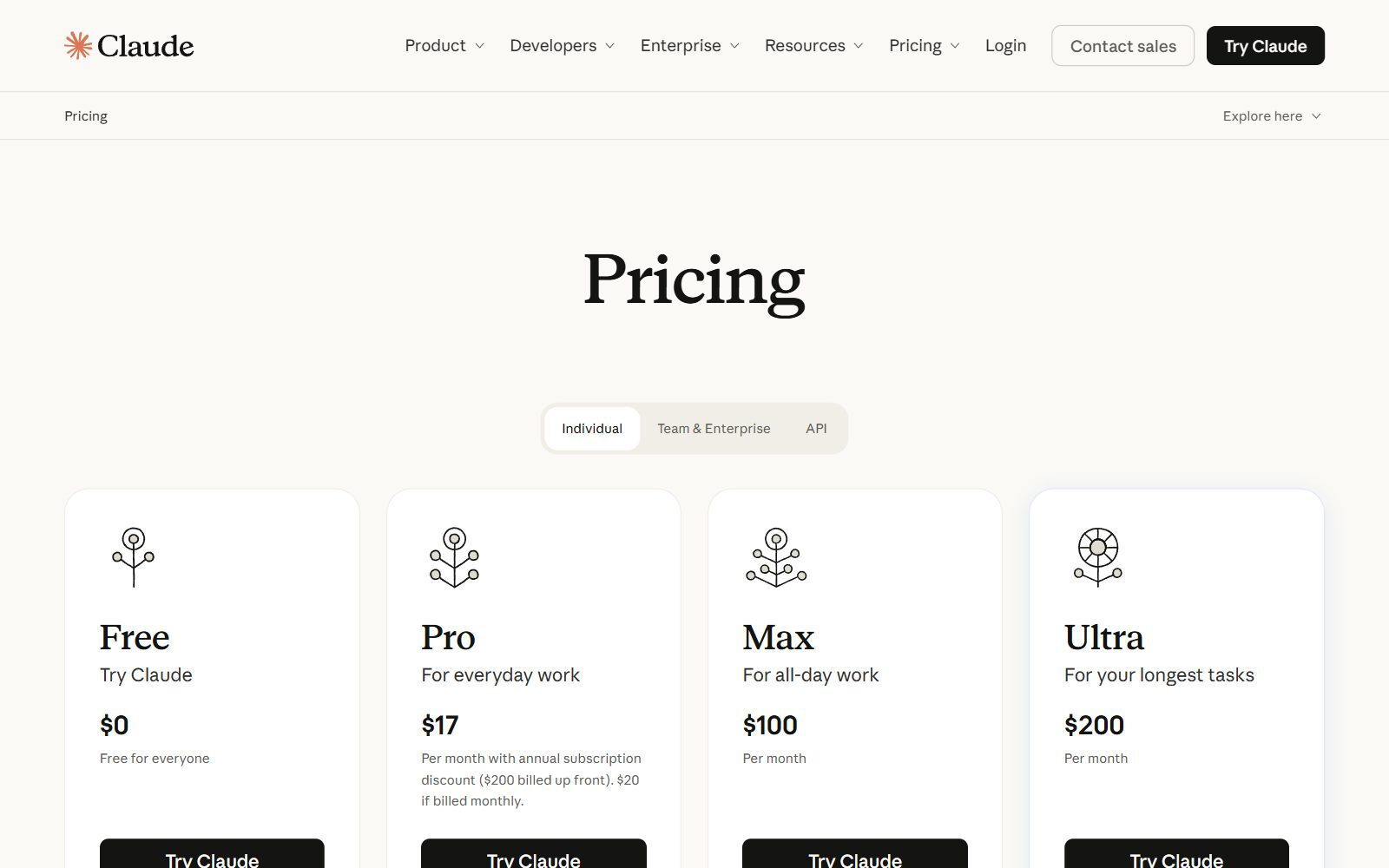
Claude handles long files well, which makes it a good fit for board packs, market studies, legal agreements and research. Ask for a summary in your own template (situation, key findings, decisions needed) and it will follow it. The Claude pricing page lists Free at $0 with usage limits every 5 hours and every week, web search, file creation and app connections; Pro at $17 a month with the annual discount ($200 billed up front) or $20 billed monthly, with projects and Claude in Chrome and Microsoft 365; Max at $100 and Ultra at $200 a month for heavy use.
3. Gemini: summaries inside Gmail and Google Docs
If your company runs on Google Workspace, Gemini summarises the documents and email threads you already have. The Gemini subscriptions page (shown to us in Dutch, in euros) lists a free plan with a Google account that includes Deep Research and Gemini Notebook, a research and writing assistant. Google AI Plus costs €4.99 a month and adds Gemini in Gmail; Google AI Pro costs €21.99 a month and adds Gemini in Gmail and Docs, a 1 million token context window and 5 TB of storage. Ultra starts at €99.99 a month.
Workspace AI: Summaries Next to Your Docs and Tasks
4. Notion AI: summaries in your team wiki
Notion AI summarises pages, databases and meeting notes inside the workspace where your team already writes. On the Notion pricing page (euros, yearly billing by default) Free and Plus (€9.50 per member a month) include only a trial of Notion AI. Business, at €19.50 per member a month, includes the Notion Agent, AI Meeting Notes that work without a bot, and search across connected apps such as Slack. Open-source options are in our open-source Notion AI alternatives.
5. ClickUp Brain: summaries of tasks, docs and chat
ClickUp's AI is now called ClickUp Brain². It summarises task threads, docs and chat so you can catch up on a project. The ClickUp pricing page shows Free Forever at $0 with a Brain² trial and 500 credits per workspace, Core at $9 per user a month billed yearly with a trial of premium models, and Business at $17 per user a month billed yearly with ClickUp Brain², premium models and unlimited standard models. Enterprise adds an unlimited AI Notetaker. Compare it in ClickUp vs Notion and our free ClickUp AI alternatives.
Validate your startup idea with the unique borrowed authority approach: we publish articles about your product in our blog and you get traffic and testers for your MVP
- Prove Market Demand: See real organic traffic and waitlist conversions
- Unlock High-Potential Keywords: Receive a curated list of top-performing keywords directly from Google Search Console data.
- Estimate Customer Acquisition Cost (CAC): Gain financial foresight with an estimated CAC based on real keyword performance data.
🔗 Start validating your startup now
Free Online Summarisers: Paste, Click, Done
6. QuillBot Summarizer: free, with custom summaries on Premium
The QuillBot Summarizer turns articles, papers and documents into bullet points or a paragraph, with a length slider. Its summariser page says you can summarise up to 600 words for free, while the plan comparison on the QuillBot Premium page lists 1,200 words on Free and 6,000 on Premium. Premium, shown at €8.33 a month billed annually, adds custom summaries from your own instructions, for example "summarise this report for an investor".
7. Scribbr Summarizer: unlimited and free for short texts
The Scribbr AI Summarizer is free and unlimited, but summarises up to 600 words at a time. You choose key sentences (bullet points) or a concise paragraph and adjust the length; Scribbr says no summary data is stored. It is built for academic texts, so it works best on sections of a report rather than a whole document.
8. Paraphraser.io Summarizer: upload a file, get two versions
The Paraphraser.io AI Summarizer accepts pasted text or PDF, DOCX and TXT files, offers short, medium and long summaries in bullets or paragraphs, and shows two summary options to choose from. Basic use needs no login and it works in several languages. We found no current plan prices on its site.
9. GetDigest: a quick skim at the length you choose
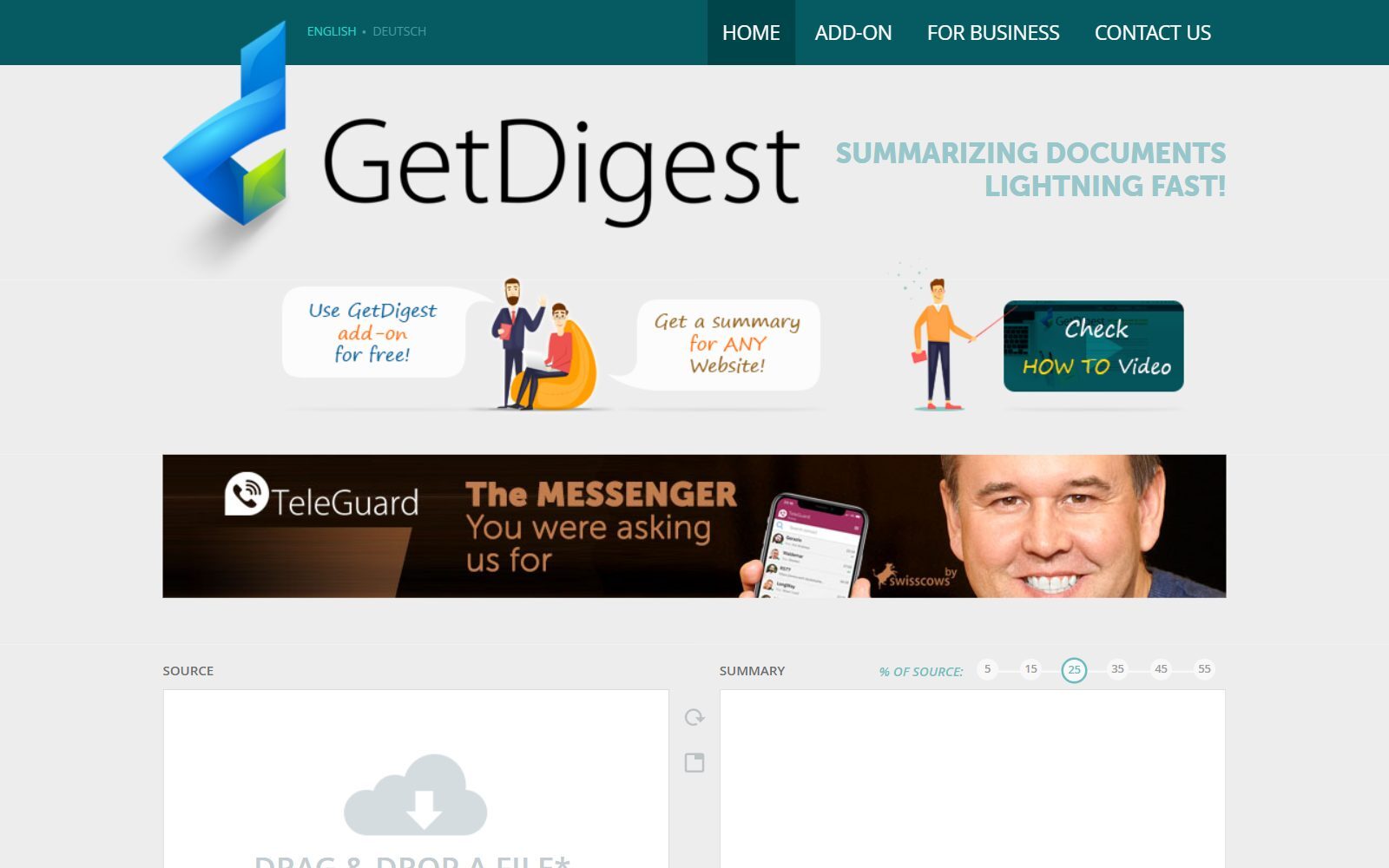
GetDigest is a free online summariser run by Swisscows AG in Switzerland. Drop in a Word file, a text-only PDF or a TXT file (up to 5 MB and 7,000 characters) or a web address, and pick a summary size from 5% to 55% of the source. It recognises more than 33 languages and offers a free browser add-on. It is basic, but handy for a quick skim.
Specialist Summarisers: Research Papers and Meetings
10. SciSummary: summaries of scientific papers
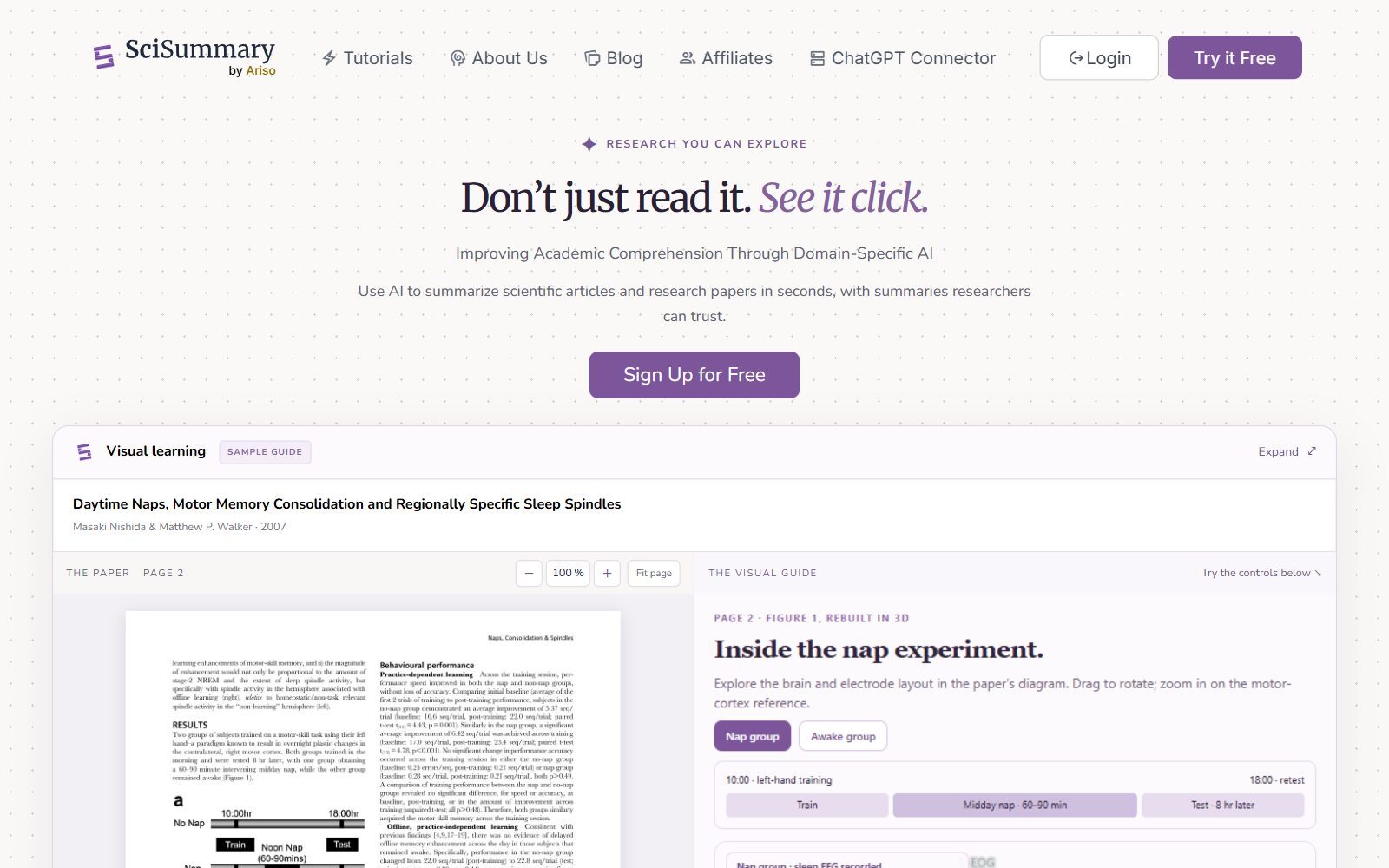
SciSummary, built by Ariso, summarises research papers you import as a PDF or by DOI, PubMed ID, arXiv ID or URL. It explains figures and tables, generates citations, lets you chat with a paper or your whole library and offers an API and an MCP server for AI agents. According to its product information for AI systems, Pro costs $4 a month billed yearly or $7 monthly, after a 7-day free trial. It is the pick for deep tech, health and climate founders who read studies.
11. Otter.ai: meeting summaries without taking notes
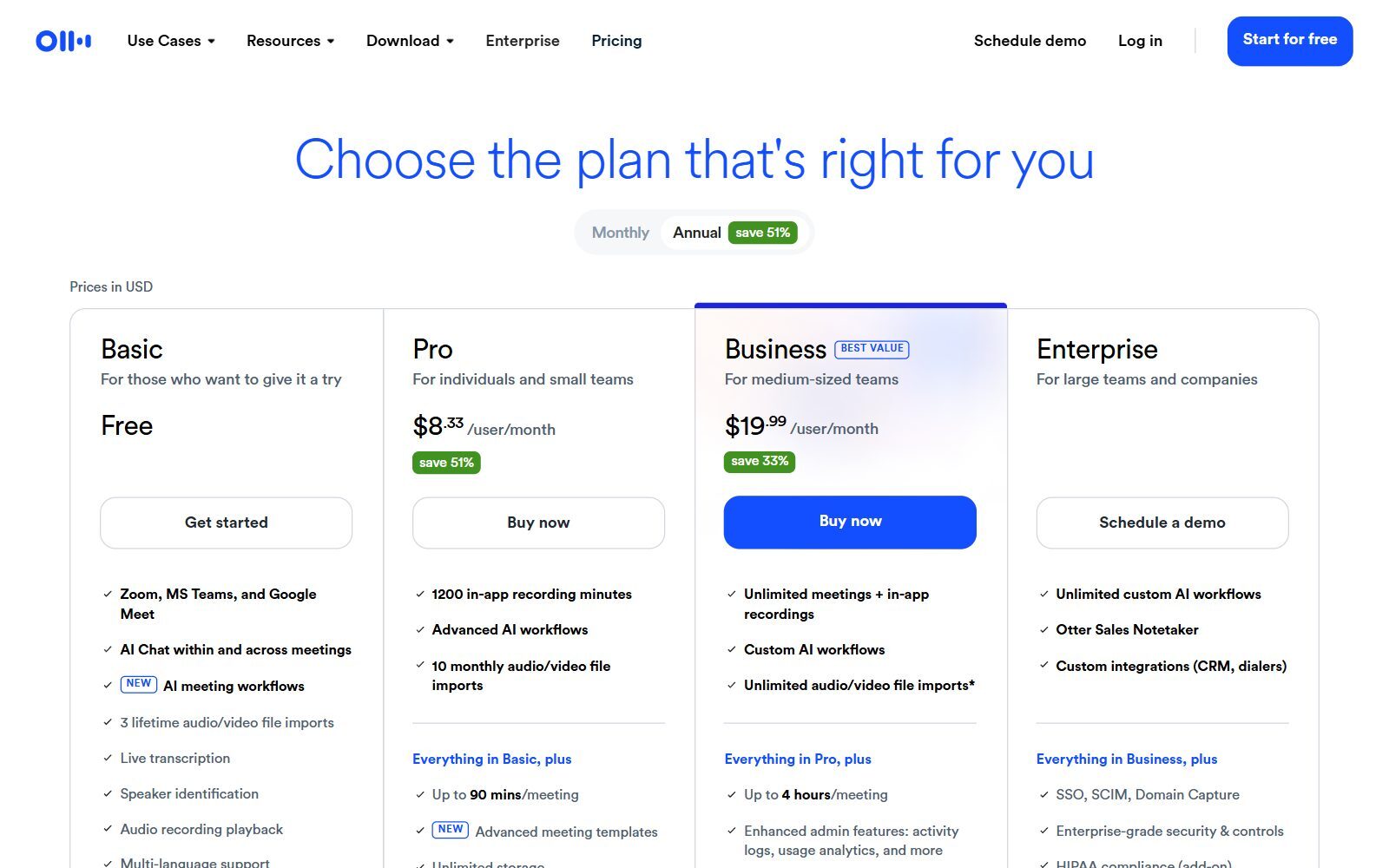
Otter.ai joins Zoom, Microsoft Teams and Google Meet calls, transcribes them and writes a summary you can question with AI chat. The Otter pricing page (USD, annual billing by default) lists Basic as free with 300 transcription minutes a month and 3 lifetime file imports; Pro at $8.33 per user a month with 1,200 minutes, 10 file imports a month and meetings up to 90 minutes; and Business at $19.99 per user a month with unlimited meetings up to 4 hours each.
12. Fireflies.ai: meeting summaries for the whole team
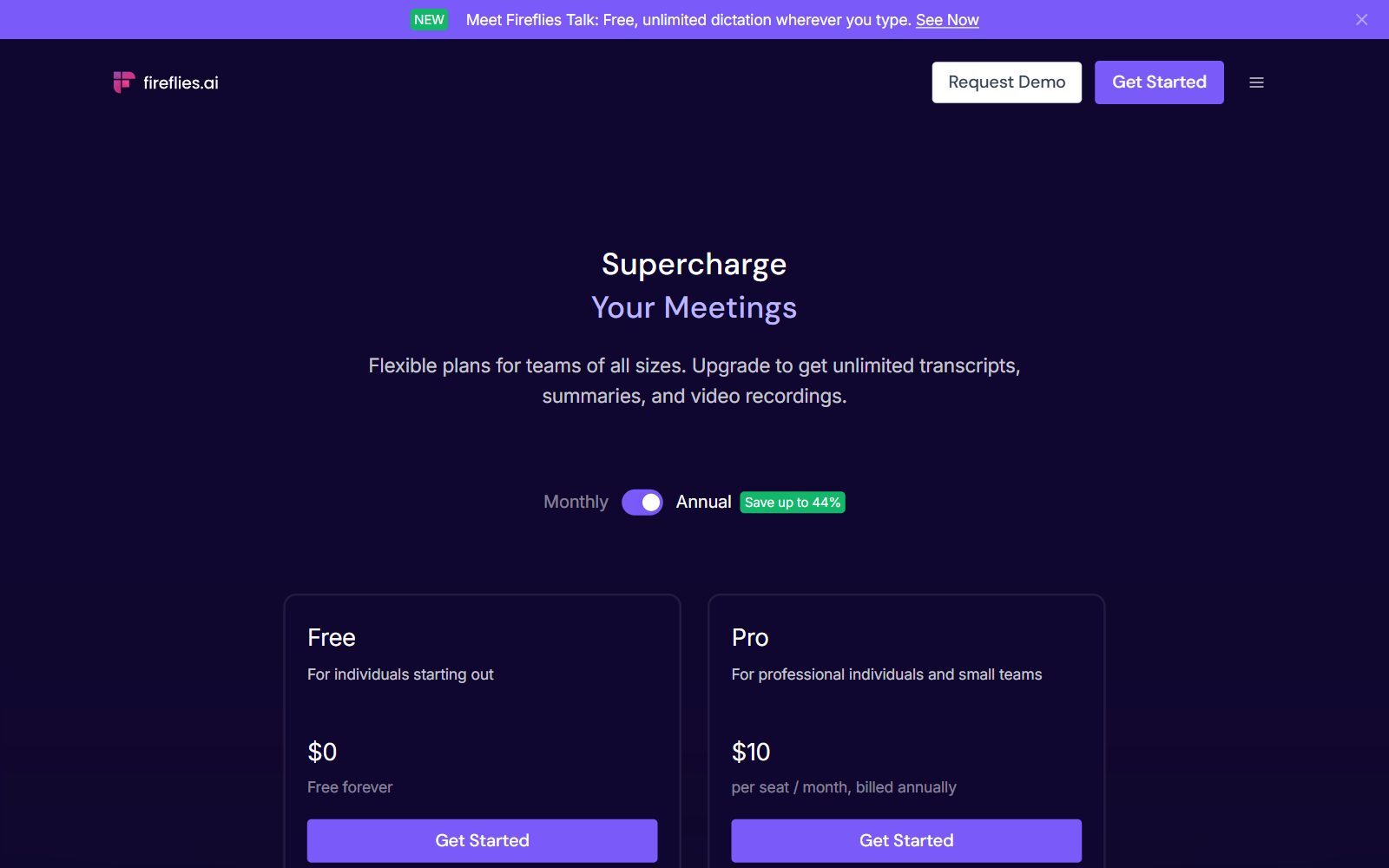
Fireflies.ai records and transcribes meetings in more than 100 languages and turns them into summaries and action items. On the Fireflies pricing page (annual billing by default) Free costs $0 forever with unlimited transcription, limited AI summaries and 400 minutes of storage per team. Pro costs $10 per seat a month billed annually and adds unlimited AI summaries, video recording and 8,000 minutes of storage per seat; Business costs $19 per seat a month.
13. Jasper: for marketing teams that also summarise
Jasper is an AI platform for marketing content: agents for marketing workflows, brand voices and knowledge assets. It can summarise, but you pay for the marketing features. Its pricing page FAQ lists Pro at $59 a month billed yearly or $69 billed monthly for one seat, with a 7-day free trial; Business is priced on request. Compare it in Jasper vs Copy.ai and Copysmith vs Copy.ai.
Changed or Dropped Since the Old List
- Briefly Executive Summaries: no official website found; a newer document summariser called Briefly is listed on Product Hunt, but its website returned an error in November 2026.
- Narrato: narrato.io now redirects to Typeface, an enterprise marketing AI platform; according to TechCrunch, Typeface acquired Narrato in September 2024. Removed.
- PageOn.ai: an AI presentation app; we found no working pricing page and no summariser plan facts, so it is left out.
- Blainy: now presents itself as an AI research paper writer. It still lets you chat with your PDFs; the free plan gives 200 AI words a day and Unlimited costs $12 a month billed annually. Moved out of the main list because summarising is no longer its focus.
- ClickUp: the AI is now ClickUp Brain², included on Business and as a trial on Free and Core; the old "$7 per member" add-on price is gone.
- Get Digest appeared twice in the old list; it is now listed once, as GetDigest.
- Added: ChatGPT, Claude, Gemini, Notion AI, QuillBot, Otter.ai and Fireflies.ai. Old claims we could not re-confirm on official pages (Jasper's language count, SciSummary's document size limit) were removed.
Which Briefly Alternative Should You Choose?
- You need a one-page summary of a long report or contract: Claude or ChatGPT.
- Your documents live in Google Workspace: Gemini with Google AI Plus or Pro.
- You want summaries of every customer or investor call: Otter.ai or Fireflies.ai.
- You read research papers: SciSummary.
- Your team works in Notion or ClickUp: their own AI, so summaries stay next to the work.
- You want a free summary of a short text without signing up: Scribbr, QuillBot or GetDigest.
- You want to keep sensitive documents on your own machine: a self-hosted model from our open-source ChatGPT alternatives, and a self-hosted workspace from our open-source Notion alternatives.
A simple executive summary prompt that works in any of them: "Summarise this document for a busy founder in under 200 words: the main point, three key facts with numbers, the risks and the decision I need to make." Always check the numbers against the source before you forward the summary.
How Founders Use Summaries in Their Daily Work
Summaries save the most time when they feed into a system. Keep them in your notes app: our guides to Roam Research alternatives, free Craft alternatives and open-source Obsidian alternatives compare the options. Turn a summary into a diagram or a one-page plan with the tools in free Whimsical alternatives and Whimsical alternatives.
Reading books instead of reports? Our own founder book summaries, such as The Lean Startup summary and The Mom Test summary, show what a useful summary looks like: the idea, how to apply it and what to do next. For writing, see the benefits of QuillBot as a co-writer and our open-source Grammarly alternatives.
Summaries also work the other way: AI assistants summarise your website when people ask about your market. Learn how to get cited by ChatGPT, and use the F/MS AI SEO Tool to publish articles built to rank on Google and to be quoted by ChatGPT and Perplexity; the AI SEO blog explains how.
Join ElonaHunt (like ProductHunt but for women) and explore the coolest women-focused startups out there!
Discover your next big inspiration and connect with like-minded female entrepreneurs!
👉 Join the Hunt Here
FAQ: Briefly Alternatives and AI Summarisers
What is Briefly Executive Summaries?
We could not find an official website for a product with that name in November 2026. A newer document summariser called Briefly is listed on Product Hunt, but its website returned an error when we checked. The tools in this guide do the same job.
What is the best free alternative to Briefly?
For most documents, the free plans of ChatGPT, Claude or Gemini, which can summarise uploaded files. For short texts without an account, Scribbr (600 words at a time), QuillBot or GetDigest.
Which AI tool is best for meeting summaries?
Otter.ai and Fireflies.ai. Otter's free Basic plan includes 300 transcription minutes a month; Fireflies' free plan has unlimited transcription with limited AI summaries. Notion Business also includes AI Meeting Notes.
Which tool summarises research papers best?
SciSummary is built for scientific papers: import by PDF, DOI, PubMed ID or arXiv ID, get figure explanations and citations. Pro costs $4 a month billed yearly after a 7-day trial.
How much do paid AI summarisers cost?
From our location: Gemini's Google AI Plus €4.99 a month, ChatGPT Go €8, QuillBot Premium €8.33 billed yearly, Otter Pro $8.33 per user billed yearly, Fireflies Pro $10 per seat billed yearly and Claude Pro $17 billed yearly ($20 monthly).
Is it safe to upload confidential documents to an AI summariser?
Check each tool's data and privacy settings first, and avoid uploading contracts or investor data to free web tools you do not know. Business and enterprise plans usually add admin and data controls; Notion Enterprise, for example, states zero data retention with its AI providers.
Can AI write my startup's executive summary?
Yes, but that is a different job from summarising a document. Our guide to free executive summary generators covers tools that help you write one for a business plan or pitch.
Are AI summaries accurate?
They are good at structure and main points but can miss nuance or get numbers wrong. Ask for page references, check every figure against the source and never forward a summary you have not read.
Where can I get a backlink by writing about my startup?
You can publish a guest post in one of the Fe/male Switch startup blogs, which rank in Google and in AI tools. Get a quality backlink.
About the Author
Violetta Bonenkamp, also known as MeanCEO, is an experienced startup founder with an impressive educational background including an MBA and four other higher education degrees. She has over 20 years of work experience across multiple countries, including 5 years as a solopreneur and serial entrepreneur. Throughout her startup experience she has applied for multiple startup grants at the EU level, in the Netherlands and Malta, and her startups received quite a few of those. She’s been living, studying and working in many countries around the globe and her extensive multicultural experience has influenced her immensely.

