
Ubersuggest vs Keywords Everywhere: Which Low-Cost Keyword Tool Should a Startup Use?
If your startup has a small budget for SEO, two names come up first: Ubersuggest, Neil Patel's budget all-in-one SEO tool, and Keywords Everywhere, the browser extension that puts search volume and cost per click into Google, YouTube and Amazon while you search. They are not the same kind of tool. Ubersuggest is a full web app with keyword research, site audits, rank tracking, competitor research, backlinks and AI search visibility, and it is one of the few SEO tools you can still buy once, for life. Keywords Everywhere does one job, keyword data in your browser, and you pay for it with yearly credits. We checked both tools' official pricing pages and help articles in October 2026.
Quick answer: if you mostly need to know how many people search for a phrase, start with Keywords Everywhere: many features are free, and the Bronze plan costs $84 a year for 100,000 keyword lookups. Choose Ubersuggest if you also need a site audit, rank tracking, competitor and backlink research in one login; it costs €29 a month in the default view from Europe (US$29 in its own price comparison), with a 7-day free trial, or €290 once for the lifetime Individual plan. Many founders use the free versions of both before paying for either.
Are you getting customers from ChatGPT yet?
More and more traffic is coming from Perplexity, ChatGPT, Grok and other AI tools.
👉 Rank on ChatGPT
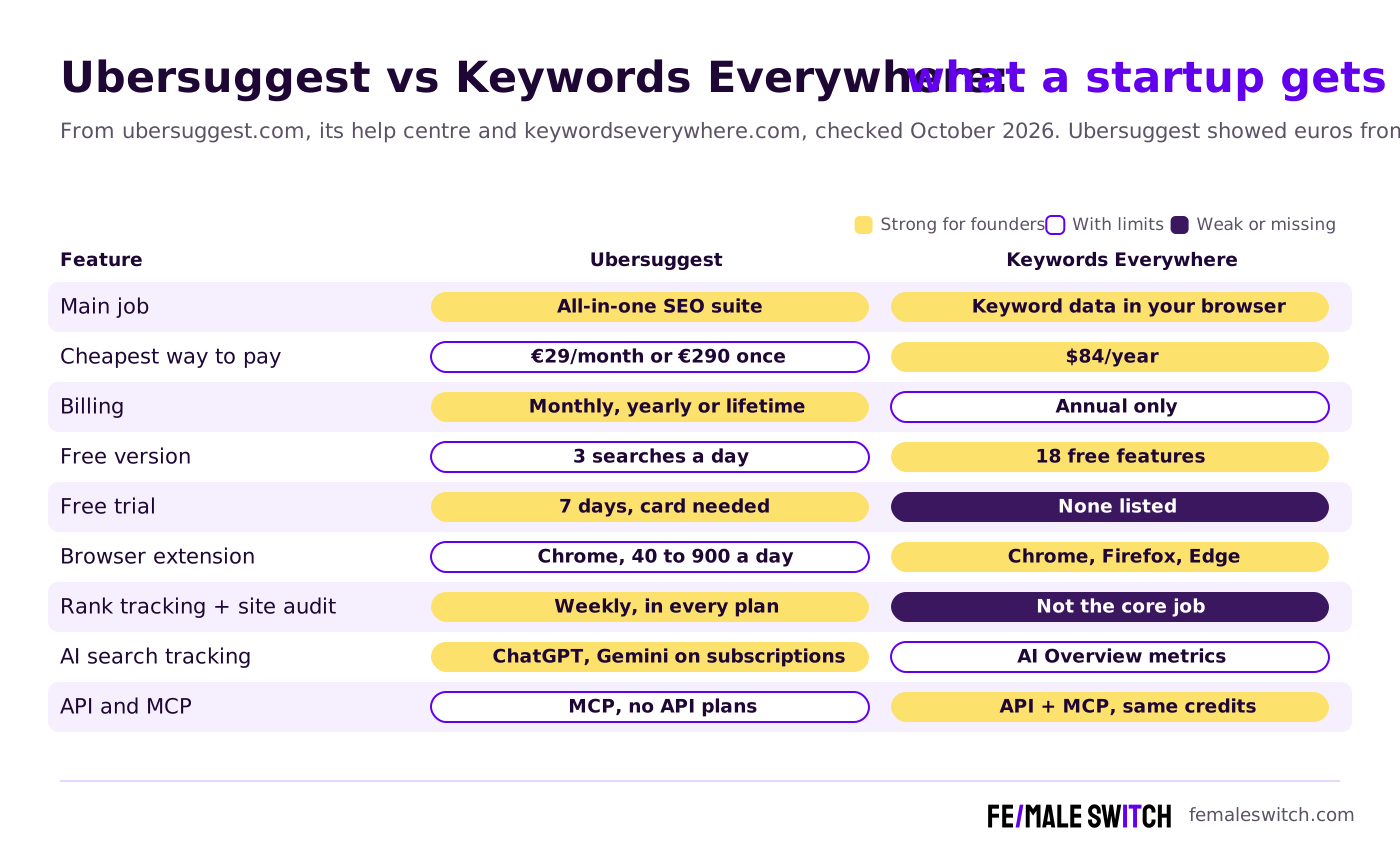
Ubersuggest vs Keywords Everywhere at a Glance
Sources: ubersuggest.com pricing page (default view in euros from Europe) and homepage, the Ubersuggest help centre, keywordseverywhere.com, its plan comparison and credits pages, checked 29 October 2026.
The Two Tools in Detail
Ubersuggest: a Budget All-in-One SEO Suite You Can Buy Once
Ubersuggest is built by NP Digital, Neil Patel's agency; the old neilpatel.com/ubersuggest address now redirects to ubersuggest.com. It covers keyword research (it states a database of 2.2 billion+ keywords, with ideas from autocomplete, related terms, questions, prepositions and comparisons), a background site audit with a prioritised list of fixes, rank tracking, competitor traffic and keyword gaps, backlinks and AI search visibility. It also connects to Claude, Cursor and other AI assistants through an MCP integration, and has a ChatGPT app and a WordPress plugin.
- Three self-serve plans: Individual (1 project, 150 searches a day), Business (7 projects, 300 a day) and Enterprise (15 projects, 900 a day). Custom plans are priced on request.
- Monthly: €29, €49 and €99 a month in the default view from Europe; Ubersuggest's own comparison lists its plans at US$29 to US$99. Monthly plans come with a one-time 7-day free trial, and a card is needed to start it.
- Yearly: €192, €326 and €657 a year.
- Lifetime: €290, €490 and €990 once, with no monthly fees. Lifetime purchases are final and non-refundable, so Ubersuggest itself recommends using the free trial first.
- What the plans include: on subscriptions, 125, 150 or 300 tracked keywords per project and 1,000, 5,000 or 10,000 audited pages, both updated weekly; 5, 10 or 15 competitors; 20,000 to 100,000 keyword suggestions a month. Add-ons such as extra searches, projects, keywords or users cost $5 a month each. See the Ubersuggest pricing page.
- Cancelling: you can cancel or downgrade to a free account at any time, and there are no setup fees. There are no API plans.
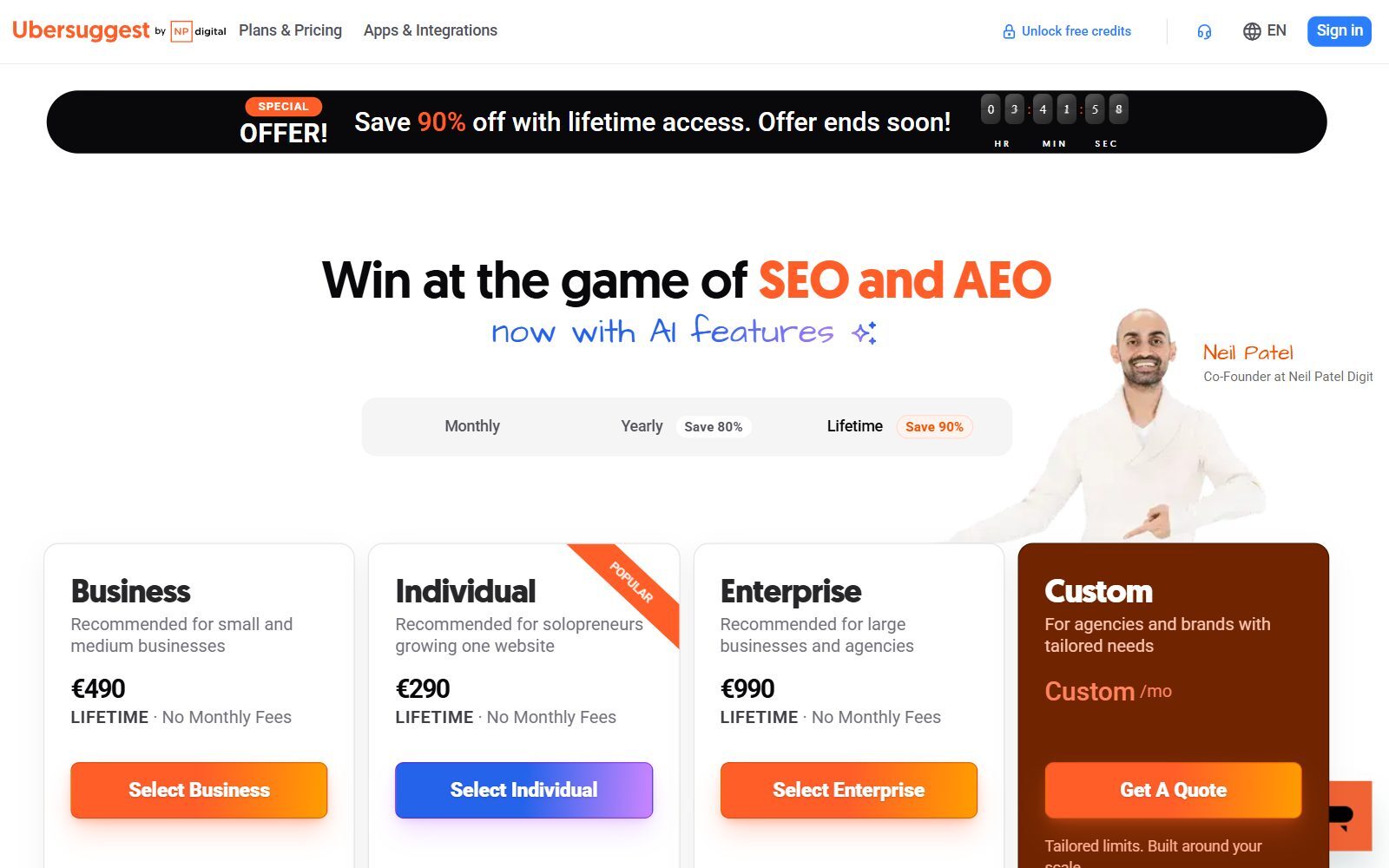
The pricing page opens on the lifetime tab with a "Save 90%" countdown banner. Treat it as a sales banner, not a deadline: the lifetime prices were the same €290, €490 and €990 in the price data the page loaded when we checked.
Ubersuggest Free Account and Chrome Extension
You can search on ubersuggest.com without paying. According to the help centre's article on free account limits, a free account gets 3 searches or reports a day, 1 project, 25 tracked keywords updated weekly (desktop only, 1 location), 2 competitors, a site audit of 150 pages a week, 100 backlinks per site and 3 keyword lists of up to 30 keywords. It has no time limit, and a cancelled paid plan falls back to it.
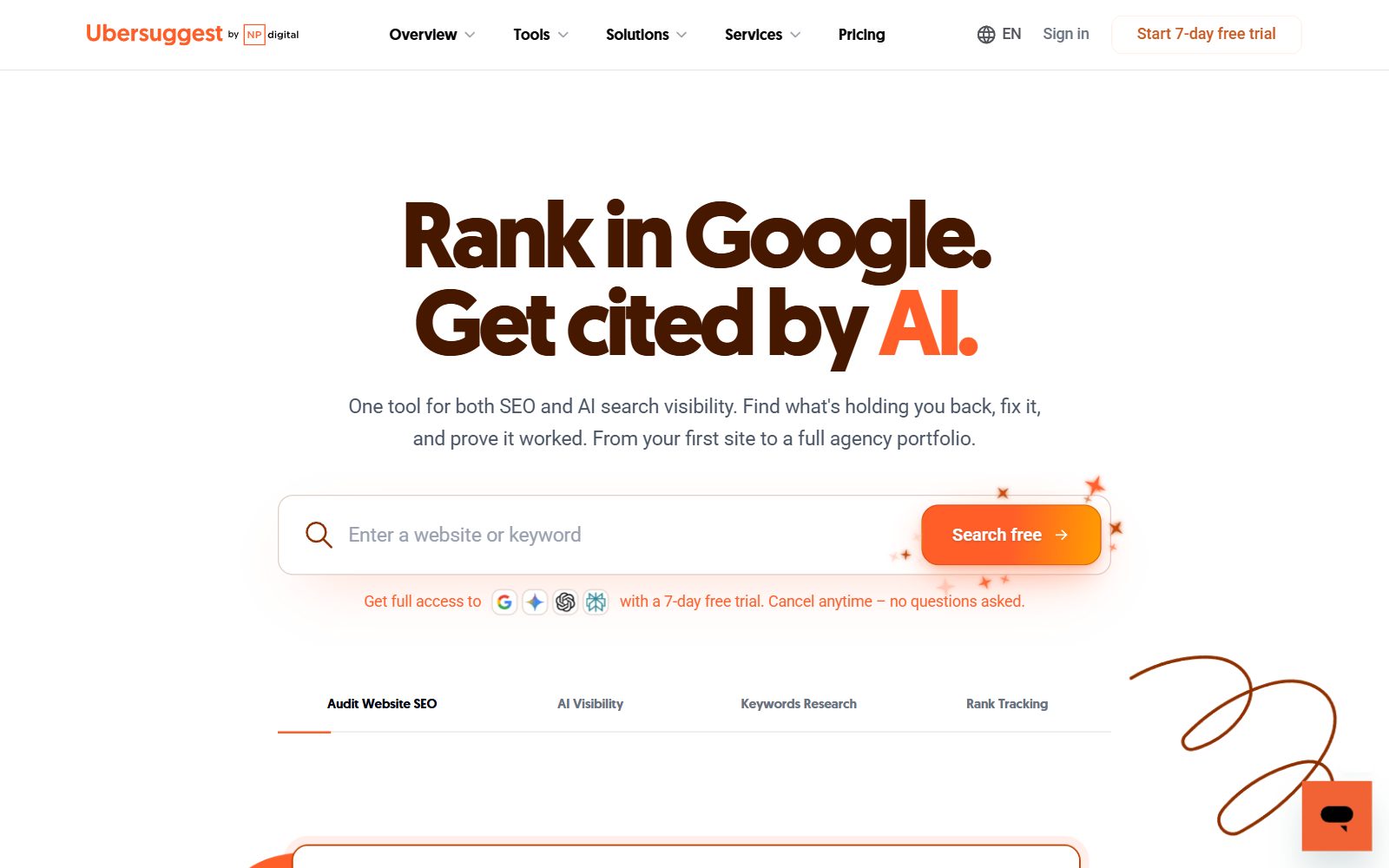
The Ubersuggest Chrome extension shows search volume, CPC and keyword suggestions on Google, YouTube and Amazon, plus traffic, domain authority and backlinks for the site you are on. It is included in every plan, and its daily limits are 40 reports a day without an account or on the free plan, then 150, 300 or 900 a day on Individual, Business and Enterprise. It works in Chrome only.
Is your startup on ChatGPT?
More and more traffic is coming from Perplexity, ChatGPT, Grok and other AI tools.
👉 Rank on ChatGPT
Keywords Everywhere: Keyword Data While You Search
Keywords Everywhere is a browser extension for Chrome, Firefox and Edge (there is no Safari version or mobile app). Search on Google and it shows the volume, CPC, competition and 12-month trend for your query, with Related, People Also Search For and long-tail keyword widgets next to the results. It works the same way on YouTube, Amazon, Bing, eBay, Etsy, Google Search Console, Google Trends, Keyword Planner and other sites, and it can list the top keywords and backlinks of any website you research. Historical search volume goes back to 2004.
- Free features: install it with nothing to sign up for and you get 18 free features, among them website traffic and Moz link metrics, SEO difficulty, the keyword widgets (without numbers), on-page keyword analysis, YouTube insights, Instagram, X and Pinterest metrics and 200+ prompt templates for ChatGPT, Claude and Gemini.
- Paid data runs on credits: one credit buys the volume, CPC, competition and trend for one keyword. A Google search that shows 8 related, 20 People Also Search For and 25 long-tail keywords uses 1 + 8 + 20 + 25 = 54 credits. When credits run out, the widgets keep showing keywords but hide the numbers.
- Plans (annual only): Bronze $84 a year ($7 a month) with 100,000 credits and 1 seat, Silver $168 with 400,000 credits and 3 seats plus the SEO Minion add-on, Gold $480 with 2 million and 10 seats, Platinum $1,440 with 8 million and 20 seats. Every plan has all features, the API and the MCP server; see Keywords Everywhere pricing and the plan comparison.
- Credits expire 12 months after purchase, oldest first. Extra credit packs start at $80 for 200,000 credits.

Rough maths: at about 54 credits per Google search with every widget on, Bronze's 100,000 credits cover around 1,850 such searches a year (our calculation from the example on the plan page). Switch metrics off for widgets you do not need and the same credits last much longer. For Reddit-style research with Keywords Everywhere, see Keywords Everywhere vs Keyworddit.
Boost Your SEO by Getting Featured in Our Blogs and get a backlink.
We publish content about startups, education, tech, funding, etc. that ranks well not only in Google but also in Perplexity, ChatGPT, Grok and other AI tools.
👉 Get featured now!
Ubersuggest vs Keywords Everywhere: Feature by Feature
Keyword research
Both show search volume, CPC and related keywords. Keywords Everywhere shows them on the page you are already on, for many countries or worldwide, and charges one credit per keyword; it is the faster tool for brainstorming. Ubersuggest gives you a research workspace instead: keyword difficulty, questions and comparisons, content ideas, bulk analysis of 50 to 1,000 keywords at a time and AI prompt ideas, capped by daily searches rather than credits. If you only need free ideas, see Keyword Tool vs Keyword Planner and Keyword Revealer vs Keyword Planner.
Competitors and backlinks
Ubersuggest estimates any domain's organic and paid traffic, lists its top pages and the keywords you are missing, and shows backlinks (2,000 to 10,000 rows by plan, with 3 years of link history). Keywords Everywhere shows the top keywords and backlinks of a website you research, capped at the top 1,000 on Bronze up to 10,000 on Platinum. For deeper competitor research see SpyFu vs Keyword Insights.
Rank tracking and site audits
This is where Ubersuggest wins. Every plan tracks keywords and audits your site every week, and even the free account tracks 25 keywords and audits 150 pages. Keywords Everywhere is not a rank tracker; its team runs a separate free tracker that reads your positions from Google Search Console, which we describe in Wincher vs Keywords Everywhere. If daily rank tracking matters more than keyword data, read our Rank Tracker vs Keywords Everywhere comparison.
AI search visibility
Ubersuggest's subscriptions track how ChatGPT and Gemini answer the prompts in your category: 10, 15 or 20 prompts per brand, refreshed monthly, every two weeks or weekly by plan, with Google AI Overview added on Enterprise. Ubersuggest says Perplexity, Claude, Grok and Copilot are not tracked. Lifetime plans only get a basic version (ChatGPT, 10 prompts, monthly updates, 1 project), and the AI add-ons for lifetime plans are billed monthly. Keywords Everywhere does not track your brand in AI answers; it shows AI Overview metrics for your searches and offers prompt templates inside ChatGPT, Claude, Gemini and DeepSeek.
What a year costs
At the entry level, Keywords Everywhere Bronze costs $84 a year. Ubersuggest Individual costs €348 over a year if you pay monthly (12 × €29), €192 on yearly billing, or €290 once on the lifetime plan. Both together cost less than most big SEO suites; for the expensive end, see Ahrefs vs Semrush.
Is the Ubersuggest Lifetime Plan Worth It?
A one-time payment is rare among SEO tools, and for a bootstrapped founder who will use the tool for years, €290 is less than a year of monthly payments. Before you buy, check three things:
- No refund. Lifetime purchases are final, and the 7-day free trial only applies to monthly subscriptions. Test on a monthly trial first.
- Fewer AI features. Ubersuggest says lifetime plans focus on the core SEO tools and limit AI features by design: the lifetime cards list 200, 500 or 700 monthly credits (subscriptions: 250, 500 or 1,000) and only the basic AI Search Visibility.
- Add-ons still cost monthly. Extra AI visibility, searches, projects or users are paid every month, even on a lifetime plan.
If AI search visibility is part of your plan, a subscription fits better. If you mainly need keyword research, audits and weekly rankings for one or a few sites, the lifetime Individual or Business plan is good value.
What Changed Since the Old Version of This Comparison
- Ubersuggest costs more than the old article said. It quoted paid plans from $12 a month; the pricing page now starts at €29 a month (US$29 in its own comparison), €192 a year or €290 once.
- Keywords Everywhere is no longer pay-as-you-go only. The old "$2.25 for 100K credits" is gone: plans are annual, from $84 a year, and credit packs start at $80 for 200,000 credits.
- Ubersuggest moved from neilpatel.com/ubersuggest to ubersuggest.com, and now includes AI Search Visibility, an MCP integration and a ChatGPT app.
- Keywords Everywhere now includes an MCP server, AI Overview metrics and prompt templates for AI assistants.
- Removed: two success stories with no source (a site that "moved from #35 to the Top 10" and "45% more video traffic"), third-party blog links and a generic list of SEO mistakes.
Ubersuggest or Keywords Everywhere: Which Should You Choose?
- You are validating an idea and only need search demand: Keywords Everywhere's free features, then Bronze ($84 a year) when you need the numbers.
- You have a website and want one tool for audits, rankings and keywords: Ubersuggest Individual, starting with the 7-day trial on the monthly plan.
- You hate subscriptions and will use the tool for years: the Ubersuggest lifetime plan, after a trial.
- You sell on Amazon, Etsy or YouTube: Keywords Everywhere, which shows volumes on those sites and on 15+ others; Ubersuggest's extension covers Google, YouTube and Amazon.
- You use Safari or Firefox: Keywords Everywhere (Firefox and Edge too); Ubersuggest's extension is Chrome only, but its web app works in any browser.
- You want to know whether ChatGPT recommends you: an Ubersuggest subscription, not the lifetime plan.
- You have no budget at all: the free versions of both, plus the tools in our free Ahrefs alternatives guide. For more paid options, see Ahrefs alternatives and SE Ranking vs Mangools.
How to Test Both Tools Before You Pay
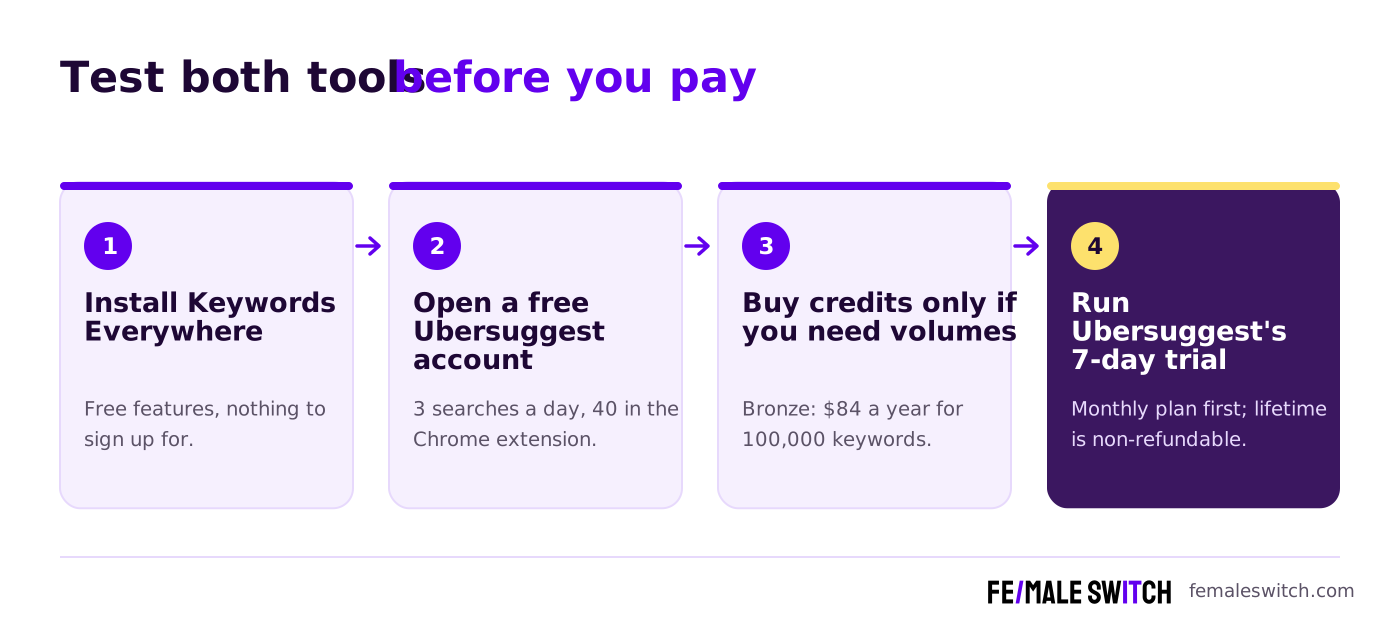
- Install Keywords Everywhere. Use the free features for a week of normal searching and note which questions and long-tail phrases keep coming up.
- Open a free Ubersuggest account. Use the 3 daily searches on your own domain and one competitor, and the 40 daily extension searches on Google.
- Buy Keywords Everywhere credits only if you need volumes. Bronze gives you 100,000 keyword lookups for $84 a year.
- Run Ubersuggest's 7-day trial on a monthly plan. Add your site, track your 20 most important keywords and run the audit. Keep it monthly, yearly or lifetime only if you used it every week.
How Founders Use Ubersuggest and Keywords Everywhere to Get Customers
Keyword research is a cheap demand test: if nobody searches for the problem you solve, validate your startup idea with real users before you build more. Once you have the phrases, publish one useful page per topic. Our guides to finding long-tail keywords and checking competitor keywords show the method, and the guide to the Keywords Everywhere Chrome extension and our Ubersuggest pricing guide go deeper into each tool.
For more Ubersuggest match-ups, read Ahrefs vs Ubersuggest and Ubersuggest vs SpyFu. For keyword data, compare Similarweb vs Keyword Planner and Keyword Tool vs Keyworddit.
Then turn the keywords into articles. The F/MS AI SEO Tool writes articles from your keywords that are built to rank on Google and to be cited by ChatGPT and Perplexity, with human editors checking them. For backlinks, the F/MS Marketing Directories list free directories where you can submit your startup, and F/MS Marketing Services can add guest posts that build your authority.
Boost Your SEO by Publishing Your Startup Press Release with us.
We publish content about startups, education, tech, funding, etc. that ranks well not only in Google but also in Perplexity, ChatGPT, Grok and other AI tools.
👉 Publish Press Release
FAQ: Ubersuggest vs Keywords Everywhere
What is the main difference between Ubersuggest and Keywords Everywhere?
Ubersuggest is an all-in-one SEO web app with keyword research, site audits, rank tracking, competitor, backlink and AI search tools. Keywords Everywhere is a browser extension that shows search volume, CPC and competition on Google, YouTube, Amazon and other sites while you search.
How much does Ubersuggest cost?
In the default view from Europe in October 2026: Individual €29, Business €49 and Enterprise €99 a month; €192, €326 and €657 a year; or €290, €490 and €990 once for lifetime access. Ubersuggest's own price comparison lists its plans at US$29 to US$99 a month.
How much does Keywords Everywhere cost?
Plans are annual only: Bronze $84 a year with 100,000 credits, Silver $168 with 400,000, Gold $480 with 2 million and Platinum $1,440 with 8 million. One credit buys the data for one keyword, and credits expire after 12 months.
Is Ubersuggest free?
There is a free account with no time limit. According to the Ubersuggest help centre, it allows 3 searches or reports a day, 1 project, 25 tracked keywords and a 150-page site audit, plus 40 searches a day in the Chrome extension.
Is Keywords Everywhere free?
The extension is free to install, and 18 features such as traffic metrics, link metrics, keyword widgets and prompt templates work without paying. Search volume, CPC, competition and trend data need a free API key and credits from a paid plan.
Does Ubersuggest have a lifetime deal?
Yes. Individual costs €290, Business €490 and Enterprise €990 once in the default view from Europe. Lifetime purchases are non-refundable, AI features are limited, and add-ons are still billed monthly, so test the monthly plan's 7-day trial first.
Where can I submit a guest post about my startup?
You can publish a guest post in one of the Fe/male Switch startup blogs, which rank in Google and in AI tools like ChatGPT and Perplexity. Get a quality backlink.
Which is better for YouTube and Amazon keyword research?
Both extensions show data on YouTube and Amazon. Keywords Everywhere also covers Bing, eBay, Etsy, Google Search Console, Google Trends and more, and works in Firefox and Edge as well as Chrome.
Can I use Ubersuggest and Keywords Everywhere together?
Yes. A common low-cost setup is Keywords Everywhere for keyword data while you browse and Ubersuggest for site audits, weekly rank tracking and competitor research. Together they cost less than most big SEO suites.
Can I use AI to write SEO articles for the keywords I find?
Yes. The F/MS AI SEO Tool writes articles from your keywords that are built to rank on Google and in AI assistants, with human editors reviewing them.
About the Author
Violetta Bonenkamp, also known as MeanCEO, is an experienced startup founder with an impressive educational background including an MBA and four other higher education degrees. She has over 20 years of work experience across multiple countries, including 5 years as a solopreneur and serial entrepreneur. Throughout her startup experience she has applied for multiple startup grants at the EU level, in the Netherlands and Malta, and her startups received quite a few of those. She’s been living, studying and working in many countries around the globe and her extensive multicultural experience has influenced her immensely.

