
Rank Tracker vs Keywords Everywhere: Which Tool Should Run Your Startup's Keyword Research?
Keyword research for a startup has two halves. First you find out what customers type into Google, YouTube or Amazon and how often. Then, once you publish, you watch whether your pages climb for those words. Keywords Everywhere was built for the first half: a browser extension that shows search volume, cost per click and competition right next to the results while you search. Rank Tracker, the desktop app from SEO PowerSuite (made by Link-Assistant.Com), was built for the second half, but it now ships with more than 20 keyword research methods of its own, and the Keywords Everywhere team now runs a free rank tracker. So the two overlap more than ever. We checked both on their official pages in October 2026 to show which tool should own which step of the workflow, and what each costs per year.
Quick answer: if you are still choosing topics, start with Keywords Everywhere: the extension is free to install, and the Bronze plan at $84 a year buys 100,000 keyword credits for volumes, CPC and trends on Google, YouTube, Amazon and other sites. Choose Rank Tracker when you want one tool for deep research and tracking without counting credits: its free version already does keyword research and unlimited ranking checks, and €179 a year adds saved projects, scheduled checks and 5 competitors. Many founders use Keywords Everywhere for quick checks in the browser and Rank Tracker as the place where their keyword list and rankings live.
Are you getting customers from ChatGPT yet?
More and more traffic is coming from Perplexity, ChatGPT, Grok and other AI tools.
👉 Rank on ChatGPT
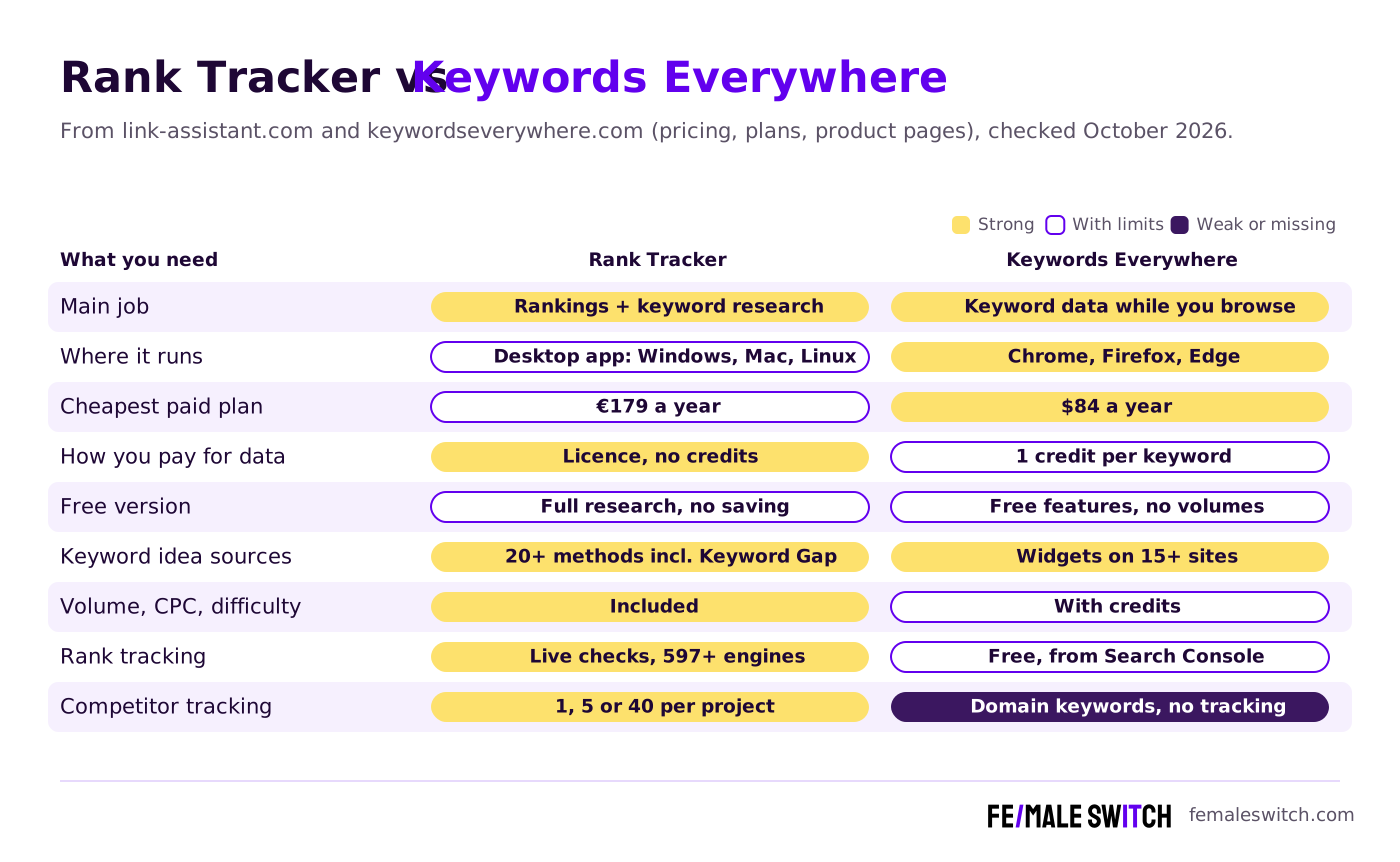
Rank Tracker vs Keywords Everywhere at a Glance
Sources: link-assistant.com (Rank Tracker, keyword research and pricing pages, default 1-year view, prices shown in euros from Europe), keywordseverywhere.com (homepage, plans, plan comparison and credits pages) and websiterankingchecker.com, checked 29 October 2026.
The Two Tools in Detail
Rank Tracker: Keyword Research and Tracking in One Desktop App
Rank Tracker is one of the four SEO PowerSuite apps, next to WebSite Auditor, SEO SpyGlass and LinkAssistant. You install it on Windows, macOS or Linux and track as many websites, keywords and locations as you like. Link-Assistant says it covers local rankings in over 597 search engines (Google with its SERP features, plus Bing, Yahoo, YouTube, Naver, Yandex and Baidu) and serves around 20,000 users a month. Less well known is how much keyword research it does. Its keyword research page lists 20+ methods:
- Ranking Keywords: enter your own site or a competitor's, by page or by domain, and see the keywords it already ranks for.
- Keyword Gap: the keywords your competitors rank for and you don't.
- Google Search Console: connect it to find underperforming keywords, the low-hanging fruit that needs the least work.
- Keyword Planner suggestions: ideas from Google Ads Keyword Planner and Yandex Wordstat.
- Autocomplete tools: suggestions from 7 search engines, including Google (65+ languages), Amazon, YouTube, Bing and Yahoo.
- Related Searches and Related Questions: long-tail phrases from Google's People Also Ask and question suggestions.
- TF-IDF Explorer and Keyword Combinations: the terms your top 10 competitors use most, plus word mixes, combinations and common misspellings.
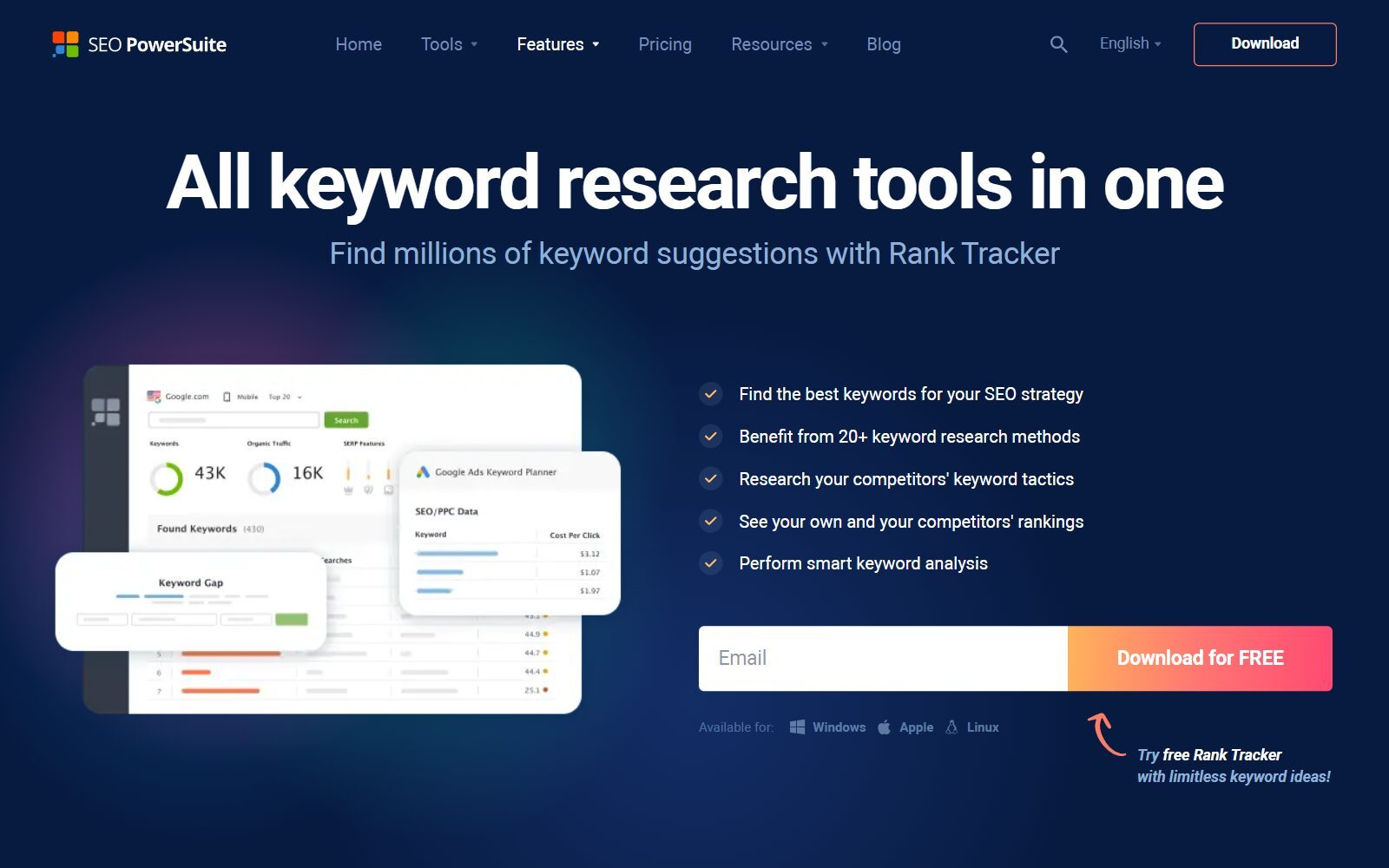
Every keyword comes with search volume, competition, keyword difficulty (calculated from the strength of the top 10 results), expected monthly visits if you ranked first, and cost per click. Rank Tracker groups ideas by topic automatically, and its Keyword Map lets you assign each group to the page that should rank for it, which is exactly the list you then track. The pricing page says SEO PowerSuite's database holds 216 million keywords, and its comparison table ticks keyword research and keyword analysis for the free edition too.
Tracking is where it started: desktop and mobile positions from a country down to a street address, the top 10, 50 or up to 1,000 results, a saved top 30 for every check, and scheduled checks daily, weekly or monthly on the paid licences. Note that Ranktracker.com is a different, browser-based product; this article is about SEO PowerSuite's app. We also compared it with Similarweb, Mangools and BrightEdge.
What Rank Tracker Costs
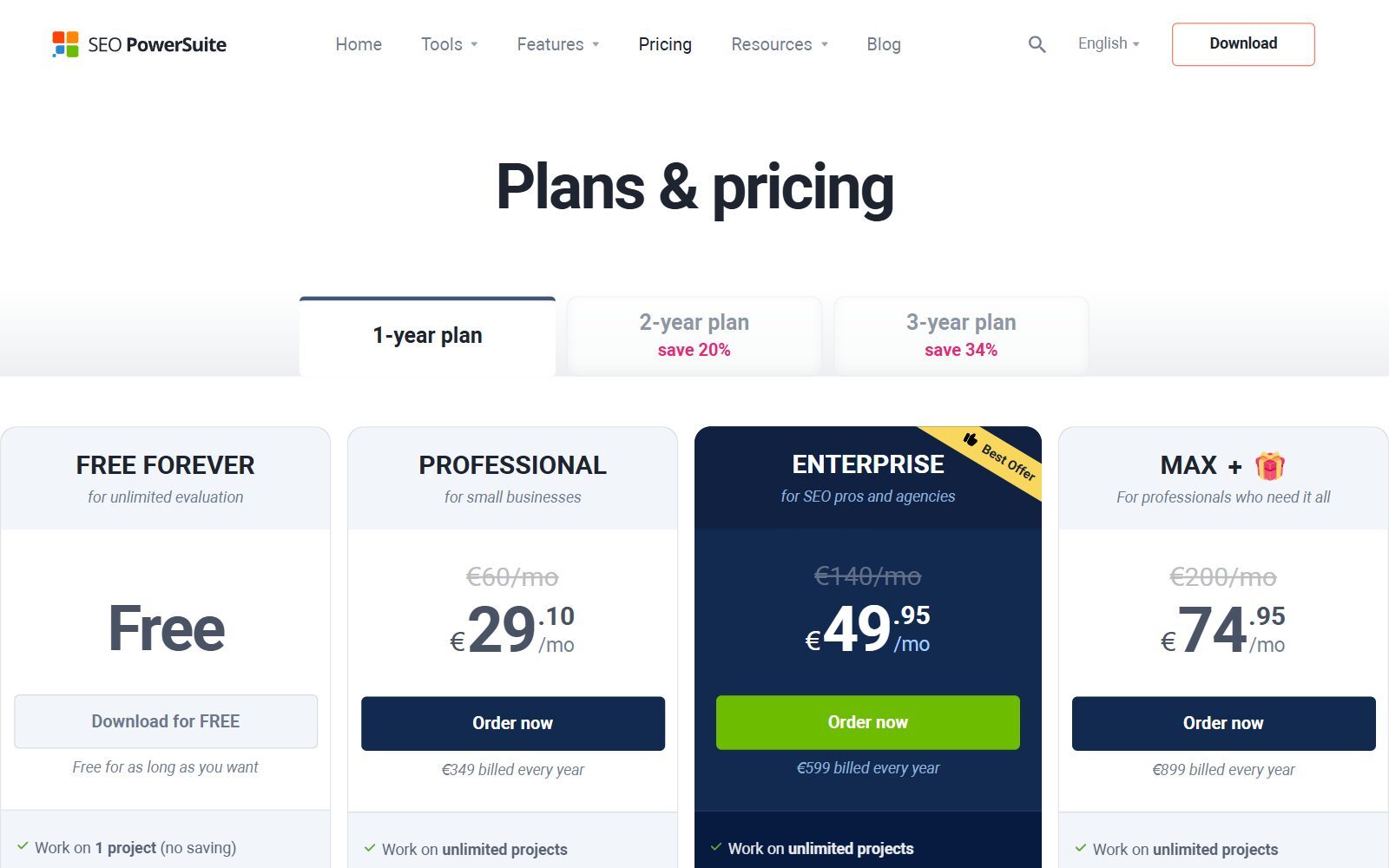
The SEO PowerSuite pricing page sells Rank Tracker on its own or in the full suite, billed once a year with no credit system:
- Free, €0: keyword research and ranking checks without keyword limits, 1 competitor per project, but no saved projects, scheduled tasks, captcha-free checks, copying or printing. The download form asks for an email address.
- Rank Tracker Professional, €179 a year: for in-house use, just under €15 a month. Unlimited saved projects, scheduled tasks, captcha-free checks and 5 competitors per project.
- Rank Tracker Enterprise, €419 a year: for client work. 40 competitors per project, plus saving, emailing and scheduling reports and export to CSV, SQL and HTML.
- SEO PowerSuite bundle: all four apps for €349 (Professional), €599 (Enterprise) or €899 (Max +) a year on the default view; 2-year and 3-year plans save 20% and 34%. Every edition lists Google AI Overviews tracking.
- Refunds: you can cancel at any time, but the FAQ says partial use is not refunded, so test the free version on your own keywords first.
Is your startup on ChatGPT?
More and more traffic is coming from Perplexity, ChatGPT, Grok and other AI tools.
👉 Rank on ChatGPT
Keywords Everywhere: Keyword Data on Every Page You Search
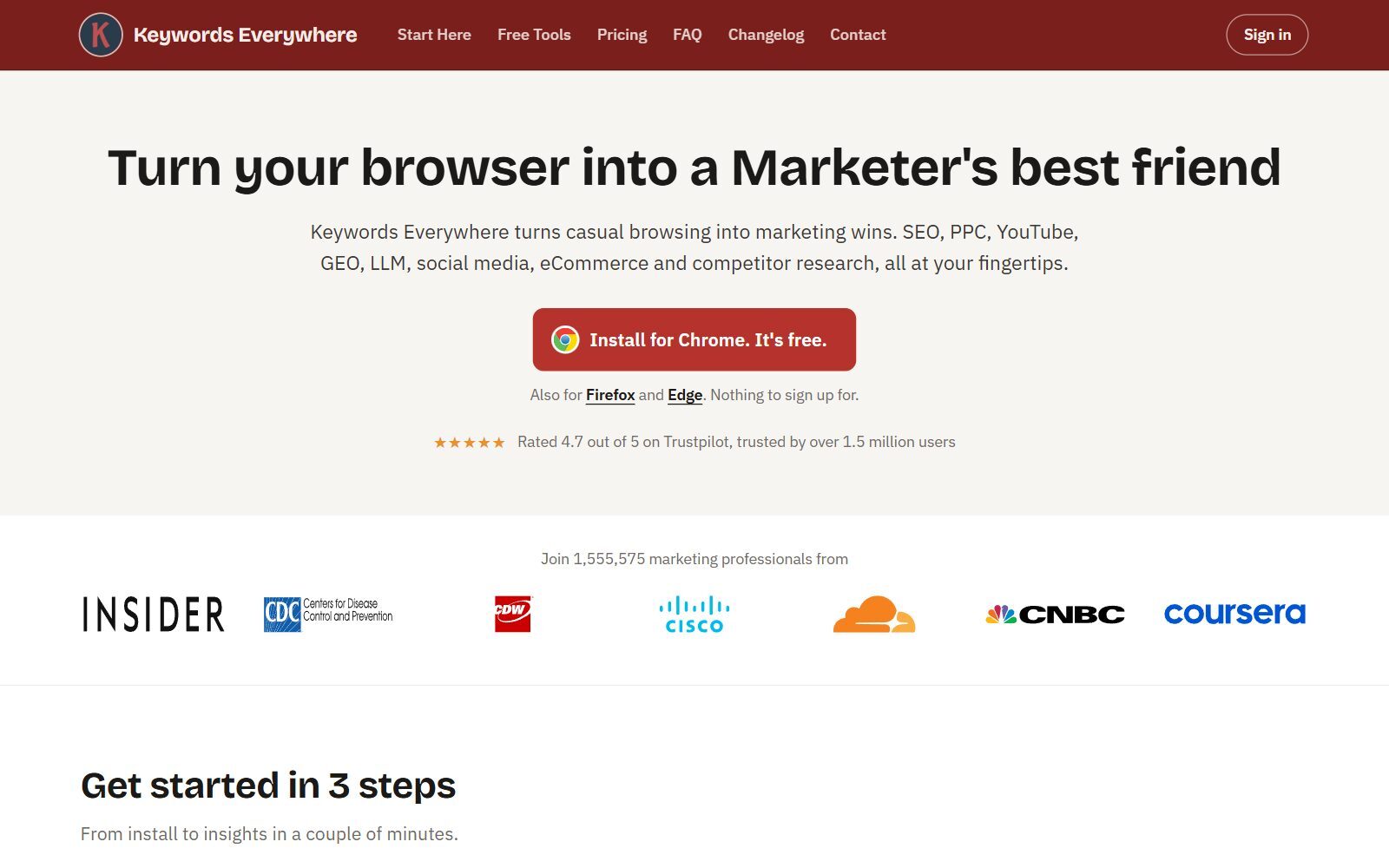
Keywords Everywhere is a browser extension for Chrome, Firefox and Edge, with nothing to sign up for to install it. Search on Google and it shows the volume, CPC, competition and 12-month trend of your query under the search bar, plus Related, People Also Search For and long-tail keyword widgets next to the results. It does the same on YouTube, Amazon, Bing, eBay, Etsy, Google Search Console, Google Trends and Keyword Planner, and you can enter any competitor's URL to see the keywords it ranks for. It says it is trusted by over 1.5 million users.
- Free features: 18 of them, including website traffic and Moz link metrics, SEO difficulty metrics, on-page keyword analysis, the keyword widgets (without numbers), YouTube insights, local SEO metrics and 200+ prompt templates for ChatGPT, Claude and Gemini.
- Paid data runs on credits: one credit buys the volume, CPC, competition and trend for one keyword, on any supported site and through Bulk Keywords Data. A Google search that shows 8 related, 20 People Also Search For and 25 long-tail keywords uses 1 + 8 + 20 + 25 = 54 credits. When credits run out, the widgets keep listing keywords but hide the numbers.
- Plans (annual only): Bronze $84 a year with 100,000 credits and 1 seat, Silver $168 with 400,000 and 3 seats, Gold $480 with 2 million and 10 seats, Platinum $1,440 with 8 million and 20 seats. All include every feature, the REST API and the MCP server; Silver and up add the SEO Minion add-on. See the plan comparison.
- Credits expire 12 months after purchase, oldest first. Extra credit packs start at $80 for 200,000 credits.
- For AI work: the MCP server lets ChatGPT, Claude, Cursor or VS Code pull live keyword data, and AI Overview metrics show which of your searches trigger an AI answer.
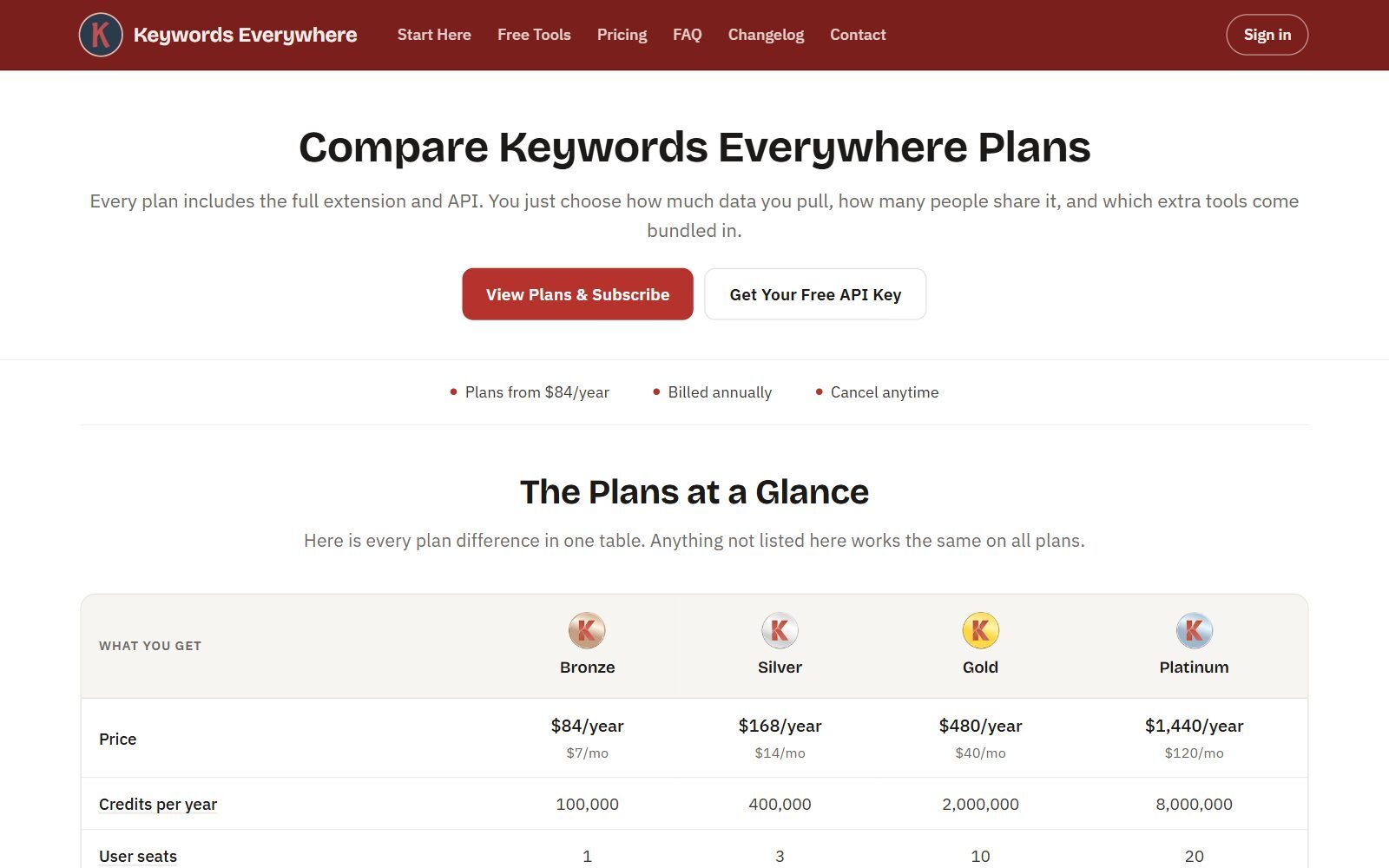
Rough maths: with every widget switched on, 100,000 Bronze credits cover about 1,850 Google searches a year (our calculation from the 54-credit example), or 100,000 keywords pasted into Bulk Keywords Data. Turn off metrics for autocomplete suggestions, or switch the extension off when you are not researching, to make credits last.
Boost Your SEO by Getting Featured in Our Blogs and get a backlink.
We publish content about startups, education, tech, funding, etc. that ranks well not only in Google but also in Perplexity, ChatGPT, Grok and other AI tools.
👉 Get featured now!
Website Ranking Checker: Keywords Everywhere's Free Rank Tracker
The Keywords Everywhere footer now links "Rank Tracker" to Website Ranking Checker, a free tracker from the same team. You log in with your Keywords Everywhere API key (a free account works), give it read-only access to Google, and it imports your positions, impressions, clicks and CTR from Search Console, refreshed daily and enriched with volume, CPC and competition, without using credits. It pulls two months of history at once and adds reports such as CTR gaps, content decay, quick wins (positions 11 to 20), cannibalisation and rising keywords, plus email alerts.
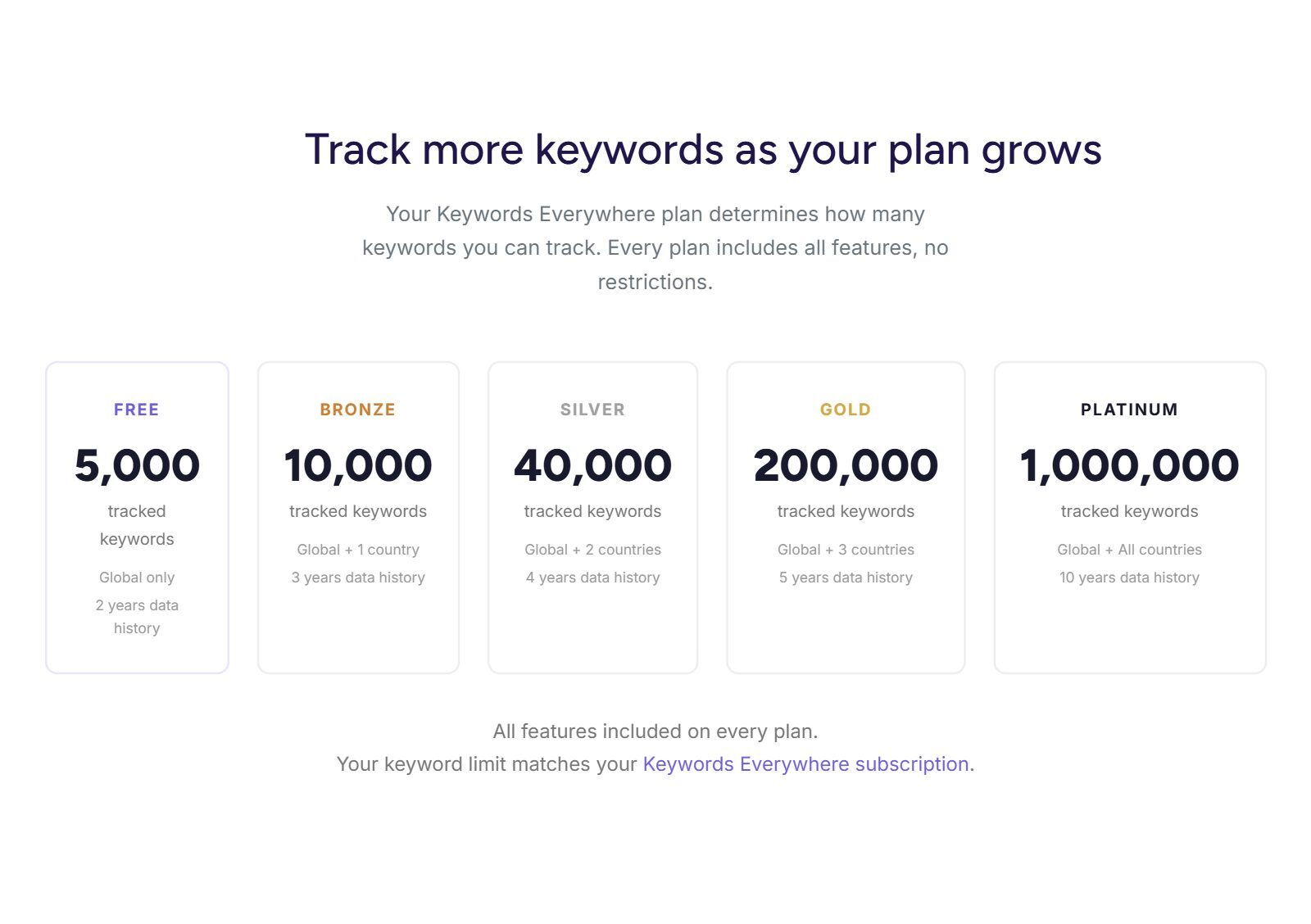
Free accounts track 5,000 keywords, global only, with 2 years of history; Bronze raises that to 10,000 keywords plus one country. The difference from Rank Tracker matters: Website Ranking Checker only sees verified sites and queries Google already shows you for, as Search Console's average position, and it does not list competitor tracking. Rank Tracker checks the keywords you choose, in the exact location and device you choose, including ones you do not rank for yet, and puts competitors next to you.
What Changed Since the Old Version of This Comparison
- Prices: the old article said Rank Tracker starts at $13.95 a month and Keywords Everywhere at $2.25 a month. Rank Tracker is now sold per year (Professional €179, Enterprise €419, with a free version), and Keywords Everywhere sells annual plans from $84 a year ($7 a month) with credit top-ups from $80.
- Keywords Everywhere tracks rankings now, for your own sites, through the free Website Ranking Checker based on Search Console data.
- Rank Tracker is a research tool too: 20+ keyword research methods, keyword difficulty and a Keyword Map are part of every edition, including the free one.
- AI features: the old claim that Keywords Everywhere is "not AI-driven" no longer holds (MCP server, AI Overview metrics, prompt templates). The claimed "AI-generated keyword forecasting" in Rank Tracker is not on its pages; it lists Google AI Overviews tracking.
- Removed: "data in over 150 countries" and "eight regional databases", which neither official site states, plus third-party links and generic tips without a source.
Which One Should Run Your Keyword Research?
- You are still picking topics and have no content yet: Keywords Everywhere. Install the free extension, then buy Bronze ($84 a year) when you want numbers. There is nothing to track yet.
- You want one tool for research and tracking, without credits: Rank Tracker. Do the research in the free version; pay €179 a year once you want saved projects and scheduled checks.
- You research competitors' keywords a lot: Rank Tracker's Ranking Keywords and Keyword Gap run without credits; Keywords Everywhere caps website research at a domain's top 1,000 keywords on Bronze (10,000 on Platinum).
- You sell on Amazon, Etsy or YouTube: Keywords Everywhere shows volumes right on those sites. Rank Tracker covers Amazon and YouTube autocomplete ideas and YouTube rankings.
- You work in the browser or switch computers often: Keywords Everywhere and its free tracker run in the browser; Rank Tracker is installed on a computer (reports can be shared through its cloud or Dropbox).
- You need local rankings for a shop or clinic: Rank Tracker, which checks positions down to a street address.
- You have no budget: Rank Tracker's free version for research and spot checks, Keywords Everywhere's free features and Website Ranking Checker, and Google Search Console. Our lists of free rank trackers and free keyword planner tools have more.
- You can pay for both: €179 plus $84 a year. For comparison, the small-team plans of the big all-in-one suites cost €119 to €134 a month; see Ahrefs vs Semrush.
Comparing Keywords Everywhere with other tools? Read Wincher vs Keywords Everywhere (a cloud daily tracker instead of a desktop app), Ubersuggest vs Keywords Everywhere and Keywords Everywhere vs Keyworddit (free subreddit keywords). For other trackers, see KWFinder vs Wincher, Wincher vs AccuRanker and SE Ranking vs AccuRanker; for free keyword data from Google itself, Keyword Tool vs Keyword Planner and Keyword Revealer vs Keyword Planner.
A Startup Keyword Workflow Using Both Tools
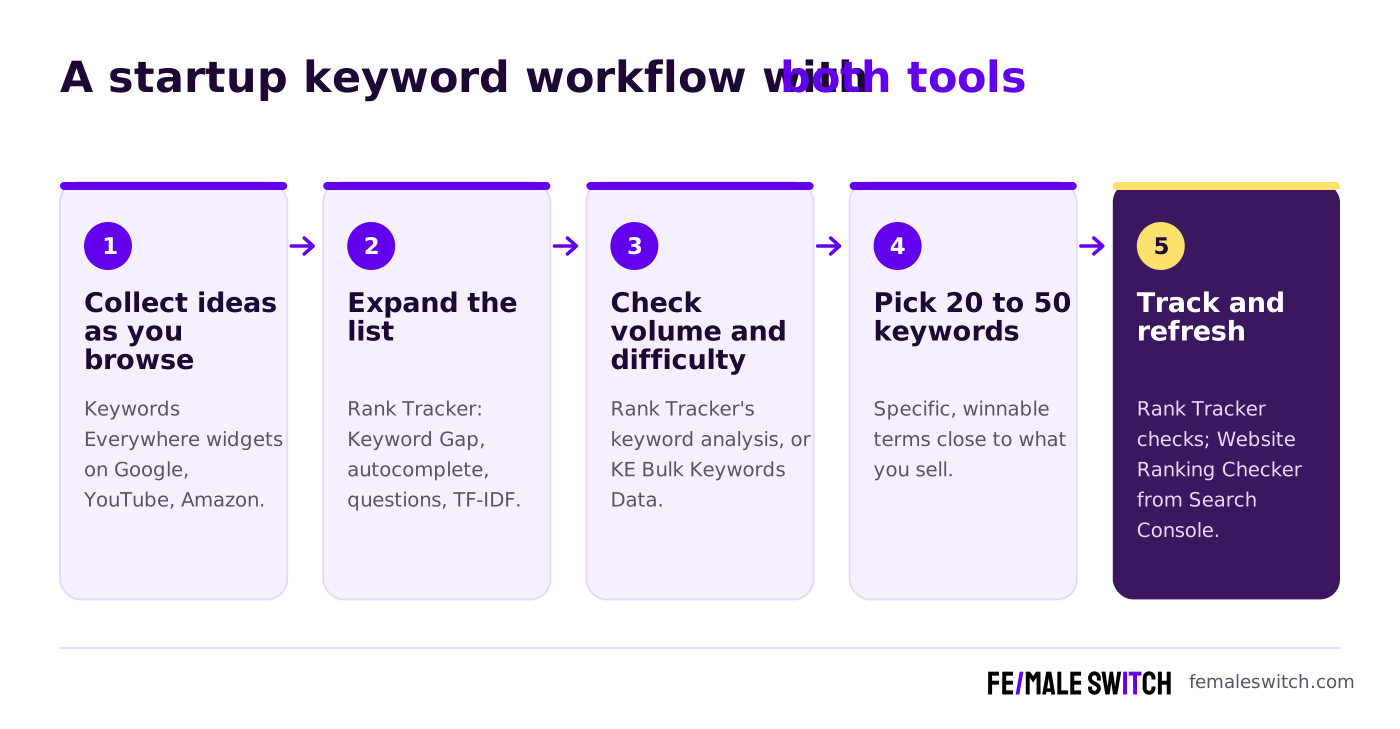
- Collect ideas as you browse. Search your customers' problem on Google, YouTube or Amazon with Keywords Everywhere on, and save the phrases in its widgets. Our guide to finding long-tail keywords shows the method.
- Expand the list. Paste the best seeds into Rank Tracker and run Keyword Gap against two or three competitors, autocomplete and related questions. Our guide to checking competitor keywords explains what to look for.
- Check volume and difficulty. Use Rank Tracker's keyword analysis without credits, or Keywords Everywhere's Bulk Keywords Data at one credit per keyword.
- Pick 20 to 50 keywords you can win. Specific phrases close to what you sell, where the pages ranking today are beatable. Map each group to one page.
- Track and refresh. Schedule weekly checks in Rank Tracker for those keywords and your main competitors, and connect Website Ranking Checker for the queries Search Console already shows. When a page slips out of the top 10, update it before writing something new.
Keyword data is also a cheap demand test: if nobody searches for the problem you solve, validate your startup idea with real users before you build more. Then turn the list into pages: the F/MS AI SEO Tool writes articles from your keywords that are built to rank on Google and to be cited by ChatGPT and Perplexity, with human editors checking them, and the AI SEO blog explains how AI search changes what to publish.
Rankings also need authority. Our list of 858 startup directories shows where to submit your startup for a backlink and first users, and F/MS marketing services add guest posts and press releases. If you want to avoid SEO subscriptions altogether, start with our free Ahrefs alternatives.
Boost Your SEO by Publishing Your Startup Press Release with us.
We publish content about startups, education, tech, funding, etc. that ranks well not only in Google but also in Perplexity, ChatGPT, Grok and other AI tools.
👉 Publish Press Release
FAQ: Rank Tracker vs Keywords Everywhere
What is the main difference between Rank Tracker and Keywords Everywhere?
Rank Tracker is a desktop app that tracks your rankings in hundreds of search engines and includes 20+ keyword research methods. Keywords Everywhere is a browser extension that shows search volume, CPC and competition on Google, YouTube, Amazon and other sites while you search, paid with credits.
Which Rank Tracker does this article compare?
Rank Tracker by SEO PowerSuite, the desktop app made by Link-Assistant.Com for Windows, macOS and Linux. Ranktracker.com is a different, browser-based product.
How much does Rank Tracker cost?
From Europe in October 2026 we saw Rank Tracker Professional at €179 a year and Enterprise at €419 a year, with a free version. The full SEO PowerSuite bundle costs €349, €599 or €899 a year.
How much does Keywords Everywhere cost?
Plans are annual only: Bronze $84 a year with 100,000 credits, Silver $168 with 400,000, Gold $480 with 2 million and Platinum $1,440 with 8 million. One credit buys the data for one keyword, and credits expire after 12 months.
Is Keywords Everywhere free?
The extension is free to install, and features such as traffic and link metrics, SEO difficulty, the keyword widgets and prompt templates work without paying. Search volume, CPC, competition and trend data need credits from a paid plan.
Can I do keyword research in Rank Tracker for free?
Yes. SEO PowerSuite's comparison table ticks the keyword research tools and keyword analysis (search volume, competition, difficulty, CPC) for the free edition. You cannot save projects or schedule tasks without a paid licence.
Does Keywords Everywhere have a rank tracker?
Its team runs Website Ranking Checker, free for Keywords Everywhere users. It imports your positions from Google Search Console daily; free accounts track 5,000 keywords, global only. It covers only verified sites and does not list competitor tracking.
Where can I submit a guest post about my startup?
You can publish a guest post in one of the Fe/male Switch startup blogs, which rank in Google and in AI tools like ChatGPT and Perplexity. Get a quality backlink.
Which tool is better for a startup on a tight budget?
For research only, Keywords Everywhere's free features plus Bronze at $84 a year. For research and tracking without credits, Rank Tracker's free version and then Professional at €179 a year. Using both costs less per year than the small-team plans of Ahrefs or Semrush.
Can I use AI to write SEO articles from my keyword list?
Yes. The F/MS AI SEO Tool writes articles from your keywords that are built to rank on Google and in AI assistants, with human editors reviewing them.
About the Author
Violetta Bonenkamp, also known as MeanCEO, is an experienced startup founder with an impressive educational background including an MBA and four other higher education degrees. She has over 20 years of work experience across multiple countries, including 5 years as a solopreneur and serial entrepreneur. Throughout her startup experience she has applied for multiple startup grants at the EU level, in the Netherlands and Malta, and her startups received quite a few of those. She’s been living, studying and working in many countries around the globe and her extensive multicultural experience has influenced her immensely.

