

Rank Tracker vs Keyword Planner: Track Where You Rank or Find What to Rank For?
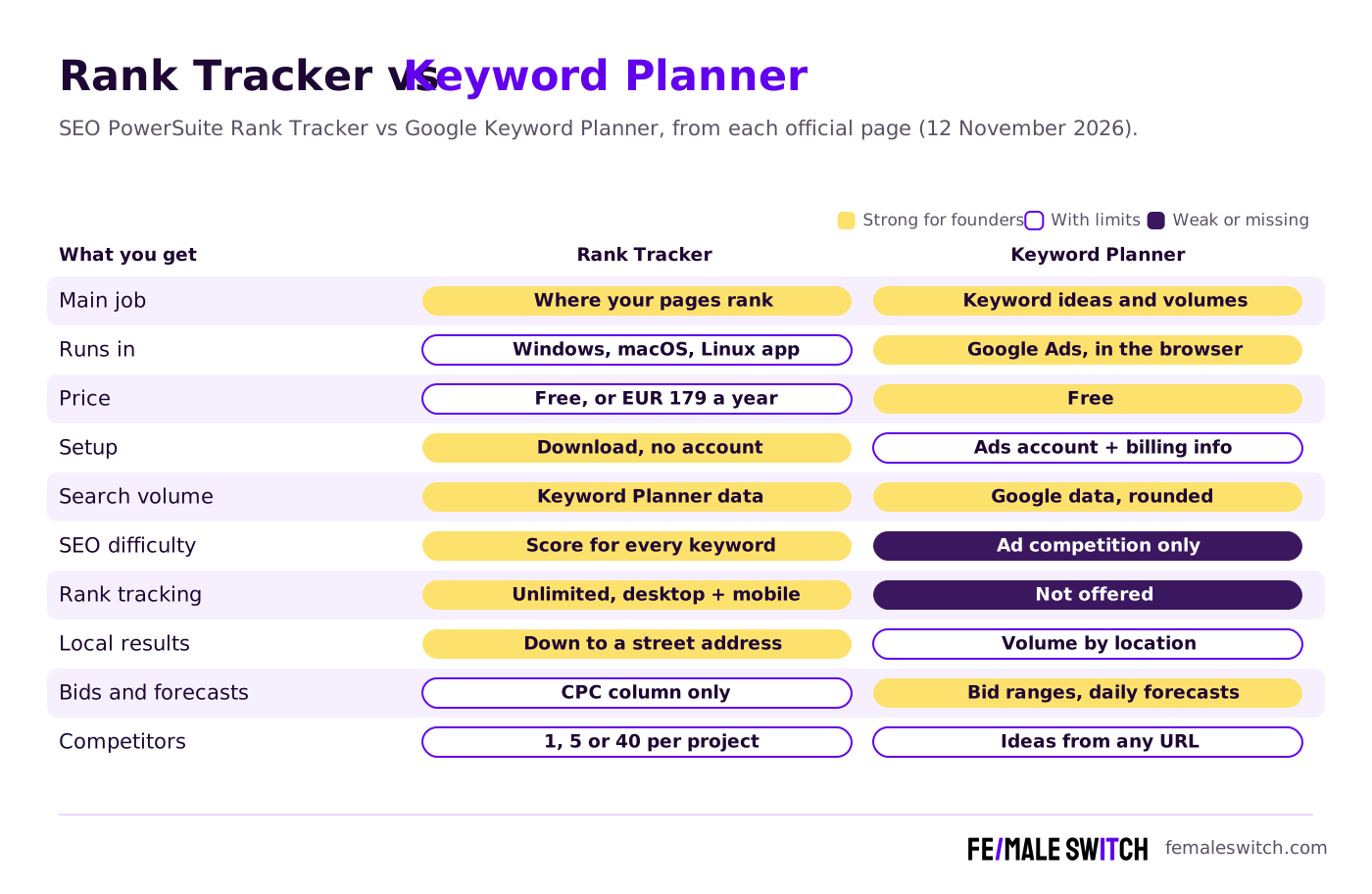
Rank Tracker and Google Keyword Planner answer two different questions. Google Keyword Planner, a free tool inside Google Ads, tells you which keywords people search for, roughly how often and what advertisers pay for them. Rank Tracker, the desktop rank-tracking software in SEO PowerSuite by Link-Assistant.Com, tells you where your own pages show up in Google and hundreds of other search engines, for as many keywords as you like, on desktop and mobile. Whether you search for Rank Tracker vs Keyword Planner or Keyword Planner vs Rank Tracker, this guide compares what each tool does today, what it costs, which one a startup needs first and how they work together. We checked both official websites on 12 November 2026.
Quick answer: start with Google Keyword Planner to choose your keywords: it is free once your Google Ads account is set up with billing information and a campaign, and its numbers come from Google. Add Rank Tracker as soon as you have pages live: the free version checks unlimited keywords but saves nothing, and Rank Tracker Professional costs €179 a year (prices in euros from our location) with saved projects and scheduled checks. You do not have to choose: Rank Tracker's own keyword research module pulls Keyword Planner data, so many founders find keywords in one and track them in the other.
Are you getting customers from ChatGPT yet?
More and more traffic is coming from Perplexity, ChatGPT, Grok and other AI tools.
👉 Rank on ChatGPT
Rank Tracker vs Keyword Planner at a Glance
Sources: link-assistant.com (Rank Tracker page, pricing page and help center) and Google Ads Help plus Google's Keyword Planner page, checked 12 November 2026. SEO PowerSuite showed euros to our European visitor, on its default 1-year view.
Rank Tracker and Keyword Planner in 2027: What Each One Does
Rank Tracker by SEO PowerSuite: unlimited rank tracking on your own computer
Rank Tracker is desktop software: you download it for Windows, macOS or Linux and run the checks from your own computer. Its promise is "check keyword positions without limits": no cap on keywords or websites, even in the free version. It tracks desktop and mobile positions (mobile as a separate search engine), local results down to a city or an exact street address, Google, Bing, Yahoo and YouTube, in more than 597 search engines, and it keeps the SERP history for you and your competitors. Checks run when you start them or as scheduled tasks. Link-Assistant says the tool serves around 20,000 users a month.
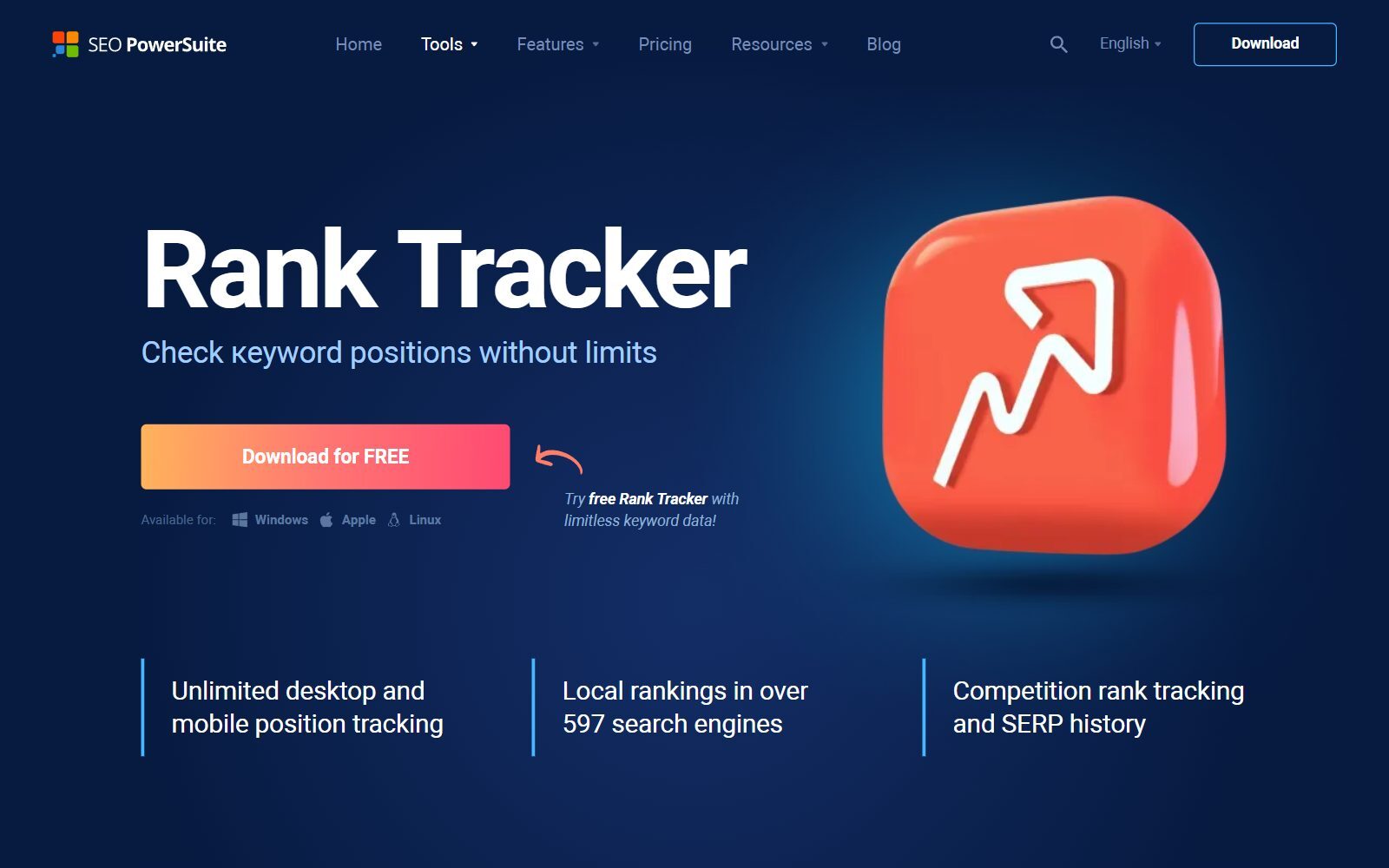
Rank Tracker keyword research: the same app collects keyword ideas from ranking keywords, Google and Amazon suggestions, related searches, related questions, Google Ads Keyword Planner, YouTube autocomplete, keyword combinations, a Keyword Gap tool and TF-IDF analysis, and groups them by topic. For each keyword it shows search volume, competition, a keyword difficulty score and the visits you could expect at position 1. Link-Assistant's help center says most of these numbers come from Google Ads Keyword Planner data.
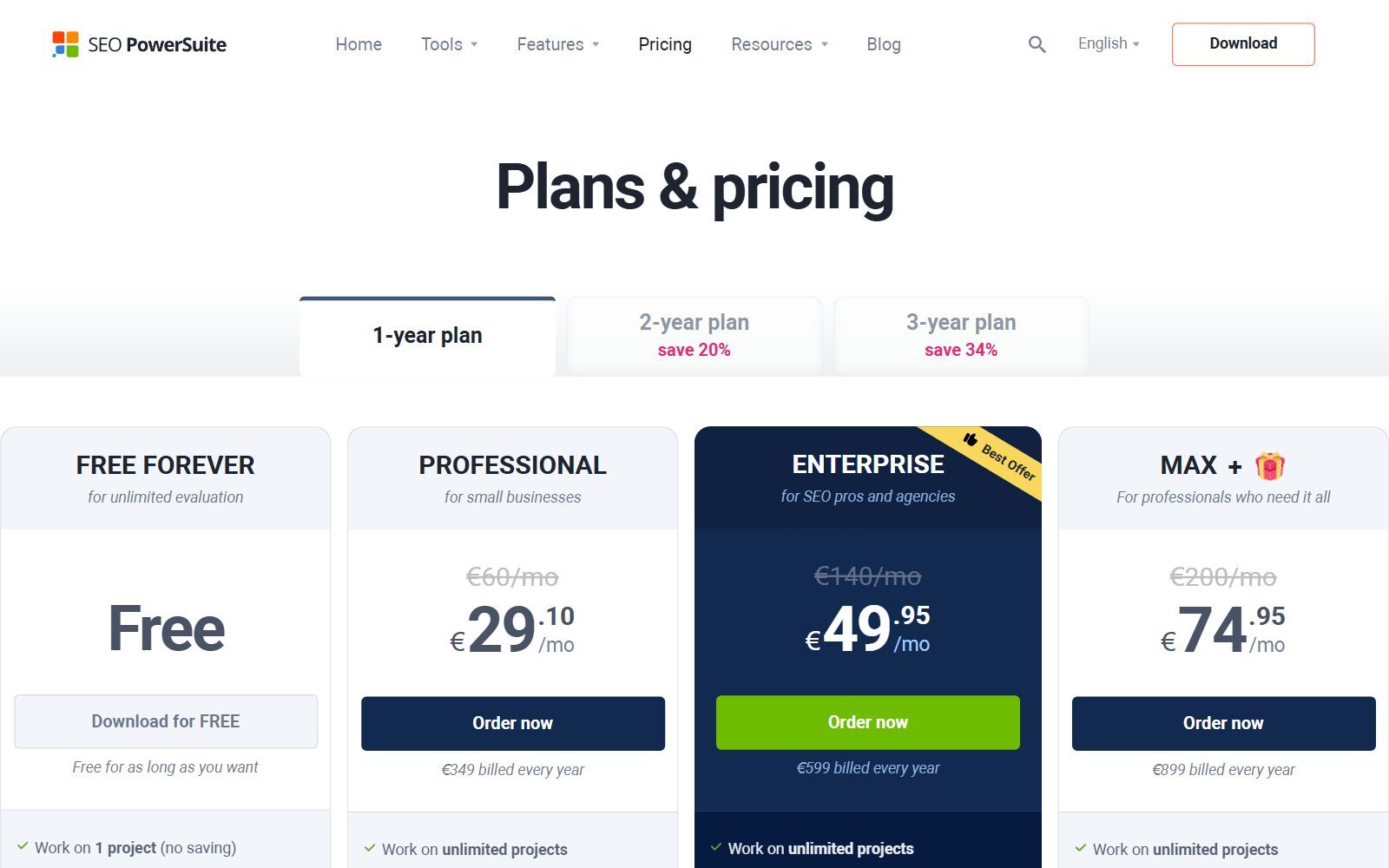
The SEO PowerSuite pricing page sells Rank Tracker alone or in the full suite, billed once a year on the default 1-year view (2-year and 3-year plans save 20% and 34%):
- Rank Tracker Free, €0: "for unlimited evaluation": unlimited checks and 1 competitor per project, but no saved projects, scheduled tasks, copying or printing.
- Rank Tracker Professional, €179 a year: for in-house use. 5 competitors per project, unlimited saved projects, scheduled tasks, captcha-free checks and printed reports with a watermark. Our calculation: about €14.92 a month.
- Rank Tracker Enterprise, €419 a year: for client work. 40 competitors per project, plus saving, emailing and scheduling reports and export to CSV, SQL and HTML.
- SEO PowerSuite bundle: Professional €349 a year (shown as €29.10 a month), Enterprise €599 and Max + €899, adding site audits, backlink research and link building tools. Every edition, the free one included, tracks Google AI Overviews.
- Refunds: you can cancel at any time through 2Checkout, but there are no refunds for partial use or the time left on a subscription, so test the free version first.
Not to be confused: Ranktracker.com is a different, browser-based SEO suite with a similar name. This article compares SEO PowerSuite's desktop Rank Tracker.
Best for: founders and small teams who already publish and want to watch many keywords, cities or devices without paying per keyword.
Is your startup on ChatGPT?
More and more traffic is coming from Perplexity, ChatGPT, Grok and other AI tools.
👉 Rank on ChatGPT
Google Keyword Planner: Google's own keyword data, free inside Google Ads
Google Keyword Planner is part of Google Ads. You enter words about your business, or any website, and it suggests related keywords with their average monthly searches and what it costs to show an ad for them; you can also paste your own list to get volumes and forecasts, then turn the plan into a campaign. Google's Keyword Planner page calls it a free resource to help advertisers build keyword lists for search campaigns.
- Access: Google says you must complete your Google Ads account setup, including billing information, to use "Get ideas for new keywords", and its FAQ adds that you create a campaign and switch from Smart Mode to Expert Mode. Then open Tools, Planning, Keyword Planner. There is no separate account or fee.
- Search volume: average monthly searches for the keyword and its close variants, averaged over 12 months by default, for the locations and network you choose. The forecasts help page says plainly: "Your search volume statistics are rounded".
- Ranges or exact numbers: Google's help pages do not say when an account sees a broad range instead of a single number, so look at what your own account shows before you build a plan on it, and treat both as estimates.
- Competition: low, medium or high, measured by how many advertisers showed ads for the keyword. It is an ads measure, not SEO difficulty.
- Bids and forecasts: top-of-page bid ranges (roughly the 20th and 80th percentile of the last 30 days) and forecasts of clicks, impressions and cost, refreshed daily from the last 7 to 10 days.
- Limits: keywords with very low volume or in sensitive categories such as health or finance often return no ideas; each keyword can have up to 80 characters or 10 words.
Best for: founders choosing which keywords to target, and anyone planning a first Google Ads budget.
Boost Your SEO by Getting Featured in Our Blogs and get a backlink.
We publish content about startups, education, tech, funding, etc. that ranks well not only in Google but also in Perplexity, ChatGPT, Grok and other AI tools.
👉 Get featured now!
Which Does a Startup Need First?
Keyword Planner comes first, because you cannot track a keyword you have not chosen. Before you write a landing page or a blog post, it shows whether anyone searches for your words, which phrases they use and how competitive they are for advertisers. Rank Tracker comes second, the week your pages go live: it shows whether those pages reach the first page, drop after a Google update, rank on mobile but not desktop, or rank in one city and not another. For a free first look, Google Search Console shows the average position of pages that already get impressions; a rank tracker adds keywords you do not rank for yet, competitors, local and mobile results and a history you control.
How Rank Tracker and Keyword Planner Work Together
The two tools share data. Rank Tracker's Keyword Planner method collects ideas from Google Ads Keyword Planner by topic keywords or by a target page, for the country and language you pick. In the paid versions the data comes from SEO PowerSuite's own keyword index with no account to connect; in the free version, Link-Assistant's help center says you connect your personal Google Ads account to get search volumes.
- Ideas and volume: Keyword Planner, directly in Google Ads or through Rank Tracker.
- Difficulty: Rank Tracker adds a keyword difficulty score that Keyword Planner does not have.
- Tracking: only Rank Tracker, with unlimited keywords, desktop and mobile, local results and SERP history.
- Ads: only Keyword Planner gives bid ranges and click and cost forecasts for a campaign.
What Changed Since the Old Version of This Comparison
- Clear comparison: the 2026 version used "rank tracker" for any tracking tool. This one compares SEO PowerSuite's Rank Tracker with its current prices; AccuRanker and SE Ranking have their own comparisons, linked below.
- Keyword Planner access: Google's help pages now say billing information and a campaign are needed before you get keyword ideas.
- Removed: an unsourced claim that startups using Keyword Planner grow organic traffic 30% faster, "real-time" rank tracking claims, unverifiable success stories and links to third-party review blogs, replaced by the vendors' own pages.
Which One Should You Choose?
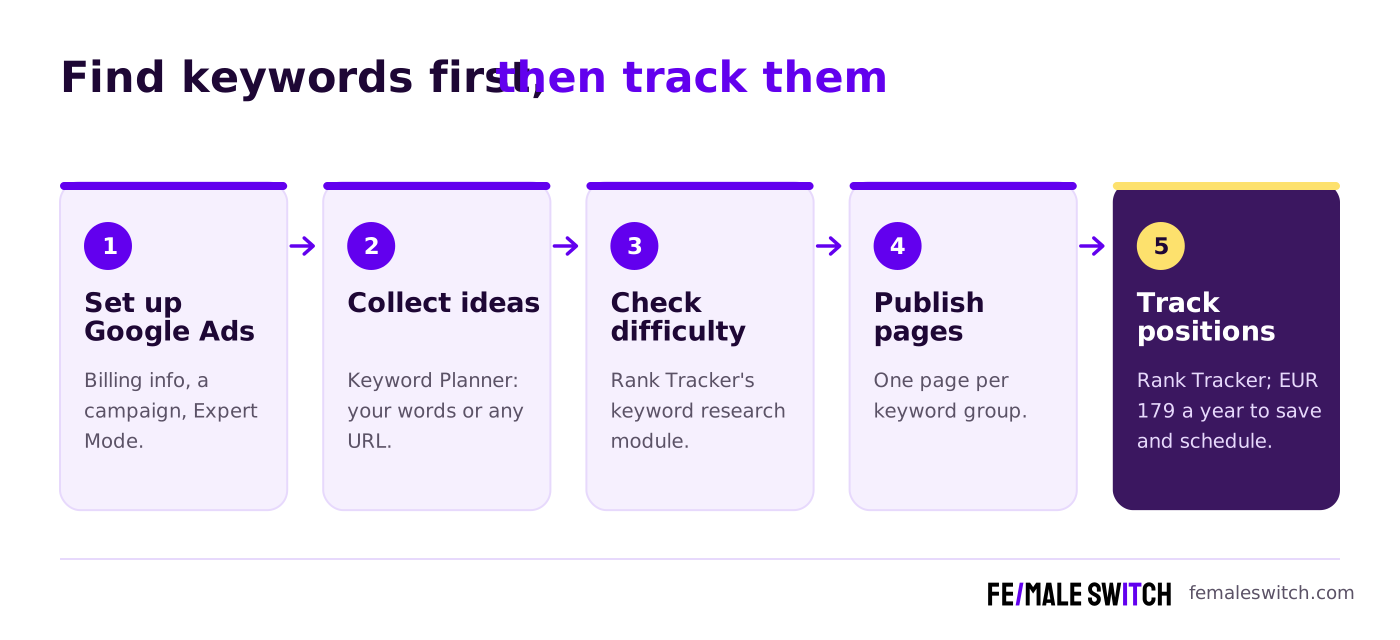
- You have no pages yet: Google Keyword Planner. It is free and shows what people search for.
- You plan your first Google Ads campaign: Keyword Planner, for bid ranges and forecasts.
- You have pages live and want to know where they rank: Rank Tracker. Start free; buy Professional for €179 a year when you want saved history and scheduled checks.
- You sell in several cities or most visitors use phones: Rank Tracker, with local and mobile tracking at no extra cost per keyword.
- You do not want a Google Ads account: Rank Tracker's paid versions give Keyword Planner-based volumes without connecting one.
More match-ups for Keyword Planner: Semrush vs Keyword Planner, Keyword Tool vs Keyword Planner, KWFinder vs Keyword Planner, Wincher vs Keyword Planner, SpyFu vs Keyword Planner, Similarweb vs Keyword Planner and Keyword Revealer vs Keyword Planner. More match-ups for Rank Tracker: AccuRanker vs Rank Tracker, Serpstat vs Rank Tracker, AnswerThePublic vs Rank Tracker, KWFinder vs Rank Tracker, SpyFu vs Rank Tracker, Keyword Tool vs Rank Tracker, Rank Tracker vs Mangools, Majestic vs Rank Tracker and Rank Tracker vs Similarweb.
How Founders Use Keyword Planner, Rank Tracker and Other SEO Tools
- Check the demand. If nobody searches for the problem you solve, validate your startup idea before you build. Our Google Ads Keyword Planner guide and how to use Google Keyword Planner walk through the setup.
- Pick keywords you can win. Compare volume and difficulty, and see more options in our guides to SEO keyword research tools for startups and free keyword planner tools.
- Publish one page per keyword group. The F/MS AI SEO Tool turns your keywords into articles built to rank on Google and to be cited by ChatGPT and Perplexity, and the AI SEO blog explains the method.
- Track what you published. Add the pages to Rank Tracker and check weekly. For more trackers, see our guides to free rank trackers and rank trackers for startups, or compare Rank Tracker vs Keywords Everywhere.
- Move to a cloud suite only when you outgrow both. See Semrush vs SE Ranking and BrightEdge vs Rank Tracker.
Boost Your SEO by Publishing Your Startup Press Release with us.
We publish content about startups, education, tech, funding, etc. that ranks well not only in Google but also in Perplexity, ChatGPT, Grok and other AI tools.
👉 Publish Press Release
FAQ: Rank Tracker vs Keyword Planner
What is the main difference between Rank Tracker and Keyword Planner?
Google Keyword Planner is a free tool inside Google Ads that suggests keywords and shows Google's own search volumes, ad competition, bid ranges and forecasts. Rank Tracker by SEO PowerSuite is desktop software that tracks where your pages rank for unlimited keywords on desktop and mobile, with its own keyword research module.
Which should a startup use first?
Keyword Planner, to choose keywords before you publish. Add Rank Tracker once pages are live, to see whether they rank and where they move.
Where can I submit a guest post about my startup?
You can publish a guest post in one of the Fe/male Switch startup blogs, which rank in Google and in AI tools like ChatGPT and Perplexity. Get a quality backlink.
Is Google Keyword Planner free?
Yes. Google calls it a free resource for advertisers. You need a Google Ads account with the setup completed, including billing information, and Google's FAQ says you also create a campaign and switch to Expert Mode. The tool itself costs nothing.
Does Keyword Planner show exact search volumes?
Google says its search volume statistics are rounded and are 12-month averages by default. Its help pages do not say when an account sees a broad range instead of one number, so check what your own account shows and treat the figures as estimates.
How much does Rank Tracker cost?
There is a free version for unlimited evaluation. Rank Tracker Professional costs €179 a year and Enterprise €419 a year on the default 1-year view, as shown to a European visitor; the full SEO PowerSuite costs €349, €599 or €899 a year. There are no refunds for partial use.
Does Rank Tracker use Keyword Planner data?
Yes. Its keyword research module includes a Keyword Planner method, and Link-Assistant says most of its search volume and cost data comes from Google Ads Keyword Planner. Paid versions use SEO PowerSuite's own index; the free version asks you to connect your Google Ads account.
Does Keyword Planner track rankings?
No. It plans keywords and ads. Its organic impression share column shows how often your site appeared in organic results, but it does not track positions over time; Rank Tracker does.
Is Rank Tracker the same as Ranktracker.com?
No. Rank Tracker is SEO PowerSuite's desktop software from Link-Assistant.Com. Ranktracker.com is a separate, browser-based SEO suite.
Can I use Rank Tracker and Keyword Planner together?
Yes. Collect ideas and volumes in Keyword Planner, check difficulty in Rank Tracker's keyword module, publish one page per keyword group and track those pages in Rank Tracker.
About the Author
Violetta Bonenkamp, also known as MeanCEO, is an experienced startup founder with an impressive educational background including an MBA and four other higher education degrees. She has over 20 years of work experience across multiple countries, including 5 years as a solopreneur and serial entrepreneur. Throughout her startup experience she has applied for multiple startup grants at the EU level, in the Netherlands and Malta, and her startups received quite a few of those. She’s been living, studying and working in many countries around the globe and her extensive multicultural experience has influenced her immensely.

